On this page
A graph is a translation from numbers into shapes. When you sit down in a mathematics exam, open a physics practical file, or start a geography project, deciding which graph to use is your first test. Pick the right one, and the trend is obvious. Pick the wrong one, and you confuse the reader and lose marks.
Many students memorise how to draw graphs without understanding why each one exists. But visualising data is not just about plotting points; it is about how the human brain decodes shapes. Our eyes are better at comparing lengths than estimating angles, and better at seeing lines than comparing areas.
Which graph to use for categorical data?
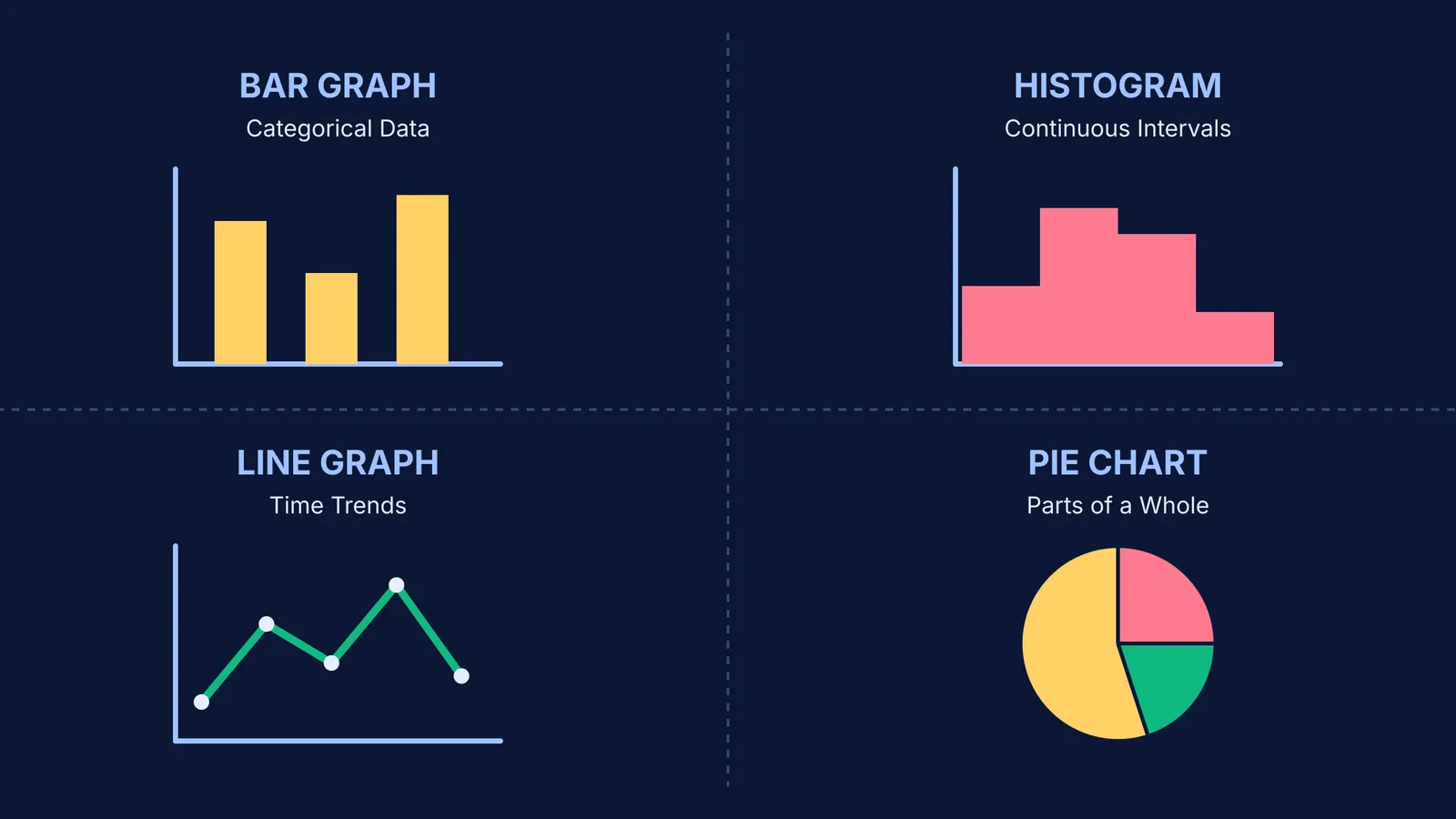
Categorical data is split into distinct, separate groups. If you are counting the number of students who chose physics, chemistry, or biology, you are dealing with categories. For this, you should almost always use a bar graph.
A bar graph places your categories on one axis (usually the horizontal x-axis) and the count or frequency on the vertical y-axis. Because the categories are separate and have no natural flow between them, you must leave equal gaps between the bars. The height of the bar does all the communication.
You might be tempted to use a pie chart for these categories, but there is a catch. In a famous 1984 study published in the *Journal of the American Statistical Association*, researchers William S. Cleveland and Robert McGill found that humans judge position along a common scale (which is exactly what a bar chart uses) 1.96 times more accurately than they judge angles (Cleveland & McGill, 1984). When you use a bar chart, you are using the most accurate visual tool available.
A pie chart is only useful for showing parts of a whole. Since a full circle represents exactly 360 degrees, the slices must always add up to exactly 100% of your total dataset (LibreTexts Mathematics/14%3A_Describing_Data/14.01%3A_Presenting_Categorical_Data)). If your categories overlap, or if a student could choose both physics and chemistry, a pie chart will be mathematically incorrect. Data visualisation expert Cole Nussbaumer Knaflic calls 3D pie charts the absolute worst because pie charts are already very hard for people to read, and 3D effects only make them worse (Storytelling with Data).
When do you use a histogram instead of a bar graph?
A histogram looks remarkably like a bar graph, but it does a completely different job. You use a histogram for continuous quantitative data that has been grouped into class intervals. Examples include heights of students, weights, or the time taken to finish a paper.
Because the data is continuous—meaning a value could fall anywhere along the scale without a break—the bars in a histogram must touch. There are no gaps. The x-axis acts as a continuous number line.
Another critical difference is that in a histogram, the area of the bar represents the frequency, not just the height. If your class intervals are uneven, you have to adjust the heights to maintain the correct area. If you are ever confused by how to adjust frequencies for unequal class sizes, every concept in mathematics has its own lesson and its place in the map in the Fermi Concept Library.
To fully grasp the difference, you can read more in our guide on Bar Graph vs Histogram: Gaps, Classes and Unequal Widths.
What is a line graph used for?
A line graph tracks how a single variable changes over a continuous period. It is the best tool for showing trends over time.
You put your time scale on the horizontal x-axis (whether that is seconds, days, months, or years) and the measured value on the vertical y-axis. The line connects the data points to show a trend—whether the temperature is rising, falling, or fluctuating throughout the week. Line graphs can be used to show how something changes over time, and they are good for plotting data that has peaks and valleys (National Center for Education Statistics).
Why is choosing the right graph so important?
A classic example of data visualisation comes from the famous statistician Florence Nightingale. During the Crimean War, she created the 'Coxcomb' chart (a variation of a pie chart) to give a graphical representation of the mortality figures. Her chart successfully showed that more soldiers were dying from preventable or mitigable zymotic diseases than from battle wounds (Maths History). By choosing a visual format that clearly highlighted the vast difference in the causes of death, she successfully convinced the authorities to reform the sanitary conditions in military field hospitals.
This historical example proves that a graph is much more than a classroom exercise. When you select the correct visual format, you allow the data to speak for itself. Whether you are presenting a simple bar chart of survey results or a complex histogram of experimental data, the goal is always clarity.
How to spot examples of poor graph choices?
Even when you know the rules, it is easy to make a mistake when trying to make a project look impressive. Avoid these three common traps:
The 3D Chart: Adding a 3D tilt to a graph heavily distorts the data. A slice sitting in the front of the 3D shape looks significantly larger than a slice of the exact same percentage sitting in the back. Always keep graphs flat.
Connecting Categories: Drawing a line graph to show the population of five distinct cities. Since the cities are separate categories and not a single city changing over time, a bar graph is the correct choice.
The Broken Scale: Starting the y-axis of a bar graph at a number other than zero. This visually exaggerates the difference between the bars, making a small gap look huge and misleading the reader.
A checklist for choosing the right graph
Before you plot your next point, ask yourself these four questions to find your format:
Is this data split into separate, distinct groups? Use a bar graph.
Am I tracking continuous intervals where one group ends exactly where the next begins? Use a histogram.
Am I tracking a trend over a continuous period of time? Use a line graph.
Do these distinct groups make up exactly all the parts of one whole? Consider a pie chart, but remember a bar graph is usually clearer.
Understanding how to present your answers is just as important as finding them. For more on getting your presentation right, read How diagrams help you learn physics, and how to draw good ones. If you are looking for ways to calculate the exact slice sizes for your charts, see How to calculate the central angle for a pie chart.