On this page
When you collect responses for a school science or social studies project, the raw data is rarely ready to analyse. Whether you use Google Forms or a paper questionnaire, some participants will skip questions, fill out the form twice, or click "Strongly Agree" down the entire page just to finish quickly.
A 2020 study by the Pew Research Center found that checking for survey speed—flagging people who finish too quickly—misses 87% of bogus respondents in online polls (Pew Research Center, 2020). The study also showed that 84% of these bad actors pass standard "attention check" trap questions. This means you need a structured data cleaning plan to stop messy data from ruining your results.
Here is a step-by-step guide to handling missing answers, duplicates and inconsistent responses so your basic statistics every student science project needs are built on solid ground.
How to handle missing answers?
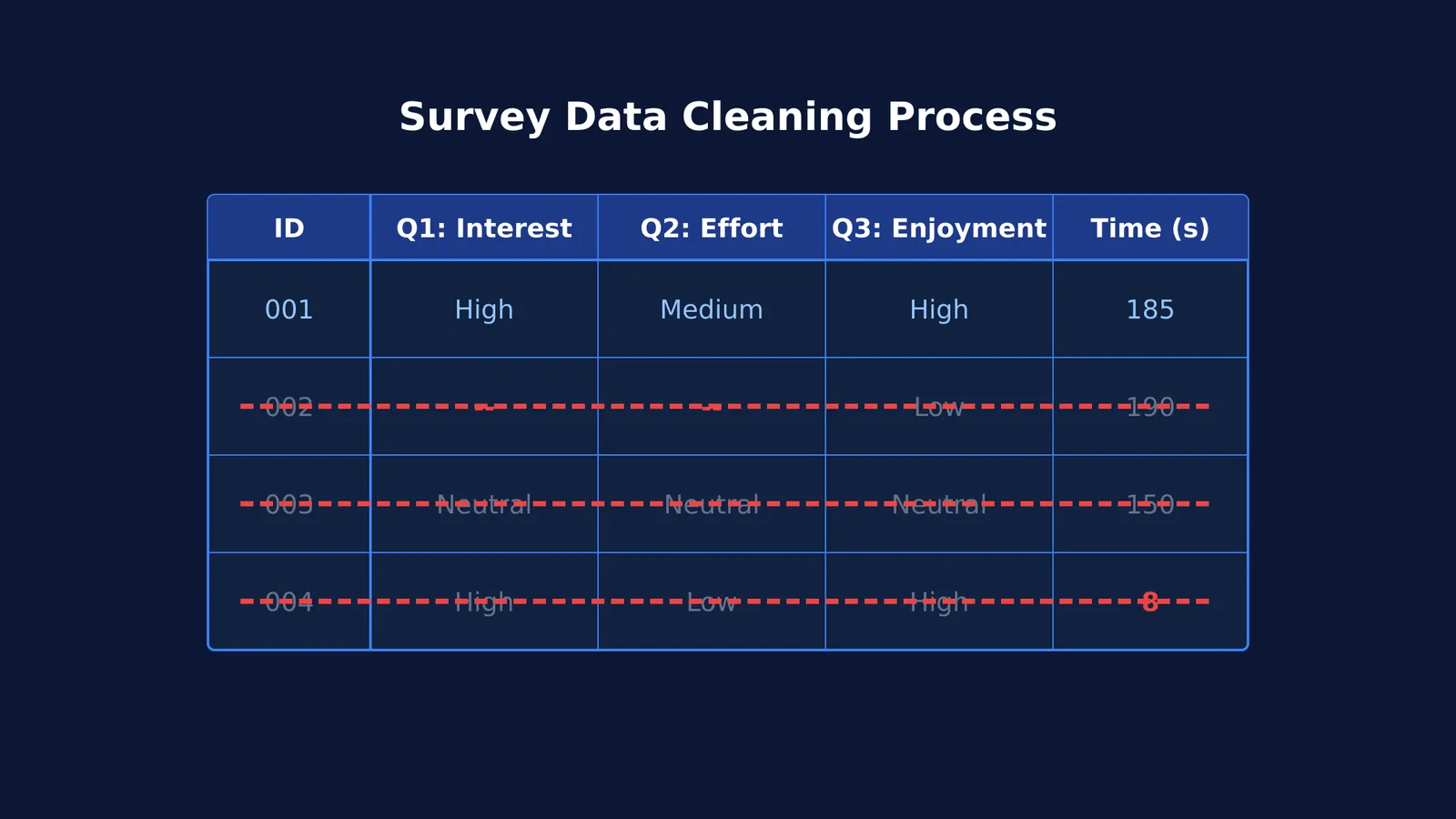
Almost every survey has people who skip a question. If a respondent skips too many questions, their incomplete data can skew your averages.
If only a few answers are missing across your whole dataset, you can usually use a method called "listwise deletion". This means deleting the entire row for that respondent. Researchers generally agree that if a small amount of data is missing completely at random, listwise deletion will not bias your results significantly.
However, if a person answered almost all the questions, deleting their entire row wastes good data. In that case, you might keep their row but exclude them only when calculating the average for the specific question they skipped.
What to do with duplicate entries and speeders?
Duplicate entries happen when a classmate accidentally submits a form twice or reloads the page. Always check your spreadsheet for identical timestamps or rows where every single answer matches perfectly. Keep the first submission and delete the exact duplicates.
Speeders are respondents who click through without reading. While the Pew Research Center study showed that speed alone does not catch every bogus response (Pew Research Center, 2020), it is still a necessary first filter. Calculate the median time it takes to complete your survey. If a response was completed in less than one-third of that median time, the respondent almost certainly did not read the questions.
How to catch straight-lining and inconsistent responses?
Straight-lining is when a respondent selects the exact same option down a grid of questions, such as picking "Neutral" for every item on a 1-to-5 scale.
To catch this, use logic checks. Include one or two reverse-coded questions in your survey. For example, if you ask "I love studying physics" and later ask "I find physics boring", a respondent who straight-lines "Strongly Agree" for both has contradicted themselves. You can safely remove their response.
If you are not sure where to start with your dataset, Fermi's AI tutor can work out what you already know and build a plan for your analysis session. If you need a refresher on the statistical terms used in analysis, you can also look them up in the Fermi Concept Library.
A four-step checklist for your school project
Do not edit your raw data file. Make a copy named "Cleaned_Data" and follow these steps before you write a project report in college or school:
Backup the raw data: Never delete rows from your original spreadsheet.
Remove the duplicates: Sort by timestamp or respondent name and delete double submissions.
Filter the speeders and straight-liners: Remove rows completed impossibly fast or where every answer is identical across a mixed scale.
Handle the missing data: If a row is missing a large portion of its answers, delete it. If the total missing data across the survey is small and missing at random, you can safely drop the incomplete rows.
By layering these checks, you ensure your project's conclusions are based on what people actually think, rather than how fast they can click.