On this page
Why does working from home increase children's screen time?
When parents work from home, client calls and deadlines often collide with hours when children need supervision. In a study published in *JMIR Pediatrics and Parenting*, Glassman and colleagues found that working parents experienced an average increase of 1.02 hours in daily child screen time alongside higher "technoference"—device interruptions that disrupt parent-child interaction throughout the workday.
Handing over a tablet provides quiet relief during a presentation, but using screens as an emergency pacifier leaves stopping times undefined. This ambiguity fuels conflict: parents feel guilt while working, and children resist when devices are abruptly confiscated.
The Indian Academy of Pediatrics guidelines on digital wellness, published in *Indian Pediatrics*, recommend limiting recreational screen time for children aged 5 to 10 to under 2 hours daily, preserving time for outdoor play and 9 to 12 hours of sleep. Moving from reactive screen handoffs to planned schedules protects both your focus and your child's health.
How can you schedule screen time around your work calls?
The most reliable way to prevent friction is to map screen windows onto your calendar each morning. Instead of reacting when a call starts, schedule your child's screen blocks to coincide with your most demanding meetings.
During these blocks, content format matters. In a study published in *Proceedings of the 2016 CHI Conference on Human Factors in Computing Systems*, Hiniker and colleagues found that transitions are smoother when media has natural stopping points, such as chapter or episode endings, rather than continuous autoplay feeds.
For older students revising during your calls, the Fermi Concept Library covers every concept in physics, chemistry, biology, mathematics and computing with its own lesson, while the Fermi Problem Library provides worked problems with a step-by-step solver that explains the reasoning rather than printing an answer, helping them study independently while you work.
Why do timers work better than verbal warnings?
Most parents rely on verbal warnings like "five minutes left," but evidence suggests this triggers resistance. Hiniker and colleagues observed that verbal warnings often increased tantrums compared to neutral stopping cues. Verbal reminders feel arbitrary and invite negotiation, framing the parent as a referee who might yield to complaints.
A physical visual timer with a disappearing coloured disc shifts authority from parent to clock. Children can see the remaining time narrowing in physical space, which reduces anticipatory stress. When the alarm sounds, the clock ends the session, sparing you from daily bargaining.
What does an effective work-from-home routine look like?
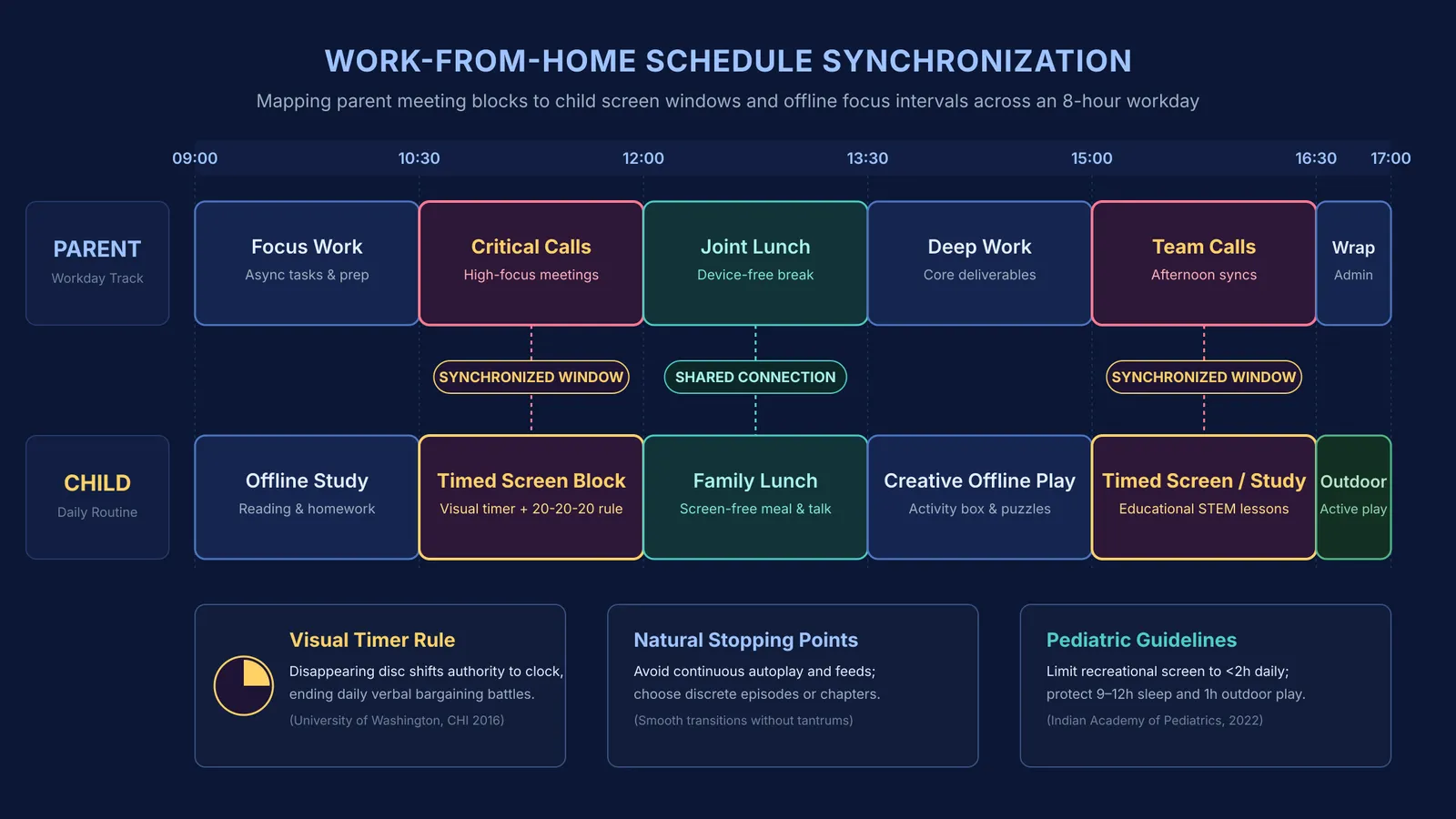
A predictable routine aligns demanding work intervals with independent activities:
09:00 to 10:30 (Focus Work / Offline Study): Children complete homework or reading while you handle asynchronous tasks. Reviewing how task-switching drains cognitive energy helps families protect these focused morning intervals.
10:30 to 12:00 (Call Block / Timed Screen Session): Pair your team meetings with a 45- to 60-minute digital block, applying the 20-20-20 rule from the Indian Academy of Pediatrics guidelines to look 20 feet away every 20 minutes.
12:00 to 13:30 (Joint Lunch & Device-Free Break): Step away from screens together to share lunch and talk, re-establishing connection before the afternoon.
13:30 to 15:00 (Deep Work / Creative Offline Play): Work on core deliverables while children use art supplies, puzzles, or building toys from a designated activity box.
15:00 to 16:30 (Late Calls / Screen or Study Block): Run late meetings during a second timed screen or study window; for gaming teens, consult managing recreational limits for older teens.
16:30 onwards (Outdoor Play): Follow research on restorative study breaks by sending children outdoors for cycling or sports to reset attention before evening.
What should you say when screen time ends?
When the timer sounds and your call ends, use a concise, three-step script rather than accusatory questioning:
Acknowledge the signal: "The timer rang, so screen time is finished."
Validate their focus: "You were deeply absorbed in that challenge."
Direct the next action: "Let's dock the tablet and grab your afternoon snack."
If your child argues, repeat the boundary calmly: "The timer finished our session today. Our next screen block is tomorrow morning. Right now it is snack time." Consistent repetition teaches children that bargaining does not bend the clock, keeping remote work calm and sustainable.