

On this page
If you are wondering whether your child is already "late" for coding, the short answer is no. Coding can start as a game at 6, become a hobby at 10 and turn into a real subject at 14, if each stage fits the child's age.
What age should my child start learning coding?
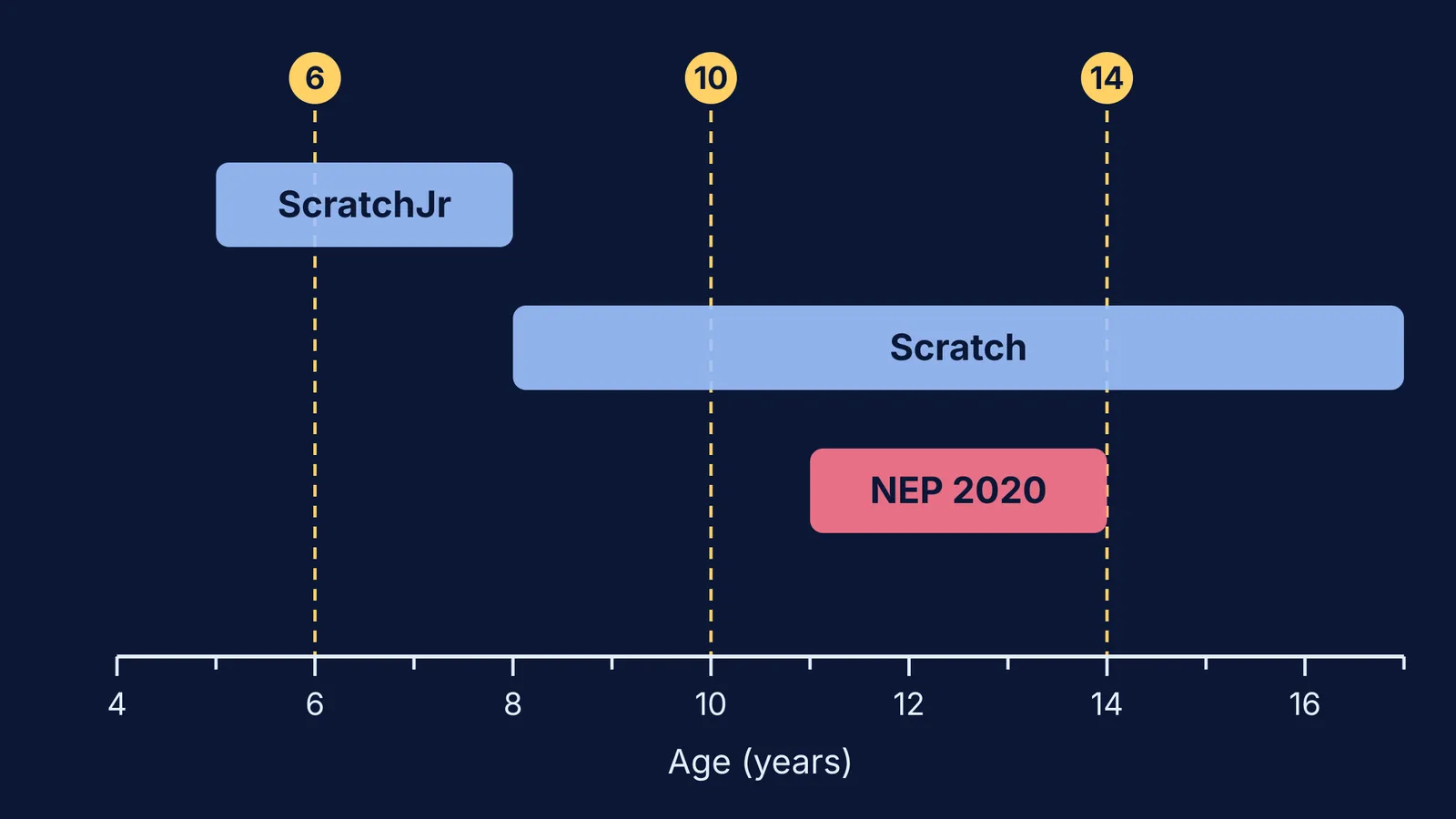
India's school policy gives a clear signal. NEP 2020 lists "digital literacy, coding, and computational thinking" among the skills all students should learn (para 4.23), and says "Activities involving coding will be introduced in Middle Stage" (para 4.25). The same document defines the Middle Stage as Grades 6 to 8, covering ages 11 to 14 (para 4.1).
The tools say something similar. According to the Scratch parents FAQ, Scratch is "designed especially for young people ages 8 to 16", while ScratchJr is "a simplified version of Scratch designed for ages 5 to 7".
For the youngest children, screen time is the real constraint. The WHO guidelines say sedentary screen time for children aged 2 to 4 "should be no more than 1 hour; less is better". That is one reason to start without a screen at all.
Do young children need a computer to learn coding?
No. "Unplugged" activities teach the thinking behind code, such as giving exact step-by-step instructions, spotting patterns and fixing mistakes, using paper, cards and movement. CS Unplugged, a project of a research group at the University of Canterbury in New Zealand, describes itself as free material that teaches computer science "through engaging games and puzzles that use cards, string, crayons and lots of running around."
The evidence is encouraging. A 2023 systematic review and meta-analysis of unplugged activities in school (49 studies reviewed, 13 meta-analysed) found "a generally large overall effect size" on computational thinking skills. In a study of 84 second-grade students, the group that started with unplugged activities before moving to screens made the most progress in computational thinking, and its motivation fell less over time than the group that started on screens.
What does coding look like at 6, 10 and 14?
At 6: instructions, patterns and play. Coding at 6 is mostly unplugged. Try these at home:
Robot parent: your child gives you exact instructions to walk to the door ("two steps forward, turn left"). You follow them literally, so missing steps show up at once.
Arrow maps: draw a 5 by 5 grid, put a toy in one square and let your child write arrows to reach it. Then add a "wall" square.
Bead patterns: make a pattern (red, red, blue), and ask what comes next and how many beads are in ten repeats. That is a loop.
A short ScratchJr session fits here too, within your family's screen limits.
At 10: building projects in Scratch. At 10, children can plan a small game or animated story in Scratch and debug it when it breaks. Unplugged work still helps. In a study of 84 sixth-grade students aged 10 to 11 learning basic programming, the group taught with unplugged activities scored higher on academic achievement than the plugged-in group, though computational thinking scores did not differ significantly. If screen time is already a worry at home, our post on video games and teenagers covers what research says about limits.
At 14: a text language and real problems. By 14, many students can move on to a text language such as Python and for the ideas behind it: variables, loops, functions and simple algorithms. This is also when subject choices start to matter; see our guide to choosing Computer Science or Informatics Practices in Class 11. When a concept like binary numbers or searching a list does not click, the Fermi Concept Library covers every concept in physics, chemistry, biology, mathematics and computing, each with its own lesson and its place in the map.
Is a coding class worth it?
Be clear about what you are buying. A meta-analysis of 105 studies by Scherer, Siddiq and Sánchez Viveros found a moderate overall transfer effect from learning to program (g = 0.49), with gains in creative thinking, mathematical skills and metacognition. It also found that school achievement and literacy "benefited the least". So if you pay for a class, pay for the building and the thinking, not for a shortcut to higher marks.
Before you pay, ask the class these questions:
What will my child have made by the end of the first month?
How much time is spent building and debugging, and how much watching?
What happens when my child's code does not work? Who helps, and how?
Can we attend one trial session before paying the full fee?
Walk away from promises of guaranteed jobs or marks. Our checklist for evaluating a coaching institute before you pay works for coding classes too.
Start this weekend with the robot parent game.


