On this page
Search "learning app for kids" and you get hundreds of bright, five-star results. A 2015 review by developmental scientists described "educational" apps as largely unregulated and untested (Hirsh-Pasek et al., Psychological Science in the Public Interest). You can still sort them yourself in ten minutes.
What makes an app actually educational for a 6-year-old?
Kathy Hirsh-Pasek, Jennifer Zosh and colleagues describe four "pillars" of learning. An app is educational when it makes a child active (thinking, not just tapping), engaged (not distracted), working on something meaningful (linked to real life) and socially interactive, towards a clear learning goal (Hirsh-Pasek et al., 2015).
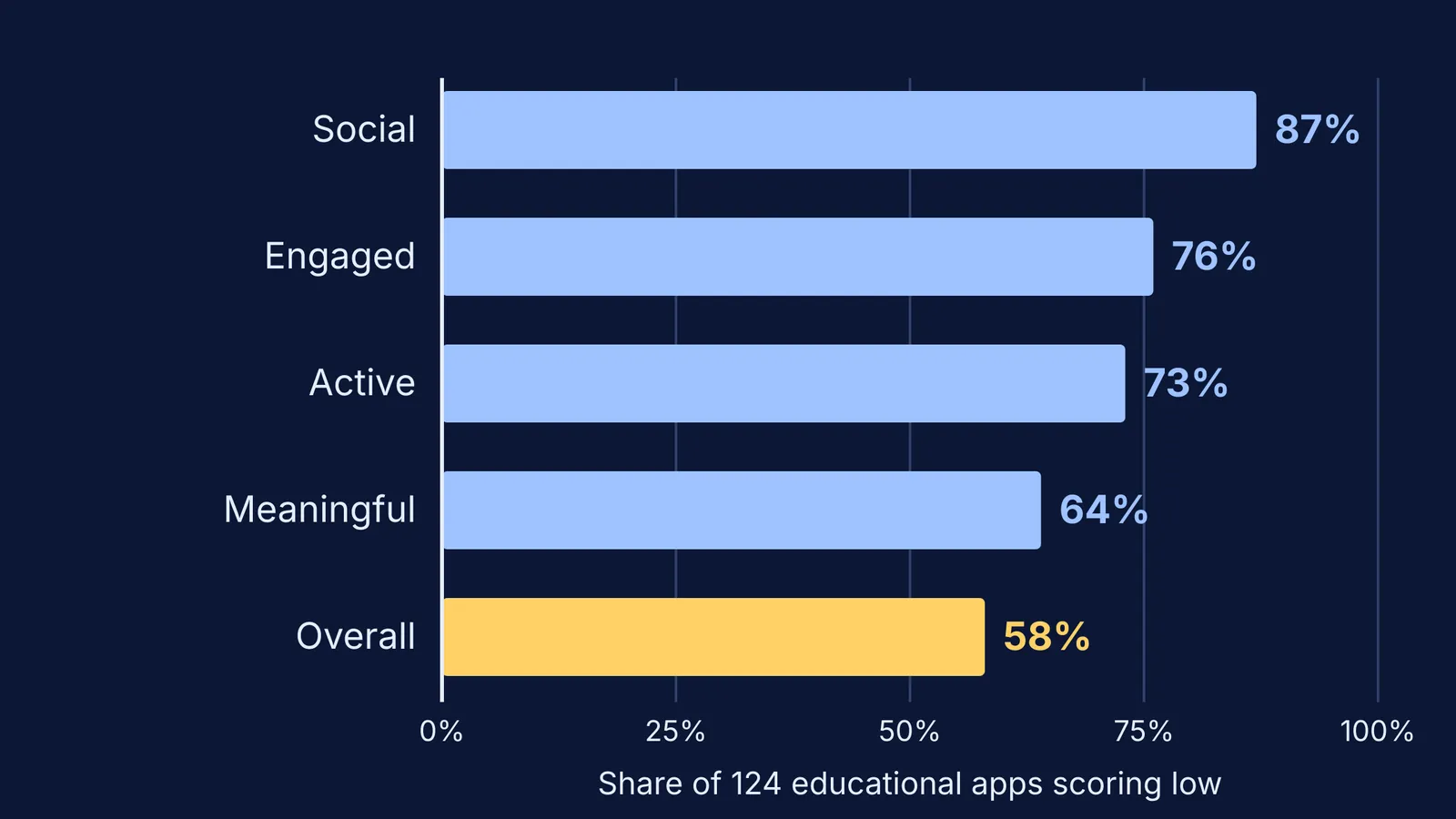
A 2021 team turned those pillars into a scoring scheme, with 0 to 3 points per pillar, and used it on 124 apps marketed as educational for young children (Meyer et al., Journal of Children and Media). What they found:
58% of the apps (72 of 124) scored 4 or less out of 12, the study's cut-off for lower quality.
73% scored low on active learning, with little real thinking required.
87% scored low on social interaction, giving few reasons to play with a parent or anyone else.
Even among paid apps, half were in the lower-quality range.
So download counts tell you little. The first few minutes of play tell you a lot.
How do you check a learning app in ten minutes?
Do this before your child uses an app alone.
Minutes 0 to 2: ads. Check the store page for "Contains ads" and "In-app purchases".
Minutes 2 to 5: real practice. Get one answer wrong on purpose. Does the app show why and let you retry, or just move on? Count how often you had to think rather than tap.
Minutes 5 to 7: rewards. Are stars earned by getting something right, or do they rain down after every tap? The 2021 researchers note that irrelevant rewards, such as virtual toys for finishing sums, are thought to get children used to working for the prize (Meyer et al., 2021).
Minutes 7 to 8: pace. Count the flashes and scene changes. In one experiment, 4-year-olds who watched 9 minutes of a fast-paced cartoon did worse straight afterwards on tests of self-control and planning (Lillard and Peterson, Pediatrics). That was television, not apps, but a calm app with natural stopping points is the safer bet.
Minutes 8 to 10: sit in. Play together. Can you take turns and talk about what is on screen?
A worked example, with an imaginary counting app: a banner ad (ads 0); ten fish to tap but no question about the total (practice 1); confetti after every tap (rewards 0); calm music, no timer (pace 2); easy to count aloud together (sit in 2). Total 5: keep it for shared time, and look for an app that makes your child work out the total.
Are free learning apps worse than paid ones?
Often, mostly because of ads. A study of 135 popular apps played by or aimed at children aged 5 and under found that 95% contained at least one type of advertising (Meyer et al., Journal of Developmental and Behavioral Pediatrics). Ads appeared in 100% of the free apps and 88% of the paid ones, and apps labelled "educational" carried ads at similar rates to other apps. They included pop-up ad videos interrupting play (35% of apps) and hidden ads disguised as game items (7%).
In the 2021 study, free apps scored lower on engagement because of distracting features, but half the paid apps were still lower quality (Meyer et al., 2021). Use the ten-minute check, not the price.
Should you sit with your child while they use a learning app?
Yes, especially in the first week. The American Academy of Pediatrics calls watching and playing alongside your child the best way to know what they are using and how they respond (AAP, HealthyChildren.org). Because 87% of the apps in the 2021 study scored low on social interaction, you usually have to bring that part yourself (Meyer et al., 2021).
Four lines that work with a 6-year-old:
"Show me how this works. What do you have to do?"
"Why did you choose that one?"
"Can you find three of those in this room?"
"Two more rounds, then we stop at the end of the level."
For video apps, see our comparison of YouTube Kids and supervised YouTube for a young child, and check store labels with our guide on how to check if a game or app suits your child's age. Later, try our two-bucket plan for study and fun screen time.
The core question, "does this make my child think?", stays useful for older students too. Fermi's AI tutor is built for STEM learners: it notices where a student is stuck and decides whether to explain, ask or show.
Try the ten-minute check on one app this week, starting with the one your child opens most.