On this page
Many children spend hours playing video games, and eventually, the natural question arises: "How can I make my own?" For parents, this is an excellent opportunity to turn passive screen time into active learning. But handing a beginner a textbook on Python or C++ can quickly lead to frustration. The barrier to entry for text-based languages—where a single missing semicolon breaks the entire game—is often too high for younger students.
Instead, the best starting point is visual, block-based coding. Learning to build a video game teaches mathematics, logic, and systems design, provided the tools match the child's developmental stage.
Why start with block-based coding?
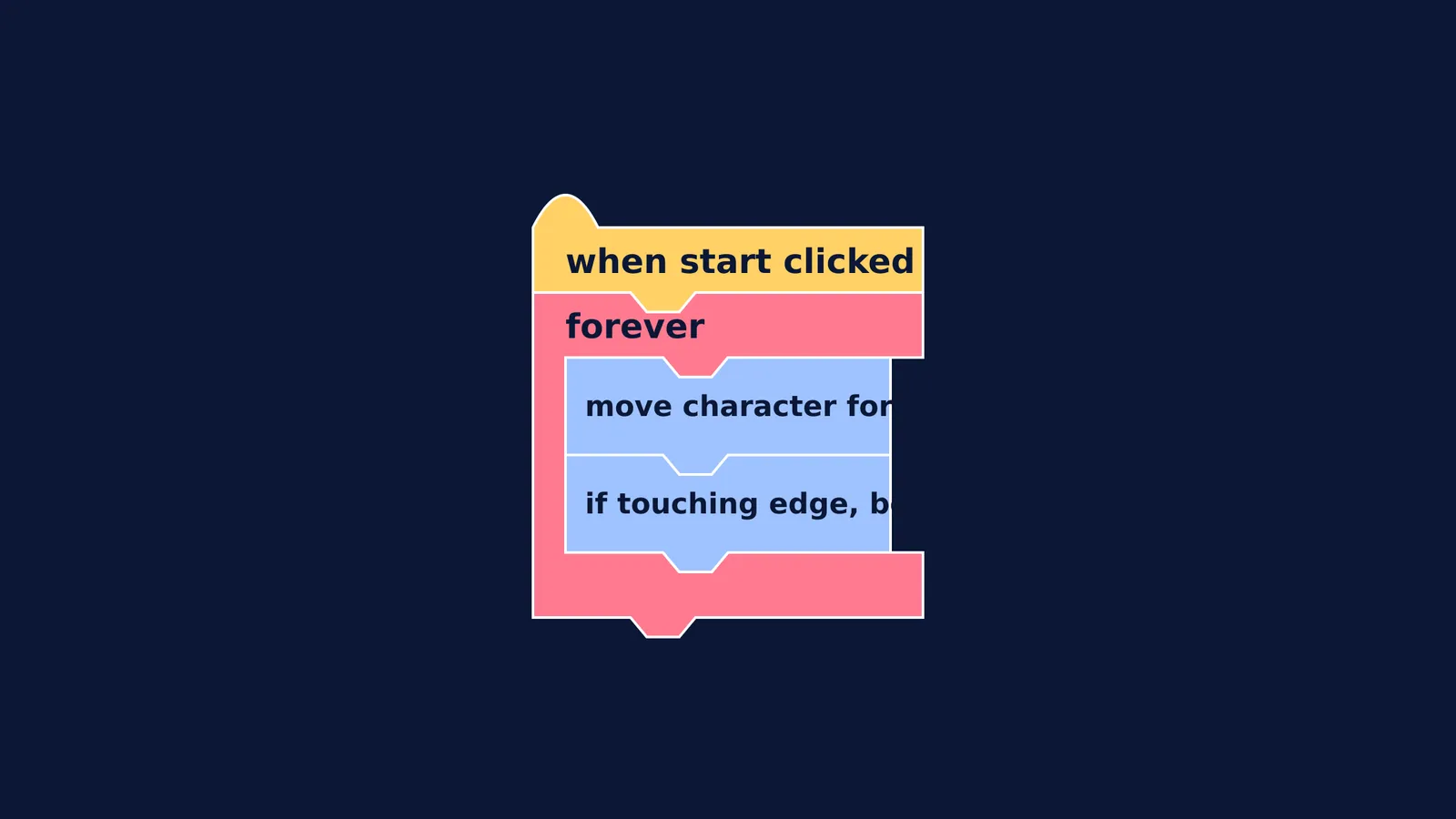
In a block-based programming environment, children snap together command blocks that look like puzzle pieces to control characters and create logic on the screen. Because the blocks only fit together in ways that make grammatical sense for the computer, syntax errors are impossible. A student cannot accidentally place a "move forward" command inside a block that only accepts numbers. This allows the beginner to focus entirely on the logic and architecture of their game, rather than hunting for a missing bracket.
This approach was heavily popularized by Scratch, a visual programming language developed by the Lifelong Kindergarten Group at the MIT Media Lab. A 2009 paper in the *Communications of the ACM* by Mitchel Resnick and his colleagues detailed how Scratch lowers the barrier to programming by making it "tinkerable." Rather than writing lines of abstract code, students experiment with visual chunks of logic, enabling them to build interactive stories and games immediately. The visual feedback is instantaneous: if a child snaps a "turn 15 degrees" block onto their script and clicks run, the character on screen rotates immediately, reinforcing the cause-and-effect relationship of their code.
Does coding build problem-solving skills?
Writing a video game is fundamentally an exercise in algorithmic thinking. A student must break down a large problem—like making a character jump over an obstacle—into a sequence of smaller, precise steps. They have to tell the computer how fast to move the character up, when gravity should pull them back down, and what happens if they touch the obstacle.
Research shows that this process translates into measurable cognitive gains. A 2025 study by Kayla Teng and Gregory K. W. K. Chung at the University of California, Los Angeles, analysed the gameplay data of 72 elementary students (aged 6 to 9) using a block-based programming game. The researchers found that the children’s in-game behaviour served as a valid, accurate measure of their computational thinking and problem-solving skills. By continuously testing and debugging their logic in the game environment, students learn resilience and systematic problem-solving, which they can later apply to traditional academic subjects.
How do you balance screen time and active learning?
When a child starts programming, their time on the computer will naturally increase. It is important to distinguish between passive consumption, like endlessly scrolling through videos, and active creation, like debugging a script to fix a broken game mechanic.
The World Health Organization's 2019 guidelines recommend no more than 1 hour of sedentary screen time per day for children aged 2 to 4 years. For older children, the emphasis remains on limiting passive sedentary time and ensuring it does not displace physical activity, social interaction, or sleep. However, educational experts often distinguish active digital engagement—where the brain is solving problems, generating ideas, or creating art—from passive viewing.
To maintain a healthy balance, treat game development as a structured hobby rather than unrestricted screen time. Set specific windows for coding, and encourage them to plan their logic on paper before they ever open the laptop. Sketching out algorithms, flowcharts and pseudocode is a standard practice even for professional software engineers, and it pulls the learning process off the screen and onto the desk.
What are the next steps for older students?
Once a student is comfortable with loops, conditional statements, and variables in a block-based environment, they will naturally want to do more than the blocks allow. When they start asking how to build 3D environments or write custom physics rules, this is the time to introduce text-based languages like Python, Java, or industry-standard game engines.
If they are considering studying the subject formally in higher classes, they might need to look at choosing Computer Science or Informatics Practices for their board exams. Game development is also an excellent gateway into advanced mathematics and science. If they decide to program random events or rare item drops, they will eventually encounter the mathematics of probability in repeated trials. Moreover, if they want to understand the physics of how objects move in their games, the Fermi Simulation Lab has interactive simulations for ideas easier to see than read, bridging the gap between their code and real-world mechanics.
By starting with block coding, you provide a frictionless environment where they can master the logic of programming first, setting a strong foundation for their future academic and creative projects.