On this page
The question usually arrives when a teacher wants an email address for homework. The age on the form matters, but so do the settings you choose together and the habits your child builds early.
What age can a child have their own email account?
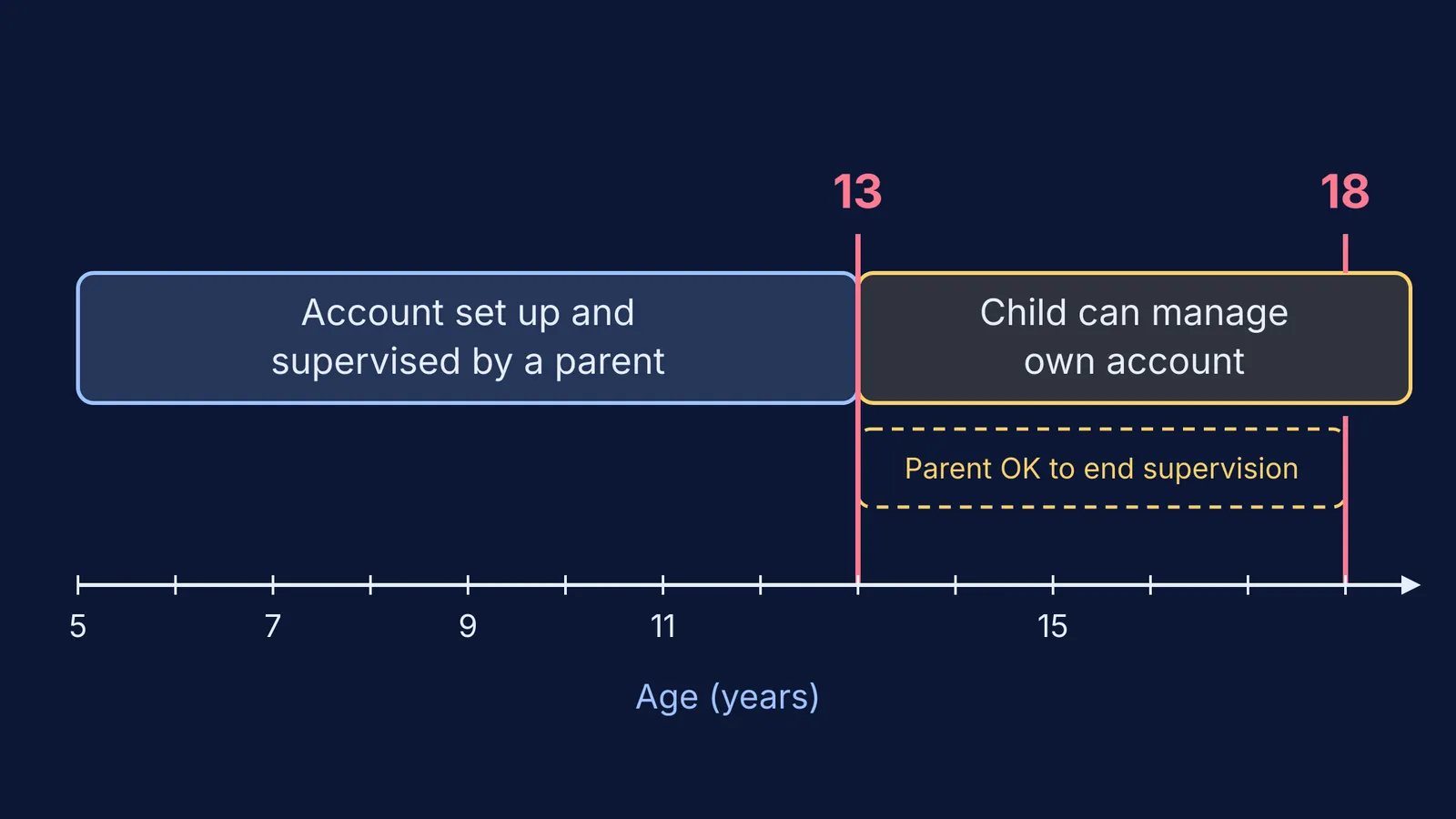
Gmail runs on a Google Account. Google's age requirements page says that 13 is the minimum age to manage your own Google Account in every country it does not list separately, and India is not on that list. Below that age, a parent can create and manage the account with Family Link.
Turning 13 does not end supervision on its own. Google's Family Link page on turning 13 says children need parent approval to stop supervision until they turn 18.
Indian law also asks services to involve parents. Under the Digital Personal Data Protection Rules, 2025, processing a child's personal data needs verifiable consent from a parent or guardian, unless it relates to essential services such as healthcare, education or real-time safety, according to a Press Information Bureau backgrounder. The same document says organisations get an eighteen-month period for phased compliance.
So: 13 to run it alone, any age with a parent. Your child is ready for a supervised school account when:
they can explain, in their own words, why a password stays private
they already tell you when something on a screen feels odd
there is a real use for it now, such as assignments or writing to a teacher
What can parents see in a supervised account?
With Family Link a parent can reset the child's password, choose which Google Play apps the child uses, set up purchase approvals and filter Google search results, according to Google's guide to managing a child's account. Resetting the password turns 2-Step Verification off until your child switches it back on.
If you add supervision to an account your child already had, Google's supervision help page says you cannot use Family Link to check or reset the password, or to read your child's emails or messages.
How do you set up a child's first email account together?
Sit side by side:
Agree the purpose in one sentence: "This address is for school, teachers and family."
Choose an address without full name plus birth year or city.
Let your child make the password, a long phrase they can remember. The Reserve Bank of India advises never sharing passwords or OTPs with anyone; at home, the only other person who knows it is you.
Turn on 2-Step Verification, with a parent's phone as backup.
Add the contacts they will use: class teacher, subject teachers, grandparents.
Agree that they ask you before signing up anywhere new with this address.
For step 6, our guide to what parents should check in a learning app's privacy settings helps. When the address goes into a study tool, such as Fermi's AI tutor, which works out what a student already knows and builds a plan for the session, read the sign-up screen together first.
How can a child spot a phishing email?
Phishing is a message that pretends to come from someone trustworthy to get a password, money or a download. The Government of Canada's Get Cyber Safe guide to teaching kids about phishing lists the signs to teach: misspelled words, grammar errors, incorrect email addresses or links, and an unnecessarily urgent tone. It also advises clicking email links only with your permission and going to a trusted adult right away.
Practise on a made-up example:
From: School Admin, support@schoo1-portal-help.com
Subject: URGENT: your account will be deleted in 24 hours
Message: "Dear student, verify you're password now to keep access. Click here."
Ask your child to find the clues: "schoo1" with a one, an address that is not the school's, a deadline threat, "you're" for "your", no name, and a link asking for a password.
If your child has already typed a password into a link, change it from another device and check that 2-Step Verification is still on. If money is involved, the RBI asks the public to report financial cyber fraud immediately on cybercrime.gov.in or the cybercrime helpline 1930.
Who should a child share their email address with?
Share it with teachers, school staff, relatives and classmates for group projects.
Keep it out of game chats, comment sections and public forms.
Use a parent's address for contests, prize draws and "free gift" offers.
Don't reply to strangers, even to say "stop".
A script you can use: "Your email is like our house key. Give it only to people we both know. If anyone else asks for it, show me first. You won't be in trouble for asking."
Agree these rules the way you would set family rules for phones and homework, and revisit them around the 13th birthday, when Google emails both you and your child to say the account can be updated.
Start with one supervised address, one shared purpose and one rule: when in doubt, show a parent.