On this page
You open YouTube to watch one 12-minute explanation of torque. Fifty minutes later you are watching a cricket bowler's action in slow motion, and the torque notes are still blank. That is not a character flaw. The app is doing the job it was built for.
How does YouTube decide which video to recommend next?
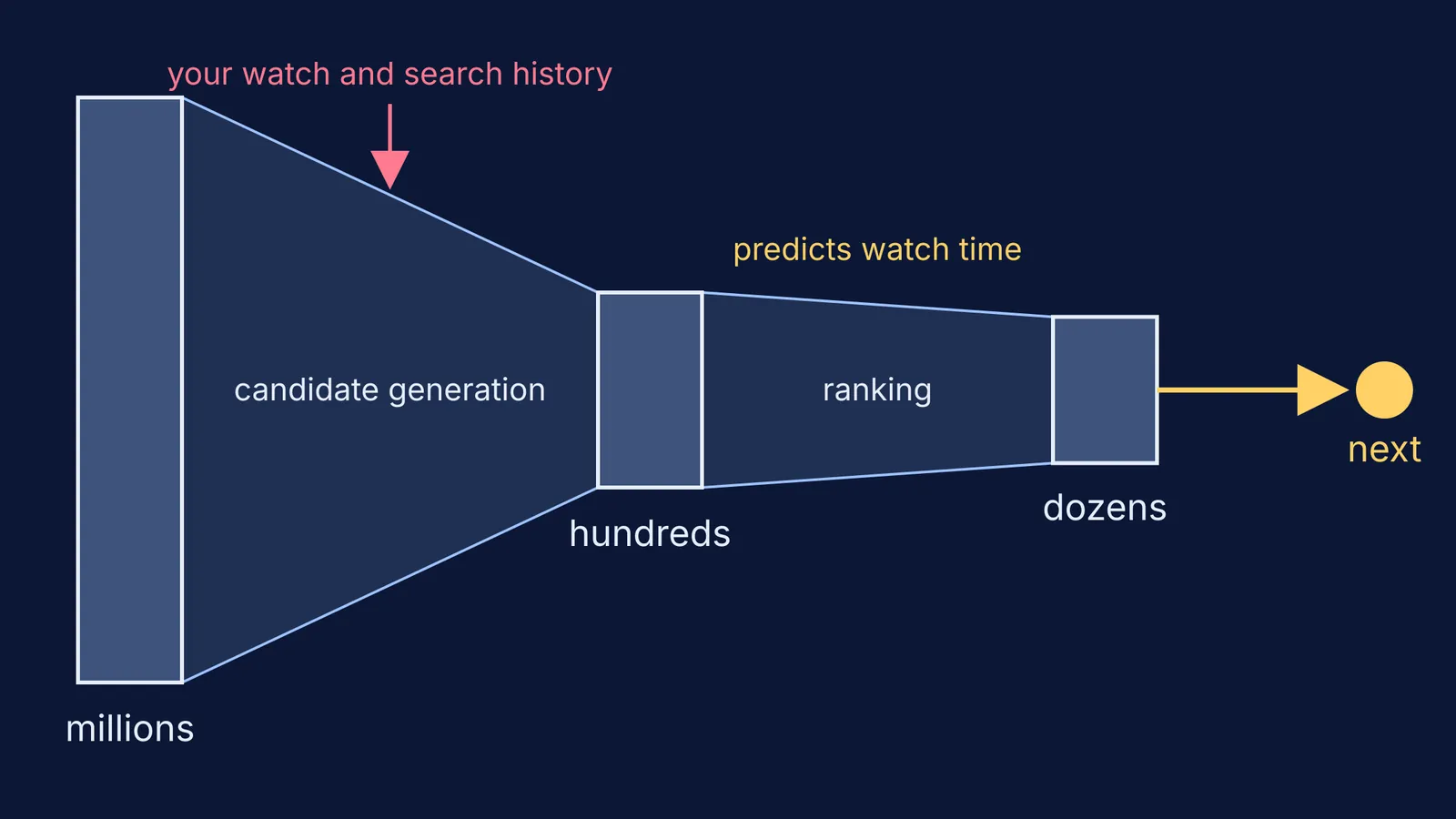
YouTube's recommender works as a funnel: one neural network picks a few hundred candidates from millions of videos, and a second network ranks them, according to a 2016 paper by Google engineers Paul Covington, Jay Adams and Emre Sargin. The first stage uses your activity history, such as the videos you watched and the words you searched. The authors wrote that their ranking objective is “generally a simple function of expected watch time per impression”. They preferred watch time to clicks because ranking by click-through rate “often promotes deceptive videos that the user does not complete”.
In a 2021 post on YouTube's official blog, Cristos Goodrow, YouTube's VP of Engineering, listed the signals as “clicks, watchtime, survey responses, sharing, likes, and dislikes”. He also described “valued watchtime”, measured by surveys that ask viewers to rate a video from one to five stars.
So the system asks “what will this person watch next?”, not “what does this student need for Thursday's test?” The gap between those questions is where your hour goes.
Why does one study video turn into an hour?
Researchers led by Kai Lukoff surveyed 120 US users of the YouTube mobile app about which features made them feel in or out of control. In their CHI 2021 paper (DOI), they found that autoplay and recommendations mainly undermined users' sense of agency, while search and playlists supported it. In 13 co-design sessions, people who came with a specific intention preferred designs that gave them more control.
You arrive with an intention: understand torque. Autoplay and the sidebar swap it for the app's guess, one small step at a time.
Which YouTube settings help you stay focused while studying?
Each comes from YouTube's own help pages.
Turn off autoplay. It is a switch on the video player. YouTube says autoplay is off by default for users aged 13 to 17, so check that nobody switched it back on.
Set a break reminder. In Settings, then General, turn on “Remind me to take a break” and pick a frequency. YouTube sets this reminder on by default for 13 to 17-year-olds.
Prune what feeds the funnel. Use “Not interested” and “Don't recommend channel” on the videos that keep pulling you away, as described in YouTube Help.
Think about pausing watch history. YouTube says that if you have no significant recent watch history and have chosen not to get recommendations based on it, recommendations on the homepage are removed.
Add a block at phone level. Our guide to setting up Focus mode on a teen's phone walks through it.
A worked example: one video, one question, about 25 minutes
Riya, in Class 11, is stuck on torque before a unit test. Here is how she could run one video session.
Write the question first (1 minute). On paper: “Why does a longer spanner make a nut easier to turn?”
Go in by search, not Home (2 minutes). She searches the topic, picks one video, and saves one backup to a playlist called “Study: Physics”. Then she stops browsing.
Watch with a pen moving (15 minutes). She pauses each time a formula appears and predicts the next step. When a stray thought arrives, she writes it on a distraction parking-lot sheet and carries on.
Close the tab when the video ends. No sidebar, no “one more”.
Answer the question without the video (5 minutes). If she cannot, the gap is in the concept, and another video may not fill it.
If you are tempted to speed things up at 2x, read what studies found about lecture playback speed first.
When step 5 shows a concept gap, the Fermi Concept Library gives each concept in physics, chemistry, biology, mathematics and computing its own lesson and its place in the map, so the next step is the next idea rather than the next video. And if you do not know where to start, Fermi's AI tutor works out what you already know and builds a plan for the session.
What can parents say without starting a fight?
Try sitting down together and saying something like this:
“I read that YouTube ranks videos largely by how long people are likely to keep watching, not by what's on your test. It's not your fault.”
“Can we switch off autoplay together and keep study videos in one playlist?”
“Instead of me checking screen time, show me your written answer at the end.”
The last line moves the check from minutes on screen to what was learned.
Tonight, switch off autoplay and write your question on paper before you press play.