On this page
Your textbook shows a fraction as a stack: a numerator, a line, a denominator. When you type it into a chat box, that stack gets flattened into one line of text. Anything the layout made obvious now has to be spelled out, and the AI has to guess at whatever you leave out. Some "the AI got it wrong" moments start here, before any solving begins.
Why does a missing bracket change the answer?
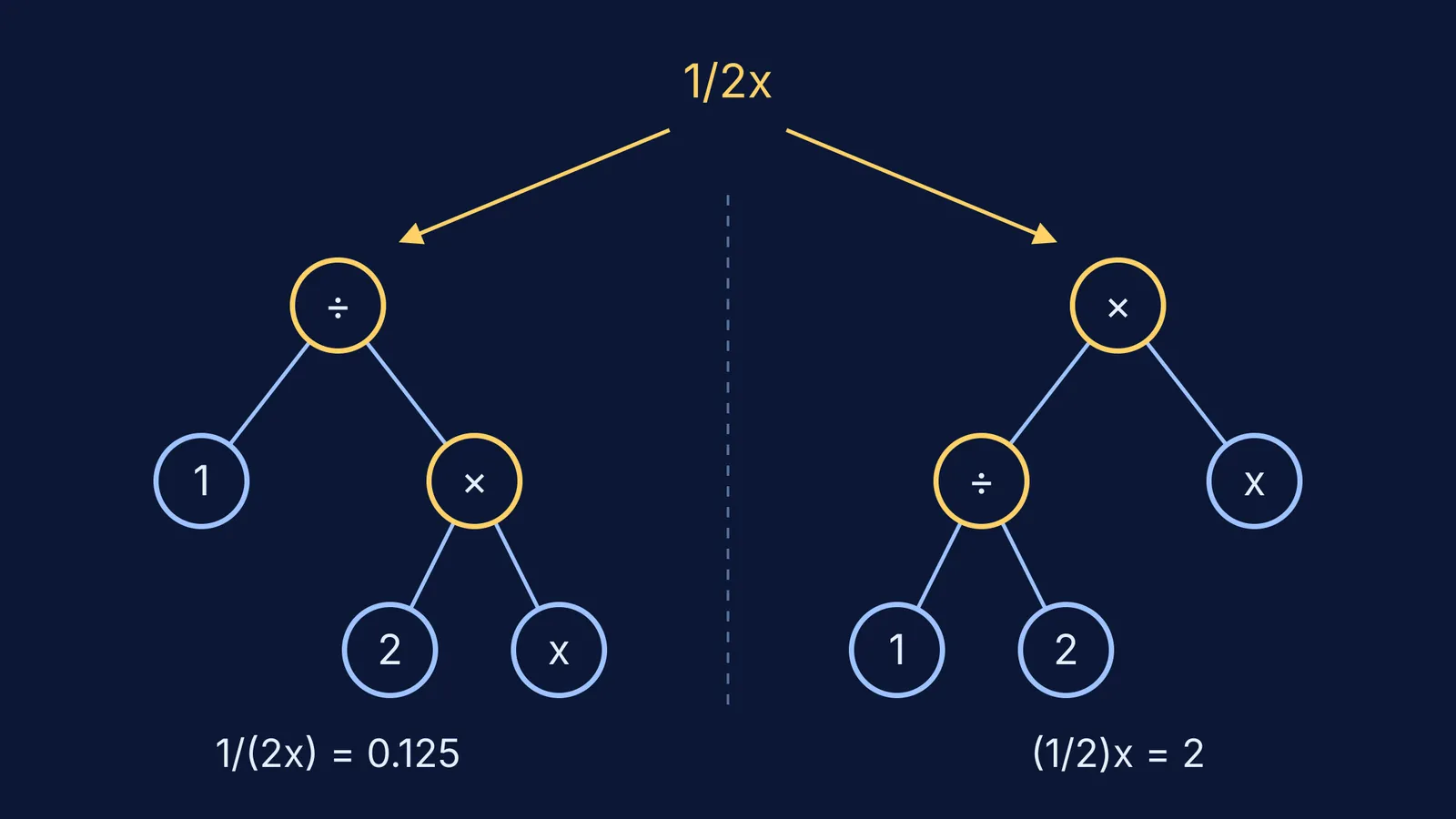
Take a common homework line: find the value of 1/2x when x = 4.
Read as 1/(2x), the answer is 1/8 = 0.125.
Read as (1/2)x, the answer is 2.
Same keystrokes, two very different answers. The book meant one of them; the typed line doesn't say which.
Software doesn't agree on these unwritten rules either. Python's official documentation states that in Python `-1**2` results in `-1`, because the power is applied before the minus sign (Python Language Reference, section 6.5). Microsoft's precedence table for Excel lists negation before exponentiation (Microsoft Support), so in Excel `=-3^2` squares −3 and gives 9. If two well-known tools disagree, a chatbot can too. Brackets settle it: type `-(3^2)` or `(-3)^2`.
How do you type powers so the AI reads them right?
Use `^` for "to the power of", and bracket any exponent longer than one symbol.
e^(-2t), not e^-2t, which can be read as (e^-2)·t
2^(n+1), not 2^n+1, which means (2^n) + 1
(-5)^2 = 25, while -5^2 is usually read as -(5^2) = -25
x^2, never x2: "x2" can look like a variable called x2, or like 2x
Functions need the same care. Type sin(2x), not sin2x, and write sin(x)^2 or (sin x)^2 rather than sin^2x.
How should you type fractions and units?
For fractions, bracket the whole numerator and the whole denominator, every time: (a + b)/(c + d). Without brackets, a + b/c + d means a + (b/c) + d. For a nested fraction, bracket from the inside out: 1/(1 + 1/x).
Units follow the same logic, and there is an official rule for them. The US National Institute of Standards and Technology says the slash "must not be repeated on the same line unless parentheses are used", so m/s/s is out and m/s^2 or m·s^-2 is fine (NIST Guide to the SI, chapter 6). Type specific heat as J/(kg·K), not J/kg K.
NASA lost its Mars Climate Orbiter on 23 September 1999 because ground software used English units while the spacecraft's software used metric (NASA). So give every quantity its unit (u = 20 m/s, not just u = 20) and say which units you want the answer in. Then you can run a quick dimensional analysis check on whatever comes back.
What should you type before asking the AI to solve it?
Run through this checklist before you press enter:
Every fraction: numerator and denominator each in brackets.
Every power: ^ with the exponent in brackets if it has more than one symbol.
Every function: its input in brackets, as in sin(2x), sqrt(b^2 - 4ac), ln(1 + x).
Multiplication: write it out, as in `2*(x + 3)`.
Every quantity: a number, a unit and the symbol it stands for.
The question itself: what to find, and in what form or units.
Then add one line that costs you nothing:
If the AI's rewrite doesn't match your book, you've caught the error before it got baked into every step after it. If you know LaTeX, `\frac{1}{2x}` removes this ambiguity. Sending a photo instead? See our guide on photographing a problem so an AI reads it correctly.
Worked example: a physics line, typed twice
Unclear: `s = ut + 1/2at^2, u=5, a=2, t=3, find s`
Clear: `s = u*t + (1/2)*a*t^2, with u = 5 m/s, a = 2 m/s^2, t = 3 s. Find s in metres.`
The intended answer is 15 + 9 = 24 m. The unclear line can be read as 1/(2at^2), and that turns 9 m into 1/36, a number with the wrong units altogether.
A clear input fixes how the AI reads the question. It doesn't fix how it solves it, and models can still slip on the arithmetic, as we explain in why AI makes maths mistakes. That's the reason to look at each step rather than just the final number. The Fermi Problem Library has worked problems with a step-by-step solver that explains the reasoning rather than printing an answer, so you can see where each term came from. And Fermi's AI tutor writes on a board and checks understanding as it goes, so the expression it's working on is right there for you to check.
Next time you type a question, add the brackets first and ask the AI to read it back. It takes a few seconds and can save you a wrong answer.