
On this page
Play a lecture video while a PDF downloads and a chat app pings, and three programs are sharing one processor, one memory and one storage chip. The operating system (OS) is the software that makes this work. Here are its four jobs, how Android and Windows do each, a worked example and an exercise.
What does an operating system actually do?
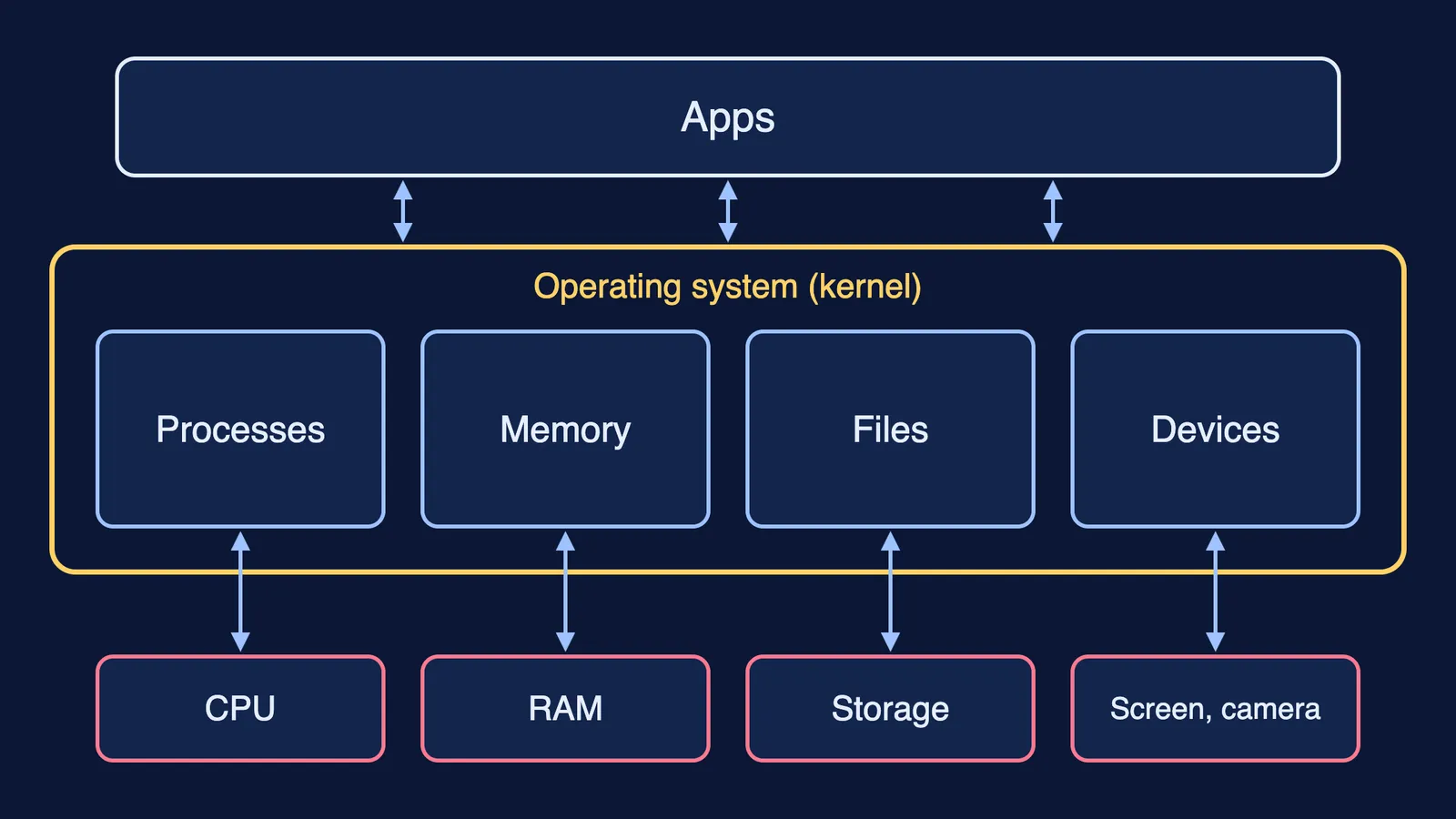
The core of every OS is the kernel. Android's architecture guide puts it simply: the kernel is the central part of any operating system and talks to the underlying hardware. On Windows, the processor has two modes: applications run in user mode, while core operating system components run in kernel mode.
Everything the OS does falls into four jobs:
Processes: which program uses the processor, and for how long.
Memory: a private space for each program, reclaimed when RAM runs short.
Files: storing and finding your data.
Devices: talking to the screen, camera and speaker, and deciding which apps may use them.
How does an operating system run many apps at once?
In Microsoft's definition, each process provides the resources needed to execute a program, and a thread is the entity within a process that can be scheduled for execution.
Each processor runs one thread at a time, so the OS takes turns. Windows allocates a time slice to each thread; when it elapses, the system saves that thread's context and restores the next one. The same page says each time slice is small, about 20 milliseconds, which is why many threads appear to run at once. On a computer with several processors, it adds, threads really do run at the same time, distributed among the processors.
Android adds a twist. In most cases, every Android app runs in its own Linux process, and the app does not directly control how long that process lives. The system does.
How does an operating system manage memory?
On Windows, each process gets a virtual address space that is private and cannot be accessed by other processes unless it is shared. A page table translates those addresses to real locations in RAM, so one app cannot overwrite another's data. If you study Python in Class 12, the call stack behind recursion lives inside this private space.
Android handles shortage by ranking. It places each process in an importance hierarchy, from foreground and visible to service and cached, and the system is free to kill a cached process when memory is needed elsewhere. Keeping a process cached lets you switch back to an app faster, but cached processes can be terminated at any time.
How does an OS handle files and devices?
A file system enables applications to store and retrieve files on storage devices, placing them in a hierarchy of volumes, directories (folders) and files. The file system also sets the format of a path, so a path such as Documents, then Physics, then Notes names one place on the disk.
Devices need translators. A driver is a software component that lets the operating system and a device communicate. Microsoft notes the stakes: if an application crashes, it doesn't affect other applications, but if a kernel-mode driver crashes, the entire operating system crashes.
The OS also guards devices. Android assigns a unique user ID to each app and runs it in its own process, creating a kernel-level sandbox. Sensitive access needs your say: runtime permissions show a prompt you can allow or deny, and the microphone and camera count as particularly sensitive. That is what to check before you install an APK shared in a study group or add an AI homework browser extension.
Worked example: what happens when you tap a lecture video?
Follow one tap through all four jobs:
Devices: the touchscreen's driver reports your tap to the OS.
Processes: the OS starts the video app in its own process, with its own user ID.
Memory: the app gets private memory; if RAM is tight, Android may kill a cached app to make room.
Files: the file system finds the downloaded video on storage and hands it to the app.
Processes again: the scheduler gives the video player and your PDF download turns on the processor.
Devices again: frames go to the screen and sound to the speaker, each through its driver.
Switch to your chat app and the video app drops down the importance list; come back later and it may resume, or restart if its memory was reclaimed.
Try it yourself
On Windows, open Task Manager, sort running processes by memory and note which program uses the most.
On Android, open Settings, then Apps, pick an app and open Permissions (menu names vary by phone maker).
For each thing you see, write which of the four jobs it belongs to.
If process, thread and kernel blur together, the Fermi Concept Library covers every concept in computing, each with its own lesson and its place in the map, so you can see how they connect.