On this page
Yes, you can. A small AI model is a chatbot shrunk enough to fit on an ordinary laptop: you download it once, and after that it answers with the Wi-Fi switched off. That helps in a hostel with patchy internet or when you would rather your notes stayed off a company's server. But small models know less and slip more often than the big online ones, so how you use them matters more than which one you pick.
Can I really use AI on my laptop without internet?
Yes, once the model is downloaded. Free apps such as LM Studio and Ollama fetch a model file and run it on your own computer. LM Studio's offline guide says the app "does not require the internet in order to work", and that nothing you enter when chatting with a model leaves your device. You still need internet to search for and download models and to update the app.
The files are smaller than most people expect. On Ollama's Llama 3.2 page, Meta's 1-billion-parameter model is a 1.3 GB download and the 3-billion-parameter model is 2.0 GB. Parameters are the numbers a model learns during training; more parameters usually means more knowledge and a bigger file.
What laptop do I need to run AI offline?
Memory (RAM) matters most. LM Studio's system requirements recommend 16 GB of RAM, and say an Apple Silicon Mac with 8 GB can work with smaller models. On Windows, the same page recommends at least 4 GB of dedicated graphics memory and, on standard Intel or AMD (x64) PCs, requires a processor that supports a feature called AVX2.
In plain terms: with 8 GB of RAM, start with a 1B or 3B model and close your browser tabs while it runs. If replies crawl out a word at a time, try a smaller model before thinking about a new laptop.
How accurate are offline AI models for studying?
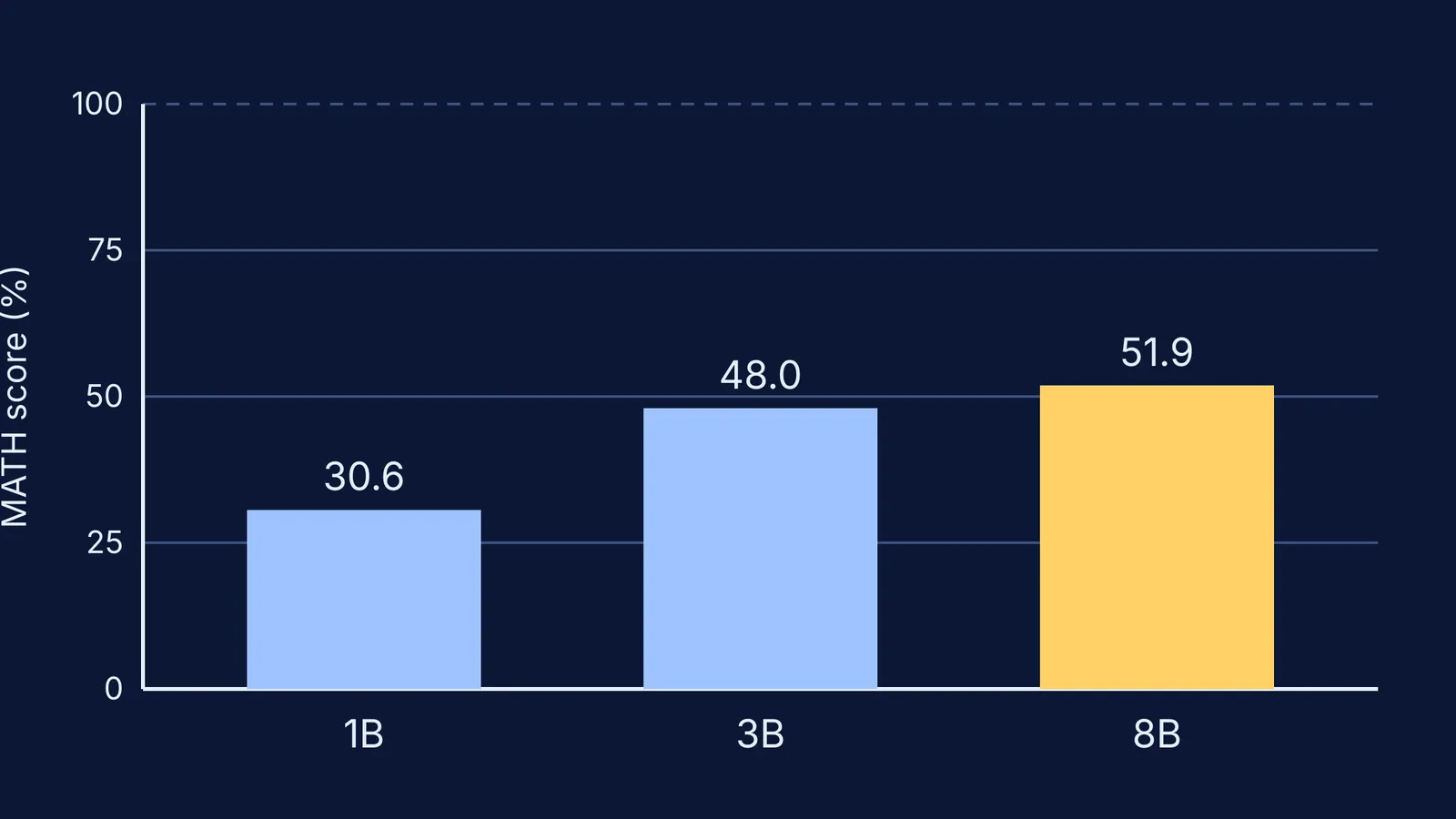
Less accurate than you might hope, especially in maths. Meta's own Llama 3.2 model card reports scores on MATH, a set of 12,500 challenging competition mathematics problems. On Meta's test, the 1B model scored 30.6 out of 100 and the 3B model 48.0, against 51.9 for the larger Llama 3.1 8B. Put simply, the 3B model got more than half of the test problems wrong.
Small models also forget facts. Microsoft's Phi-3 technical report describes a 3.8-billion-parameter model small enough to run on a phone, and its authors write that the model "simply does not have the capacity to store too much 'factual knowledge'". Their knowledge also stops at a date: the Llama 3.2 model card says its pretraining data has a cutoff of December 2023, so it cannot know this year's syllabus changes or exam dates.
Before you trust any answer, read why AI tools make confident maths mistakes and how they can invent sources that do not exist.
Is offline AI better for privacy?
Mostly, yes. Ollama's FAQ says "We don't see your prompts or data when you run locally". It also offers cloud models, where Ollama processes your prompts to provide the service, and the same page explains how to switch cloud features off. For a parent, that is the one setting to check: local models only, cloud off. Our guide to privacy in learning apps covers what to look for in any study app.
What should I use it for, and what should I skip?
Small models do best when they work from text you give them, and worst when they must recall facts. So use offline AI for:
turning your own notes into quiz questions
summarising a chapter you paste in, then checking the summary against the book
explaining an idea in simpler words, or in Hindi, which the Llama 3.2 model card lists as an officially supported language
making flashcards from a list of definitions
Skip it for:
final answers to numericals
facts you cannot check yourself: constants, dates, syllabus, cut-offs
references, quotations and "what the examiner wants"
A 20-minute offline revision plan
Paste one page of your own notes, say on Coulomb's law, and type: "Using only these notes, ask me five questions, one at a time. Do not give the answer until I reply."
Answer each question on paper first, then type your answer in.
Ask: "Which part of my answer does not match my notes?"
Underline anything the model says that is not in your notes. That is a verify item, not a fact.
Check every verify item against your NCERT textbook before you close the laptop.
When a problem still will not come out and you are back online, the Fermi Problem Library has worked problems with a step-by-step solver that explains the reasoning rather than printing an answer. If you are not sure where to start, Fermi's AI tutor works out what you already know and builds a plan for the session.
This week, download one small model, try the plan on one chapter, and keep your textbook open beside it.