
On this page
You type a short name, press Enter, and a page appears. In between, your device asked several computers one question, "where does this name live?", got back a number, and then asked that number for the page. Here is the journey step by step, with an example to try tonight.
What happens when you type a website address?
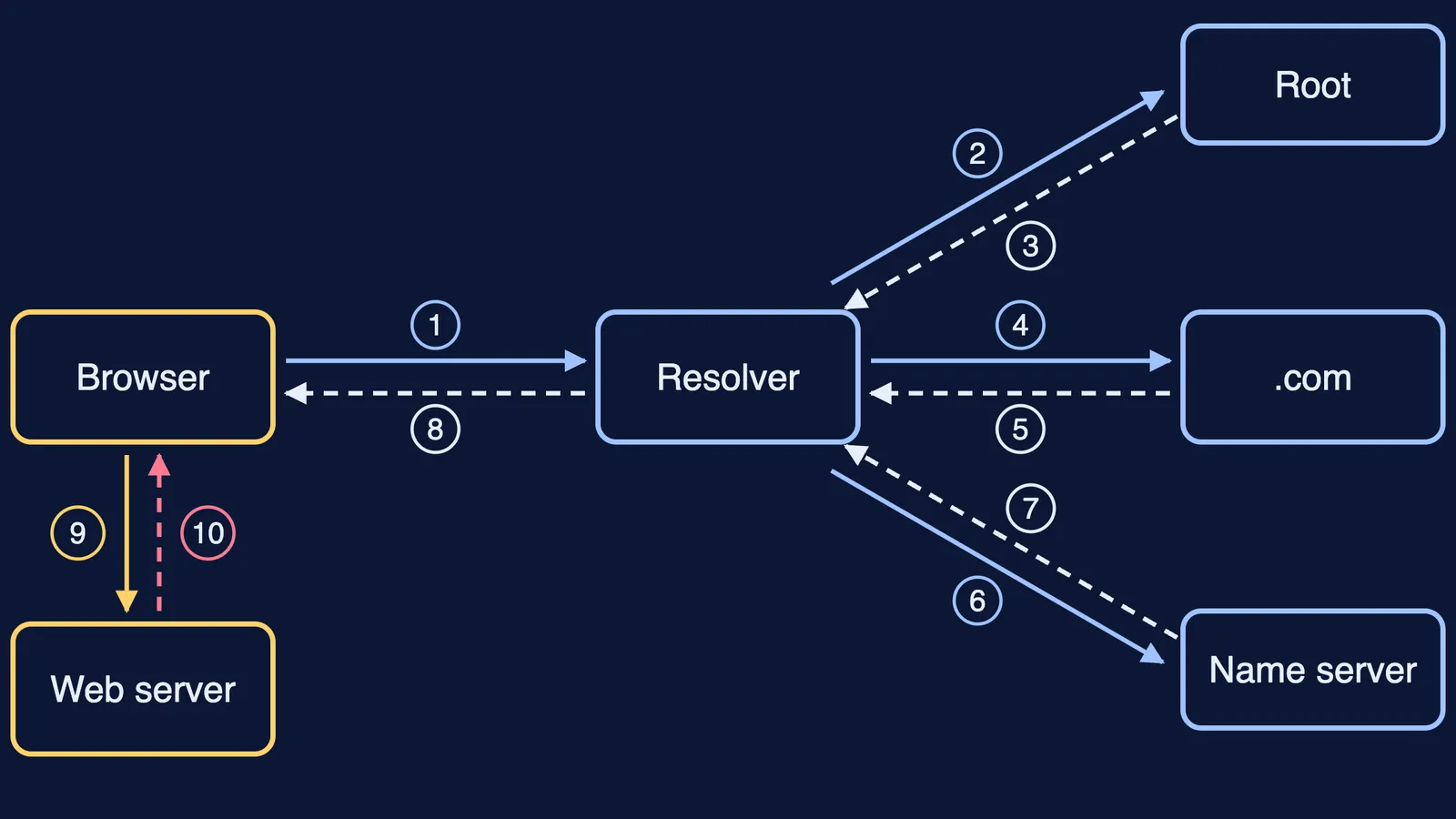
Every website lives on a computer called a server, and computers find each other by number, not by name. So the first job is to turn the name into a number. The steps match the numbers on the diagram above.
If your device does not already know the address from a recent visit, it asks a resolver, often one run by your internet provider.
The resolver asks a root server where to find names ending in .com.
The root server replies with the addresses of the .com servers.
The resolver asks a .com server about the site's name.
The .com server points it to the name servers the website's owner has chosen.
The resolver asks that name server.
The name server gives the final answer: the site's IP address.
The resolver passes the IP address back to your browser and remembers it for later.
Your browser opens a connection to the web server at that address and sends a request for the page.
The web server sends back a response, and your browser draws the page.
Steps 1 to 8 are the DNS lookup. Steps 9 and 10 are the request and response.
What is an IP address?
An IP address is the number that identifies a device on a network, like a PIN code plus house number for a computer. An IPv4 address is 32 bits long, according to the original Internet Protocol specification, RFC 791. That allows 2 to the power 32, about 4.3 billion addresses. Its successor, IPv6, increases the address size from 32 bits to 128 bits, to support a much greater number of addressable devices, according to RFC 8200.
An address like 192.168.1.10 is those 32 bits written as four numbers from 0 to 255, one per group of 8 bits. Here is the worked example:
192 = 128 + 64, so it is 11000000
168 = 128 + 32 + 8, so it is 10101000
1 is 00000001
10 = 8 + 2, so it is 00001010
Put together, 192.168.1.10 is 11000000 10101000 00000001 00001010: exactly 32 ones and zeros. If converting to binary still feels shaky, the Fermi Concept Library covers every concept in physics, chemistry, biology, mathematics and computing, each with its own lesson.
How does DNS find the IP address?
DNS, the Domain Name System, works like a chain of directories, each one pointing to the next. The design is described in RFC 1034, which defines resolvers as programs that connect your apps to name servers.
The chain starts at the root. According to IANA's root servers page, the root is served by hundreds of servers in many countries, set up as 13 named authorities, from a.root-servers.net to m.root-servers.net.
Asking the whole chain every time would be slow, so answers are saved. Each DNS record carries a time to live (TTL), in seconds, that says how long it can be cached before it should be discarded, as RFC 1034 explains. That is why the full chain is often skipped for sites you visit regularly.
That habit is the same one that helps you spot AI phishing emails when the grammar is perfect.
What is in the request and the response?
With the IP address in hand, your browser speaks HTTP. It sends a request such as "GET this page", and the server replies with a status code and the page. The rules are in RFC 9110:
200 (OK) means the request has succeeded.
A code starting with 3 means a redirect: look somewhere else.
A code starting with 4, like the familiar 404 (Not Found), means a client error, such as a page that does not exist.
A code starting with 5 means the server failed.
The "s" in https means the conversation is wrapped in TLS, which is designed to prevent eavesdropping, tampering and message forgery, according to RFC 8446. It hides what you send, but it does not prove a site is honest.
How can you see a DNS lookup yourself?
You need no special software:
Open Command Prompt on Windows or Terminal on a Mac.
Type nslookup example.com and press Enter. The first address shown belongs to your resolver; the addresses listed after the site's name are the IP addresses DNS found.
Try your school's website too.
Pick one IPv4 address and convert its four numbers to 8-bit binary, as in the worked example.
Count your digits. If you do not have exactly 32, find the number that went wrong.
"Non-authoritative answer" just means a resolver answered, not the site's own name server.
For the history behind all this, read how the first internet message, "lo", crashed in 1969, and how John O'Sullivan's CSIRO team fixed Wi-Fi's echo problem.