On this page
Open a navigation app in Bengaluru at 6 pm and it says "42 min". That number is a forecast built from moving phones, traffic history and a machine learning model, then added up with Class 9 maths.
Where does the traffic data come from?
The raw material is phones like yours. In a 2009 post, Google explained that a phone with location turned on in Google Maps "sends anonymous bits of data back to Google describing how fast you're moving" (Google, 2009). Combine speeds from thousands of phones and you see which roads are crawling. The post says Google merges data from many phones in one area so no single phone stands out, and deletes the start and end points of each trip. (For how a phone knows where it is, see Gladys West and the Earth model behind GPS.)
Live speeds only describe the road now, but your trip happens over the next half hour. So the app also needs history: how this road usually behaves at 6 pm on a Monday.
How do map apps predict arrival time?
Google Maps "uses machine learning to combine live traffic conditions with historical traffic patterns for roads worldwide", according to Google DeepMind's 2020 write-up. The road network is split into "Supersegments", stretches of adjacent road that share a lot of traffic, and a graph neural network predicts the travel time for each one.
A graph neural network is a model that treats a road network as connected points, so a jam on one stretch can shape the prediction for the stretches around it, the way a jammed side street spills onto a main road (DeepMind).
DeepMind says this improved real-time ETA accuracy by up to 50% in cities such as Berlin, Jakarta, São Paulo, Sydney, Tokyo and Washington D.C. (DeepMind). The CIKM 2021 research paper reports more than 40% fewer "negative ETA outcomes" in cities like Sydney than the previous system (Derrow-Pinion et al., 2021).
Route choice also weighs road quality, speed limits, tolls, and incidents and closures reported by users (Google Maps blog, 2020).
What is the maths behind travel time?
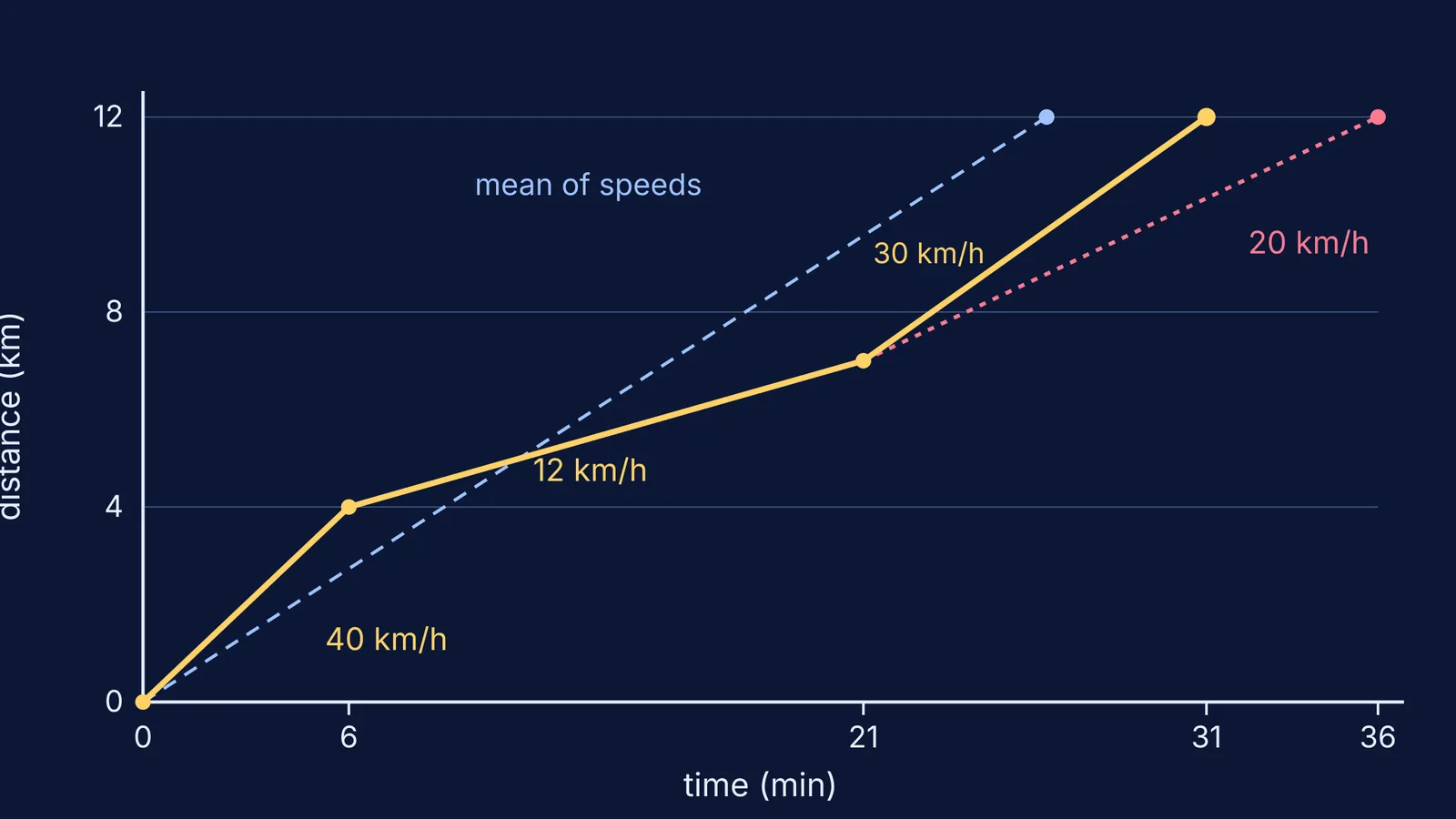
Underneath sits a formula you know: time = distance ÷ speed, per stretch, then added up. Take a 12 km trip:
Stretch A: 4 km at 40 km/h takes 4 ÷ 40 = 0.1 h, or 6 minutes.
Stretch B: 3 km at 12 km/h (a jammed flyover) takes 3 ÷ 12 = 0.25 h, or 15 minutes.
Stretch C: 5 km at 30 km/h takes 5 ÷ 30 h, or 10 minutes.
Total: 31 minutes, so your average speed is 12 ÷ (31/60), about 23 km/h.
The tempting shortcut is to average the three speeds, (40 + 12 + 30) ÷ 3 ≈ 27 km/h, and divide 12 km by that. You get about 26 minutes, five minutes too hopeful. You spend nearly half the trip on the slow flyover, so it deserves more weight than a plain average gives it. Exam questions set the same trap: see average speed vs average velocity.
If weighted averages feel shaky, the Fermi Problem Library has worked problems with a step-by-step solver that explains the reasoning rather than printing an answer.
Why are traffic estimates sometimes wrong?
Google says its predictions have been "consistently accurate for over 97% of trips" (Google Maps blog, 2020). Misses tend to come from:
History stops matching reality. Google says worldwide traffic fell by up to 50% when lockdowns began in early 2020, so it updated its models to give priority to the last two to four weeks of data.
Too few phones. The 2009 post admits you "can't get useful traffic results until you have a LOT of devices reporting their speeds" (Google, 2009). On a quiet road at night, a handful of phones sets the colour.
The data can be fooled. In 2020 the artist Simon Weckert pulled 99 second-hand smartphones in a handcart to create a virtual traffic jam, turning a green street red and sending cars onto other routes (Weckert's project page).
Sudden events. A crash or a flooded underpass beats any pattern; the app reacts only once phones slow down or someone reports it.
One confident number can hide a lot of uncertainty, a problem chatbots share; see why AI sounds confident when it is wrong.
How should you plan around an ETA?
For an exam centre or a train:
A few days before, set the app's departure time to the real trip's day and hour; that forecast leans on history.
Look for red stretches: slow stretches carry most of your time, so the estimate can slip most there.
Add a buffer, bigger if one long jam is unavoidable.
Check again before you leave. If the ETA has jumped, a new event has probably entered the live data.
To study topics like this, Fermi's AI tutor works out what you already know and builds a plan for the session.