
On this page
Open a photo on your phone and every colour is built from red, green and blue. Print the same photo and the printer reaches for cyan, magenta, yellow and black instead. Neither is wrong. A screen starts dark and adds light. Paper starts white and ink takes light away. That one difference decides which primaries each needs.
Why do screens use RGB colours?
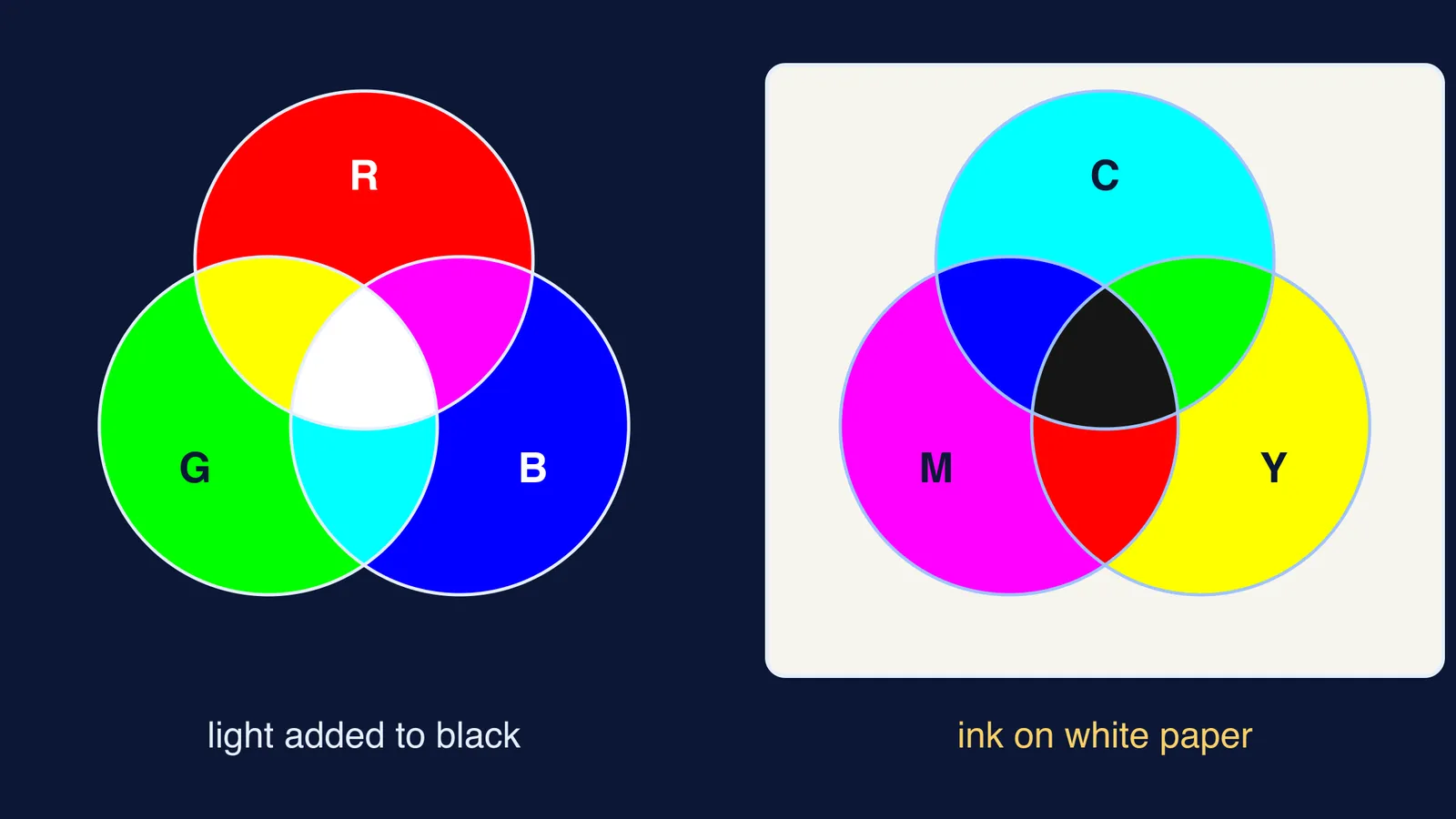
A switched-off screen is black, so the only way to make a colour is to emit light. Each pixel in CRT, LCD and most other colour displays is made of red, green and blue light-emitting elements that blend into one colour from normal viewing distance (additive colour). Two of these lights in equal amounts give cyan, magenta or yellow, and all three give white, as the same source explains.
The reason for red, green and blue is your eye. Measurements of single cone cells from a human retina found three classes of cones, with peak absorption at about 563 nm (long-wave, 'red'), 534 nm (middle-wave, 'green') and 420 nm (short-wave, 'blue') (Bowmaker and Dartnall, Journal of Physiology, 1980). Thomas Young proposed three types of receptors in 1802, and Hermann von Helmholtz developed the idea in 1850 (Young–Helmholtz theory).
The colour you perceive depends on how strongly each cone type is excited relative to the others (HyperPhysics, Georgia State University). So a screen does not have to copy the real spectrum of a ripe mango. It only has to excite your three cone types in the same ratio, and three lights aimed roughly at those cones are a simple way to do it.
Why do printers use CMYK instead of RGB?
White paper reflects most visible light back to your eye. Ink cannot add light; it can only absorb some wavelengths and let the rest bounce back. This is subtractive mixing.
Ideally, each printing primary removes one screen primary: cyan absorbs red, magenta absorbs green and yellow absorbs blue (subtractive colour). So cyan is white light minus red, which leaves green plus blue. The printer's primaries are the screen's secondaries, and the other way round.
Why not red ink? Red ink must absorb both green and blue, removing two of your three channels at once. Inks that each control one channel let a printer turn red, green and blue up or down independently, just as a screen does with light. The same source notes that commercial printing adopted the more versatile cyan, magenta and yellow set, even while printers kept calling cyan 'process blue' and magenta 'process red'.
What does the K in CMYK do?
K stands for the key plate, which prints black (CMYK colour model). In theory cyan, magenta and yellow together absorb everything, but the same source explains that full amounts of all three give a dark but imperfect black. Black ink also prints sharper text, uses less ink, dries faster and costs less than stacking three coloured inks.
Printers make lighter shades without white ink. Halftoning varies the size and spacing of small ink dots so bare paper shows between them, which is how light magenta coverage reads as pink.
How do you predict a colour mix in an exam?
Use this three-step method for any ink, filter or coloured-light question:
Write white light as red + green + blue.
For light sources, add what each one emits. For inks or filters, cross out what each one absorbs.
Name what is left: red + green is yellow, green + blue is cyan, red + blue is magenta, all three is white, none is black.
Worked examples (assuming ideal inks and dyes):
Cyan ink over yellow ink: cyan removes red, yellow removes blue, so green is left.
Magenta ink over yellow ink: green and blue are removed, so red is left.
A yellow T-shirt under pure blue light: only blue arrives and yellow dye absorbs it, so the shirt looks black.
Red writing on white paper under a red bulb: paper and ink both reflect red, so the writing almost vanishes.
Red and green spotlights on a white wall: light adds, so the overlap looks yellow.
How can you see this at home?
Hold a strong magnifying glass over your phone showing a white screen. On many screens you can make out separate red, green and blue elements.
Look at a newspaper photo through the same lens. You will see tiny ink dots, not smooth colour.
If you would rather watch an idea move than read about it, the Fermi Simulation Lab has interactive simulations for ideas that are easier to see than to read. If colour mixing keeps tripping you up, Fermi's AI tutor can draw the figure and check your understanding as it goes.
The one-line version: a screen adds the light it wants, and paper can only give back the light the ink has not taken away.