On this page
Setting up a single-board computer is one of the most rewarding milestones for a student learning to program. Instead of watching text scroll past a terminal, you connect physical wires to an electronic board, measure real environmental conditions, and turn raw digital signals into live graphs. Building a small weather logger or home dashboard teaches how computers interact with the physical world, creating an authentic foundation in computer systems and applied physics.
What do you need for your first Raspberry Pi project?
You do not need an expensive electronics lab to start. A complete beginner workstation requires only a few core components:
A Raspberry Pi board (such as a Raspberry Pi 4 Model B, Raspberry Pi 5, or Raspberry Pi Zero 2 W).
A microSD card with at least 32 GB capacity, rated Class 10 or A1 for reliable read and write speeds.
An official 5V USB-C power supply delivering at least 3.0 A of current to prevent voltage drops.
A Bosch Sensortec BME280 sensor module, four female-to-female jumper wires, and your home Wi-Fi network.
The BME280 module is ideal for beginners because it combines barometric pressure, relative humidity, and temperature on a single chip. According to the official Bosch Sensortec BME280 specification, the chip operates from 1.71 V to 3.6 V and draws just 3.6 μA when taking all three measurements at 1 Hz. This standard 3.3V operating voltage matches the Raspberry Pi GPIO pins directly. For school science exhibitions, using this hardware setup provides an ideal starting point for turning a curious observation into a testable science project.
How do you flash Raspberry Pi OS and configure the board?
The easiest way to prepare your operating system is with Raspberry Pi Imager, available from the Raspberry Pi software portal:
Insert your microSD card into your computer and launch Raspberry Pi Imager.
Under "Choose Device", select your board model, and under "Choose OS", select Raspberry Pi OS (64-bit).
In the OS Customisation menu, enter your Wi-Fi details, create a username and password, enable SSH access, and assign a hostname such as `weatherpi.local`.
Click "Write" to flash and verify the operating system.
As outlined in the official Raspberry Pi setup guide, pre-configuring credentials allows a headless setup without an external HDMI monitor or keyboard. Once the card is flashed, insert it into your Raspberry Pi, connect the power cable, and log in remotely from your laptop over SSH.
How do you wire a weather sensor to the 40-pin GPIO header?
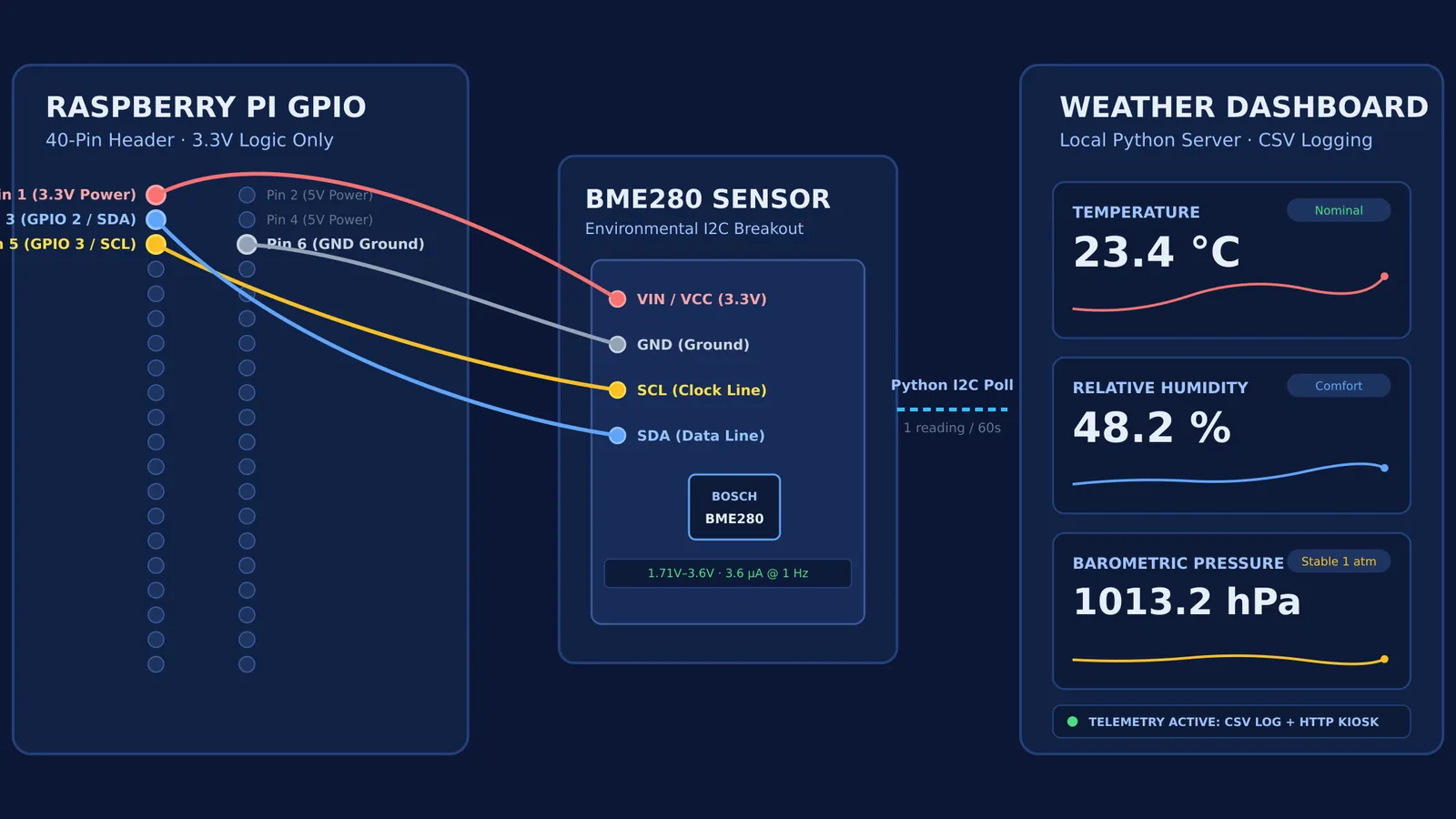
The standard 40-pin header on Raspberry Pi boards exposes power rails, ground pins, and programmable General-Purpose Input/Output (GPIO) pins. As documented on pinout.xyz, physical pin 1 sits at the top-left corner nearest the microSD card slot. Wiring the BME280 requires four jumper connections over the I2C serial bus:
Connect sensor VCC to physical Pin 1 (3.3V Power).
Connect sensor GND to physical Pin 6 (Ground).
Connect sensor SDA (Serial Data) to physical Pin 3 (GPIO 2 / I2C1 SDA).
Connect sensor SCL (Serial Clock) to physical Pin 5 (GPIO 3 / I2C1 SCL).
Every GPIO pin on the processor uses 3.3V logic (pinout.xyz). Wiring sensor VCC to Pin 1 ensures all data exchange remains safely at 3.3V without needing an external level shifter. Before assembling physical circuits, students who want to explore circuit behavior can study interactive simulations for ideas that are easier to see than to read in the Fermi Simulation Lab.
How do you code a weather logger and launch a home dashboard?
Once wired, boot your Raspberry Pi and enable I2C by typing `sudo raspi-config` in the terminal, navigating to "Interface Options", and enabling "I2C". Install the Adafruit sensor library with `pip install adafruit-circuitpython-bme280`.
A compact Python script can poll `sensor.temperature`, `sensor.relative_humidity`, and `sensor.pressure` once every minute, appending timestamps and readings to a CSV file. Logging telemetry to disk reinforces structured CSV file handling in Python, ensuring your data survives system reboots.
To display your observations around the house, serve the latest readings over a lightweight Python web script using Flask or `http.server`. You can also configure a small display to run a browser in fullscreen kiosk mode, creating a live dashboard that shows household temperature, humidity, and barometric pressure in real time.
What should you build next as your skills grow?
Hands-on hardware projects fundamentally change how students engage with computing. In *IEEE Computer*, Steve Hodges, Sue Sentance, Joe Finney, and Thomas Ball (Hodges et al., 2020) showed that physical computing bridges abstract programmatic logic with tangible real-world phenomena, substantially broadening engagement across diverse student groups. Similarly, in a survey of 484 distance learners at The Open University, Daniel Gooch and colleagues (Gooch et al., 2022) demonstrated that practical computing activities on networked Raspberry Pi hardware significantly enhanced student motivation and understanding compared to passive reading alone, while noting that independent coding requires structured scaffolding.
With a basic weather logger running, you can expand your setup:
Add an outdoor waterproof digital temperature probe to compare indoor room comfort against exterior ambient heat.
Integrate an air quality particulate sensor (such as a PMS5003) to track dust and seasonal pollution.
Model your atmospheric data mathematically, exploring pressure drops before rain storms or building physics simulations in Python.
When your logs reveal physical patterns—such as diurnal temperature swings or rapid barometric pressure drops—students can explore the underlying lessons in thermodynamics and atmospheric science in the Fermi Concept Library.