On this page
Registration for JEE Main 2027 Session 1 is open from 24 October to 22 November 2026, according to the NTA information bulletin. Two small files cause a lot of last-minute stress: your photograph and your signature. Get them right once, save them carefully, and every later form gets easier.
What photo and signature size does JEE Main 2027 ask for?
Here is what the JEE Main 2027 information bulletin says:
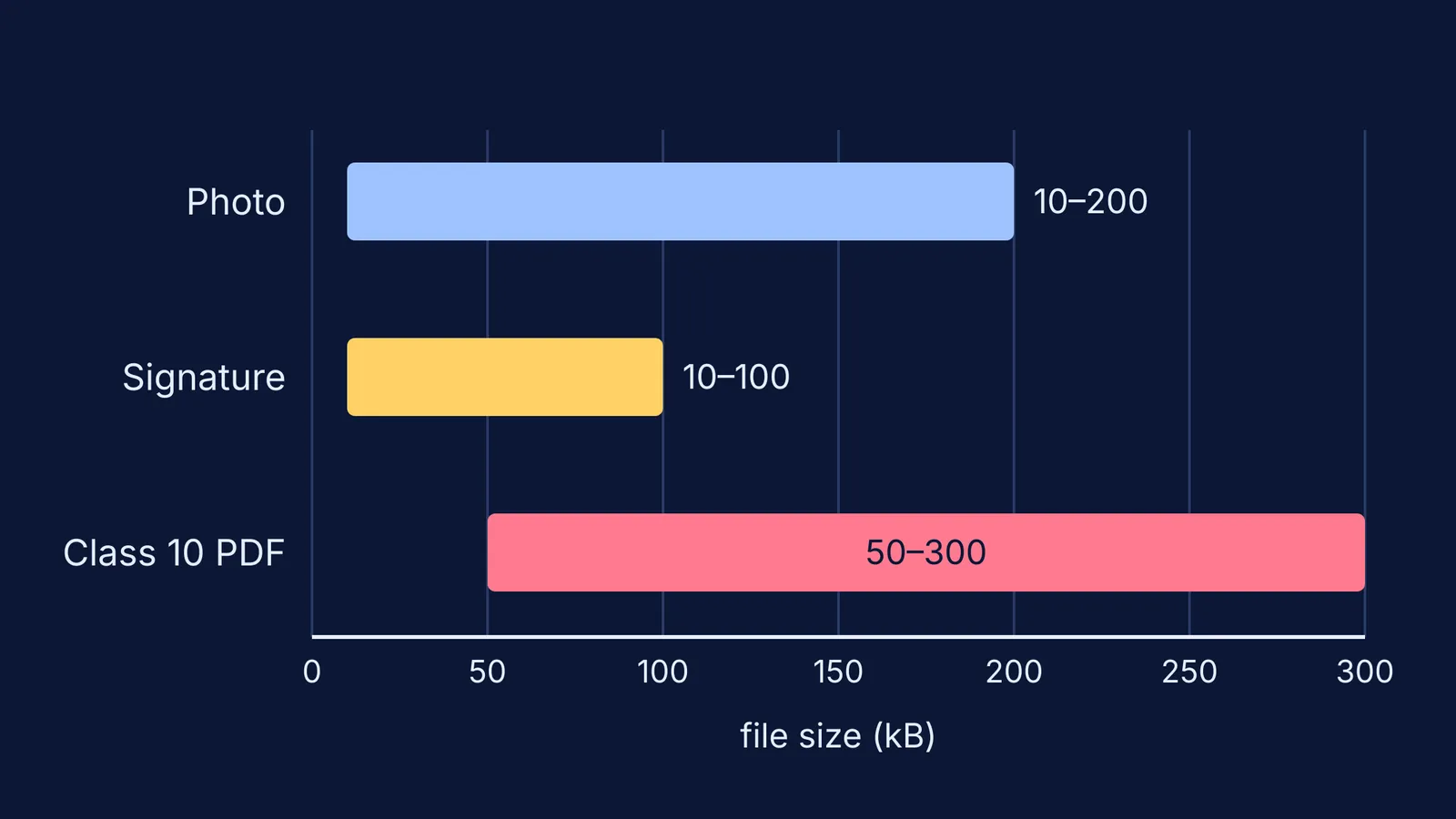
Photograph: a recent passport-size colour photo, JPG or JPEG, between 10 kB and 200 kB, with 80% face (including ears, without a mask) against a white background.
Live photograph: captured with your webcam while you fill the form, or, if your device has no webcam, by scanning a QR code with a phone or tablet. It needs a white background, proper lighting and 80% face visibility.
Signature: JPG or JPEG, between 10 kB and 100 kB, clearly legible.
Class 10 certificate or marksheet: a PDF between 50 kB and 300 kB.
The same bulletin says that uploading someone else's photograph or signature is treated as Unfair Means, and that NTA does not edit what you enter. There is a correction window from 27 to 29 November 2026, but only the fields NTA enables can be changed.
A separate NTA advisory dated 28 October 2026 asks you to log in with your own DigiLocker, JanParichay or e-Pramaan account and to make sure your name and date of birth match your Class 10 certificate.
Why do different portals ask for different signature formats?
Each exam body writes its own rules. The UPSC Civil Services 2026 notice asks candidates to sign three times, one below the other, in black ink on plain white paper, and to capture a live photograph as well as uploading one. A single-signature file made for JEE Main would not meet that rule.
So keep one high-quality original photo and one original signature scan, and make a fresh copy for each portal from its own instructions.
How do you take a photo that passes the first time?
Stand facing a window in daylight, in front of a plain white wall or a white bedsheet pinned flat.
Remove the mask and anything that hides your ears or face.
Ask someone to hold the phone at your eye level, about an arm's length away, so your face fills the frame.
Take five or six shots and pick the sharpest one with no shadow behind your head.
Crop to a passport shape, taller than it is wide, with a little space above your hair.
For the signature, sign on plain white paper with a dark pen, the way you normally sign. Photograph it flat in daylight, crop close to the ink, and save it as JPG.
How do you get a photo file into the right kB range?
Say Aarav crops his photo and saves it as a JPG, and the file is well over the 200 kB limit in the JEE Main 2027 bulletin. Here is the routine:
Check the size in the file's properties (on a phone, the file manager's details view).
Too big? Reduce the pixel dimensions, or lower the JPG quality one step, and save as a new file.
Check again. Repeat until the size sits comfortably inside the range, not right at the edge, because computers do not all count kilobytes the same way.
Too small, below 10 kB? The image has been squeezed too hard. Go back to the original and compress less.
Open the final file at full size. If your face or signature looks blurred or blocky, start again from the original.
One trap: renaming a PNG or HEIC file to end in .jpg does not convert it. Open it and save it as JPG, or export it as JPG from your phone's photo editor.
What should you do if the portal rejects your upload?
"File size" error: check which limit you crossed and repeat the steps above.
"Invalid format" error: re-save as a true JPG; check that the name ends in .jpg or .jpeg.
Wrong photo already submitted: note your application number and wait for the correction window, then check whether the photo field is open.
Still stuck: the bulletin lists the NTA helpdesk at jeemain@nta.ac.in and 011-40759000.
Before paying, read the whole form once more. Our guide on how to fill official forms correctly as a student covers names, dates and categories, and counselling portal login safety explains how to keep your password to yourself. If you are applying to several exams this year, how many entrance exam forms to fill helps you plan the deadlines.
Once the form is done, the real work is preparation. If you are not sure where to begin, Fermi's AI tutor can work out what you already know and build a plan for the session, so you sit down to a clear next step.