On this page
A tablet can hold two years of JEE Main, JEE Advanced or NEET-UG notes. It can also turn into a long scroll of untitled notebooks you never open again. The difference is a system you set up once and keep up in ten minutes a week. This one works in any note app, whether it calls things folders, notebooks or sections.
How should you set up folders on a tablet for JEE or NEET?
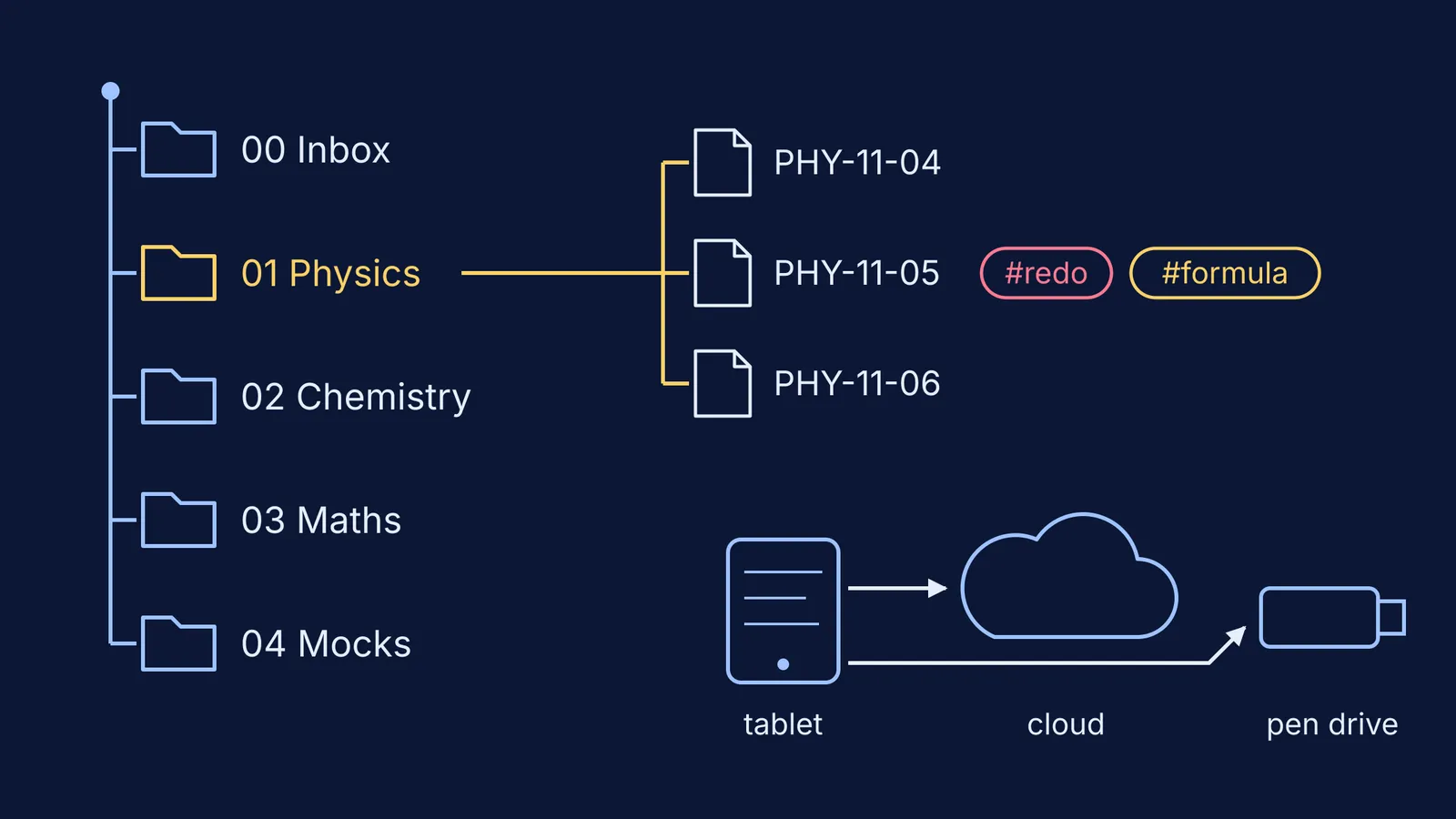
Keep it to two levels: subject, then chapter. Deeper trees cost taps every time, and soon you stop filing.
00 Inbox: everything new lands here first, such as board photos, coaching PDFs and scans.
01 Physics, 02 Chemistry, 03 Maths or Biology: one notebook per NCERT chapter, in syllabus order.
04 Mocks: one notebook per mock test, for your error analysis.
09 Archive: finished or abandoned material you are not ready to delete.
The numbers fix the order whatever your app sorts by. Still deciding what to base chapter notes on? Read our guide to making notes from NCERT or coaching modules first.
What is a good file-naming system for study notes?
A name should tell you the subject, class, chapter and type of note before you open it. Use one pattern everywhere: SUBJECT-CLASS-CHAPTER_Topic_type.
PHY-11-04_LawsOfMotion_notes
CHE-12-03_ChemicalKinetics_errors
MOCK_2026-11-08_FullTest-03
Write dates as year-month-day so files line up in time order. Give chapter numbers a leading zero (04, not 4) so chapter 10 does not sort before chapter 2. Never keep a note called Untitled 14: rename it in your weekly sweep or delete it.
How do tags help you revise faster?
Folders answer where a note lives. Tags answer what you need to do with it, across every subject at once. Four are enough:
#redo: a question you got wrong or guessed.
#doubt: something to ask a teacher.
#formula: a result you must know cold.
#pyq: a previous-year question.
Before a test, search for #redo and you have a revision list drawn from every chapter. No tags in your app? Type the tag at the top of the page and search will find it. If you also highlight, keep to a four-colour coding system so colour means the same thing on every page.
When a #doubt is really a concept gap, the Fermi Concept Library has a lesson for each concept in physics, chemistry, biology and mathematics. When a #redo came from the wrong method, the Fermi Problem Library has worked problems with a step-by-step solver that explains the reasoning rather than printing an answer.
How do you back up tablet notes so you never lose them?
Tablets get dropped, stolen and reset, and cloud sync on its own is not a backup. A US-CERT guide to data backup options sets out the 3-2-1 rule: keep 3 copies of any important file (1 primary and 2 backups), on 2 different media types, with 1 copy stored offsite. The same guide warns that rolling backups, which automatically update to match your latest files, can silently copy corruption from the primary files onto the backups. Cloud sync works in a similar way: delete a notebook by mistake and the synced copy can go too.
For a student, that looks like this:
Copy one: the notes on your tablet.
Copy two: your note app's cloud sync, which is your off-site copy.
Copy three: each month, export every subject as a PDF to a laptop or pen drive that stays at home and is not synced.
Name exports by month (2026-11_Physics.pdf), and check each month that the files on the pen drive open.
When is paper still better than a tablet?
The research on handwriting and typing is more mixed than its reputation. In Mueller and Oppenheimer's 2014 study, students who took notes on laptops did worse on conceptual questions, which the authors linked to copying lectures word for word. A 2021 direct replication led by Heather Urry found laptop and longhand note-takers did about equally well on quizzes. And writing with a stylus is handwriting anyway.
Closer to tablet notes, Umejima and colleagues (2021) had participants write down appointments in a paper notebook, on a tablet or on a phone. The paper group finished writing faster, was more accurate on the easier memory questions, and showed more activity in memory-related brain areas during the test. It was a lab task about schedules, not exam study, so treat it as a hint rather than a verdict.
Our rule is simple. If you need to recall it without looking, or you will be tested on paper, use paper. If you need to find it, reorganise it or carry it, use the tablet.
Paper: first attempts at derivations and reaction mechanisms, timed practice, blank-page self-tests and rough work.
Tablet: chapter notes, error logs, formula sheets and coaching PDFs you annotate.
Then scan the paper pages into 00 Inbox so they join the same system.
If you mostly study on a phone, our guide to preparing for JEE or NEET using only a phone covers what changes on a smaller screen.