On this page
Contributing to open source offers a clear transition from academic exercises to real-world software engineering. Working on established repositories exposes you to production-scale codebases, formal code reviews, and industry-standard tools.
Why should you contribute to open source?
An open source contribution serves as a public portfolio. According to the 2024 GitHub Octoverse report, India is one of the fastest-growing large developer communities, with over 17 million developers now on the platform. Standing out in a crowded market requires proof of skill, and a merged pull request is a timestamped record of a problem you solved in a real product.
It also teaches you how to collaborate. You will learn to read code written by others, follow strict style guides, and respond to constructive criticism from experienced engineers. This hands-on experience bridges the gap between writing isolated scripts for a university assignment and building software that many people rely on daily.
How do you find beginner-friendly projects?
Finding the right project is often the hardest part of the process. Do not start by looking at massive, complex codebases like the Linux kernel or Kubernetes. Instead, look for tools you already use, such as a JavaScript library, a Python package, or an educational tool.
Use GitHub's search features to find repositories tagged with `good first issue` or `first-timers-only`. These labels are explicitly set by maintainers for newcomers. Look for projects with a contributing guide (a `CONTRIBUTING.md` file) and recent activity. A repository that has not been updated in a long time is unlikely to review your pull request. It is also helpful to review merged pull requests from other contributors to see how the maintainers interact with the community. A welcoming community will offer constructive feedback rather than harsh criticism.
The Git workflow: how do you make a pull request?
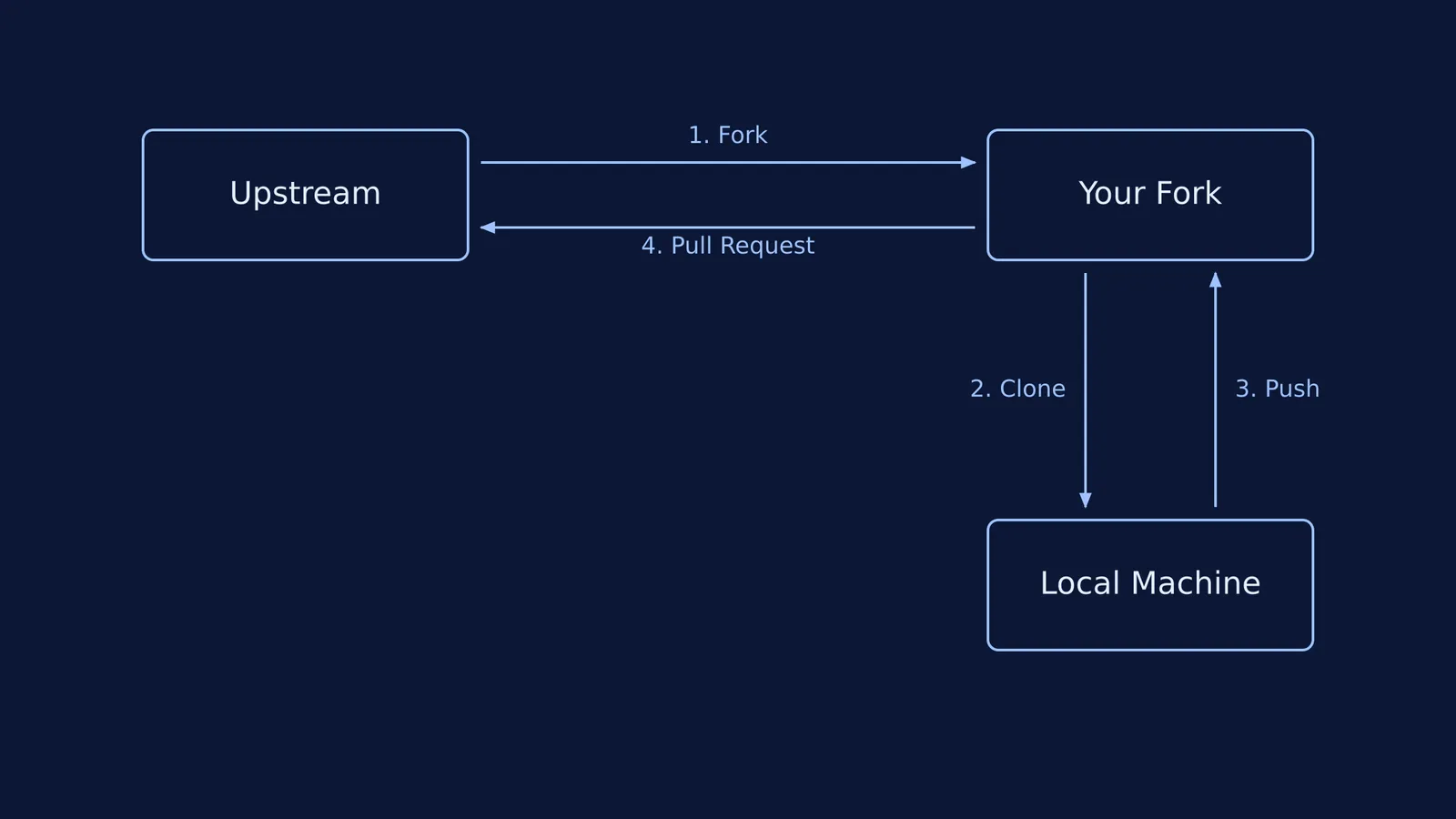
Understanding the standard open source workflow is critical before you write any code. Here is the path your code takes:
Fork the repository: Click the "Fork" button on GitHub to create a personal copy of the upstream project.
Clone it locally: Run `git clone` to download your fork to your computer.
Create a working branch: Never work directly on the `main` branch. Run `git checkout -b fix-login-bug` to isolate your changes.
Commit your work: Write clear, descriptive commit messages outlining what you changed and why.
Push to your fork: Upload your branch back to your GitHub account with `git push origin fix-login-bug`.
Submit a pull request: Open the original upstream repository and create a pull request (PR), asking the maintainers to merge your branch.
How should you communicate with maintainers?
Open source is fundamentally collaborative. When you find an issue you want to tackle, do not just start writing code in silence. Comment on the issue to ask if it is still available and state your intended approach. This prevents duplicate work and shows respect for the maintainers' time.
When your PR is reviewed, you will likely receive requests for changes. Do not take feedback personally. Maintainers are holding your code to the project's standard and ensuring it does not break existing functionality. Acknowledge their comments, make the updates on your local machine, and push the new commits to the same branch. The pull request will update automatically, showing the maintainers that you can iterate on feedback effectively.
What do you do when you get stuck?
Open source projects involve logic and concepts that extend well beyond a standard syllabus. You might encounter an unfamiliar design pattern, a complex algorithm similar to those found in Donald Knuth and the analysis of algorithms, or exponential models via dy/dt = ky inside a scientific tool you are trying to fix.
When you cannot follow the logic, Fermi's AI tutor can help. Rather than handing you the answer, Fermi works out what you already know and builds a plan for the session. If an issue requires you to understand a new logic block, the tutor holds a line of reasoning across a whole session, notices where you are stuck, and decides whether to explain, ask, or show. This teaches you the underlying principles so you can write the code yourself.