On this page
When you write code as a student, you quickly run into a filing problem. Your project folder fills up with names like `physics_project_v1.py`, `physics_project_final.py`, and `physics_project_really_final.py`. If you accidentally break the code and need to go back, finding the right version becomes a headache.
Linus Torvalds created Git in 2005 to manage the Linux kernel after the community lost access to their previous version control system. Today, it is the standard way to track changes in code files. In the Stack Overflow Developer Survey 2022, 93.87% of all developers reported using Git.
What are the benefits of version control for students?
Version control acts like a time machine for your text and code files. Every time you save a significant change, Git takes a complete snapshot of your project.
If an experiment breaks your code, you do not have to rely on the undo button or try to remember what you typed. You can simply roll the project back to a previous snapshot that worked. This makes it completely safe to try new ideas, which is one of the best ways to learn (see Seymour Papert and Logo: why building things helps you learn). You can also share your project history when applying for internships, showing that you know how to manage a professional codebase instead of just writing single files.
When you start building projects, you will inevitably hit bugs you cannot trace. Fermi's AI tutor can help you debug; it holds a line of reasoning across a session, notices where you are stuck, and decides whether to explain, ask or show you the fix, rather than just printing the corrected code.
Repositories, commits and branches: what do they mean?
Git relies on a few core ideas to manage your project timeline:
Repository: Often called a "repo", this is simply your main project folder. It contains all your files, plus a hidden `.git` folder where the system stores the entire history of your changes.
Commit: A commit is a saved snapshot of your code at a specific point in time. Each commit comes with a short message describing exactly what you changed and why.
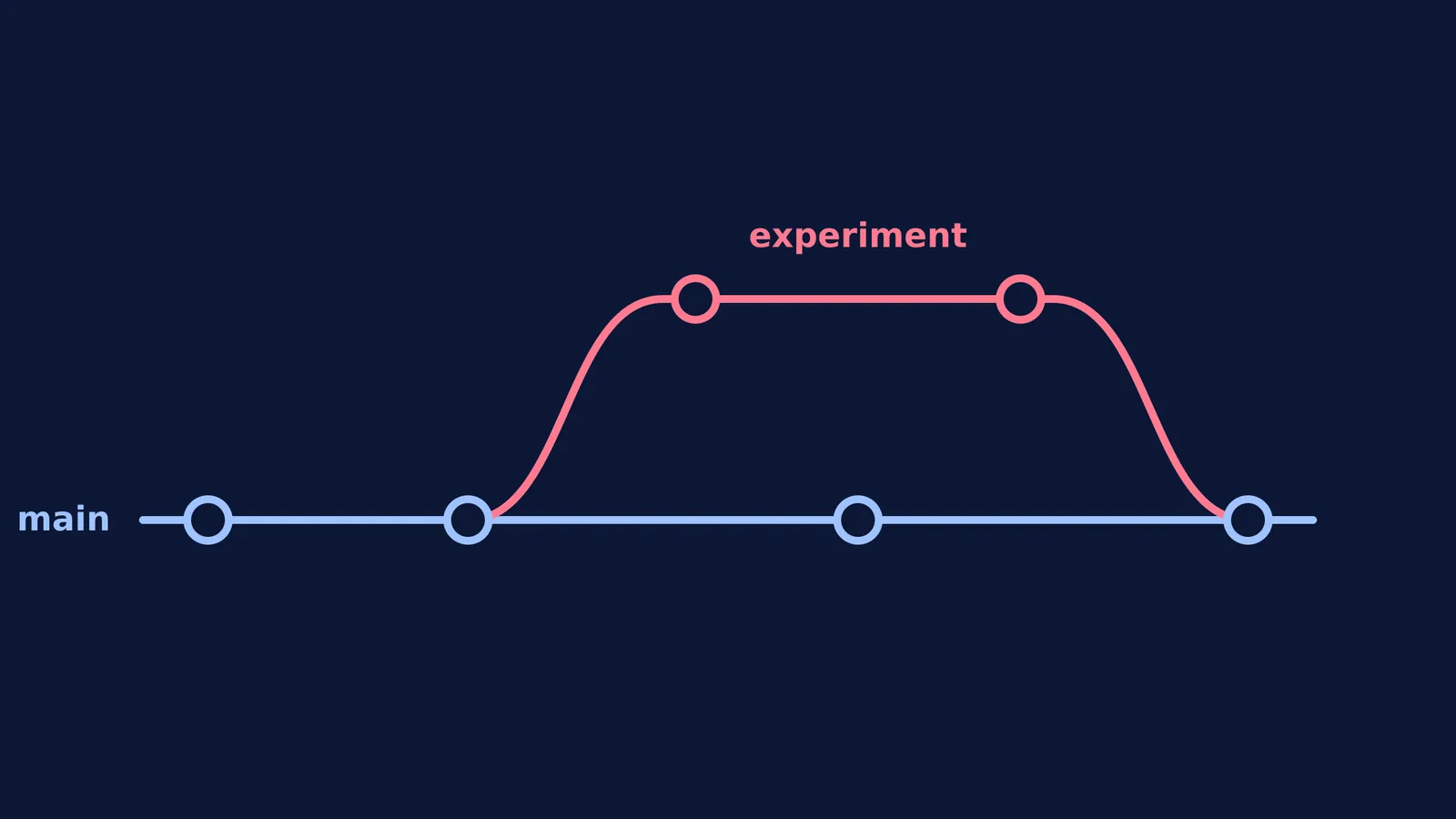
Branch: A branch is a parallel version of your project. You can create a new branch to add a new feature without touching the main code. Once the new feature works perfectly, you merge the branch back into the main timeline.
Working with branches encourages you to make small, deliberate changes rather than rewriting everything at once. This structured approach naturally leads to fewer errors, much like the steps described in Neat working: how layout and units cut errors in maths and physics.
How to learn Git as a student beginner?
The best way to understand Git is to use it on a small, personal project. You do not need to memorise every command right away. Start by installing Git on your computer, opening your terminal, and following these four steps.
Start the repository
Create a new folder on your computer for a simple practice project. Open your terminal, navigate to that folder, and type: `git init` This command tells Git to start tracking the folder and sets up your hidden repository files.
Save a snapshot
Create a plain text file named `notes.txt` and write a single sentence in it. To tell Git to prepare this file for a snapshot, use the add command: `git add notes.txt` Then, save the snapshot with a descriptive commit message: `git commit -m "Add first study note"`
Try a new branch
Suppose you want to add a risky idea to your notes without altering the original file. Create and switch to a new branch called "experiment": `git checkout -b experiment` Add a new line to your text file. Run `git add notes.txt` and `git commit -m "Test a new idea"` to save this snapshot exclusively to the new branch.
Merge it back
To see the time machine in action, switch back to your main timeline: `git checkout main` Notice that the new line has vanished from your file—it is safely stored in the other branch. Bring the changes into your main branch by typing: `git merge experiment`
If you make a mistake while practising, do not worry. As discussed in Why making mistakes helps you learn, and how to use them, errors are often the clearest path to understanding a new system. By the time you start your first real programming project, using version control will be a reflex.