

On this page
Seeing a document rejection notice on the Joint Seat Allocation Authority (JoSAA) portal can be terrifying, but it is a standard part of the verification process. The verifying officers check many uploads, and minor errors—like a blurry scan or an outdated date—trigger a "query" rather than an immediate cancellation. Here is exactly what to do when your documents are flagged.
Why are JoSAA documents rejected?
During counseling, verifying officers scrutinise every upload against the official guidelines. Rejections usually happen for administrative reasons rather than eligibility failures. The verification process is exhaustive because securing a seat at premier institutions like the IITs, NITs, and IIITs, which require clearing exams like JEE Main and JEE Advanced, demands strict compliance with government reservation and eligibility rules. The most common reasons include:
Incorrect issue date for category certificates: According to the JoSAA Business Rules, OBC-NCL and EWS certificates for the 2024 cycle must be issued on or after April 1, 2024. Older certificates are automatically rejected. This strict cut-off ensures that the financial status of the candidate's family is current for the academic year.
Wrong certificate format: Documents must follow the central government format provided in the JoSAA Annexures, not the state-level format. Many candidates mistakenly upload caste certificates issued by their state authorities, which may have different criteria for reservation than the central lists.
Medical certificate errors: The medical certificate must be signed by a registered medical practitioner and must match the exact layout of the JoSAA Annexure. Omissions of the doctor's registration number or an incomplete evaluation are common pitfalls.
Illegible scans: Blurry, cut-off, or poorly lit photographs of your Class 12 marksheet or category certificate will not be accepted. The verifying officer must be able to read every stamp, signature, and date clearly.
What happens if my JoSAA documents are rejected?
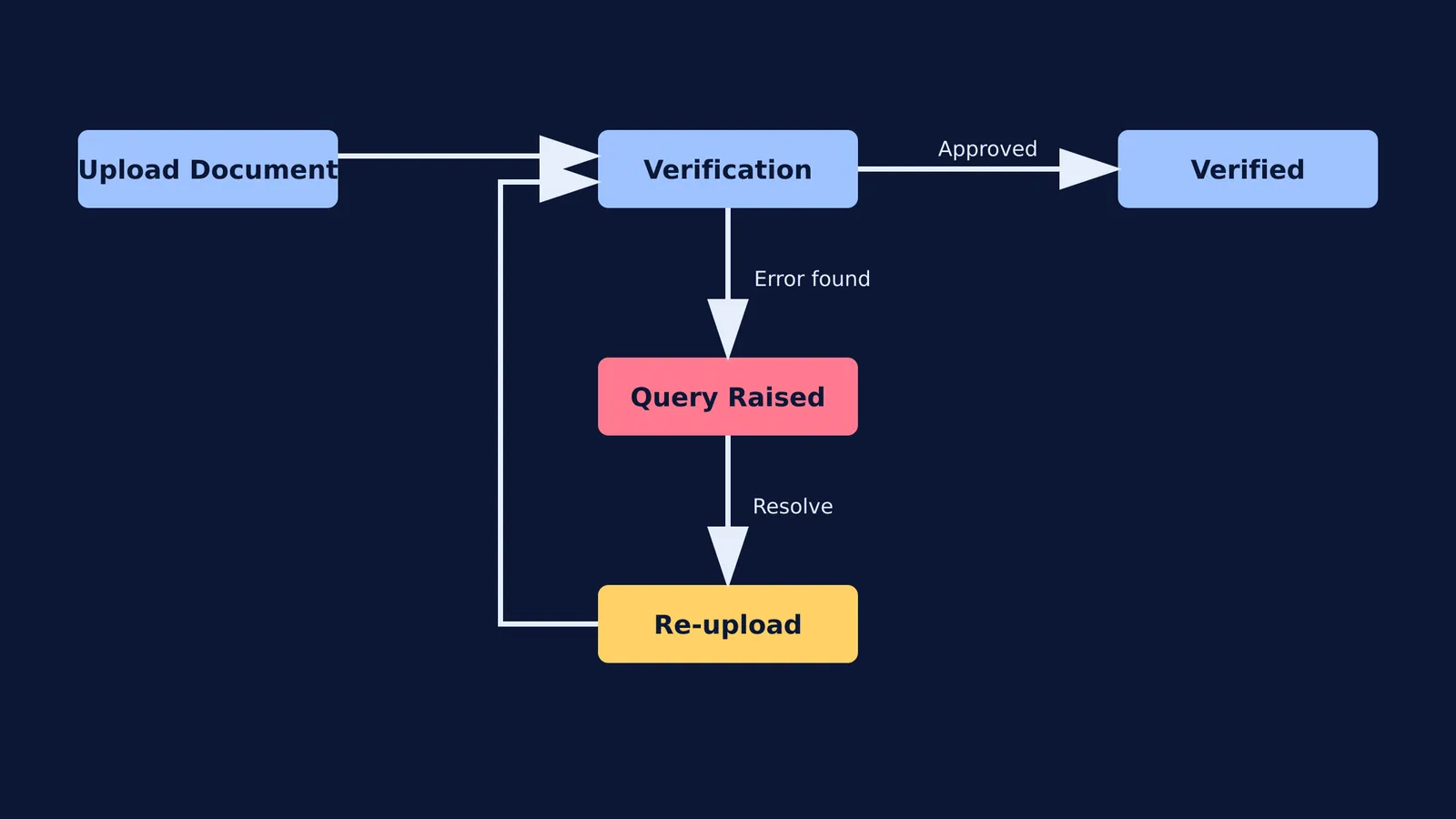
When an officer spots an issue, they will raise a query on the JoSAA portal. This acts as a pause on your verification, not an immediate rejection of your seat. You will usually receive an SMS and an email alerting you to the issue, but you should not rely on notifications alone as network delays frequently occur.
According to the JoSAA portal guidelines, candidates have a strict window to respond to a document query. If you do not resolve the query by the deadline for that specific counseling round, your allocated seat will be cancelled. The pressure during this phase can be overwhelming, so staying proactive is essential.
Step-by-step: How to resolve a JoSAA document query?
If you see a query raised against your application, follow these steps to secure your seat:
Log in to the candidate portal: Go to the "Document Verification" tab to read the exact comment left by the verifying officer. The comment will specify exactly what is wrong, such as an invalid date or a missing seal.
Prepare the correct document: If the scan was blurry, scan the original again in a well-lit area, ensuring all edges are visible. If the format was wrong, you will need to rapidly source the correct document by visiting your local district magistrate or tehsildar office.
Upload and submit: Upload the rectified document in the exact format and size specified by the portal. Crucially, ensure you click the final "Submit" button to send the response back to the officer. Merely uploading the file without submitting will not register your response.
Monitor the status: Check back a few hours later. The status should change from "Query Raised" to "Verified" once the officer approves the new document. The officer might leave another comment if the new upload is still inadequate, so continued monitoring is vital.
If you encounter persistent technical issues or the officer raises the same query again despite a correct upload, you may need to reach out directly. Use the admission helpline and grievance contacts provided on the JoSAA website to seek clarification.
What if I miss the JoSAA document re-upload deadline?
If your OBC-NCL, EWS, SC, or ST certificate is rejected because it is in the wrong format or out of date, and you cannot get a new one before the deadline, you do not automatically lose your chance at a college seat. The authorities provide a fallback option.
You can upload a "Declaration/Undertaking for Category Change", which is available on the JoSAA site. This declaration officially moves your application from your reserved category to the General (Open) category. If your JEE rank meets the Open category cut-off for the seat you were allocated, you will keep the seat without needing the category certificate. If your rank is too low for the Open cut-off, your current seat will be cancelled, but you will still be allowed to participate in subsequent rounds as a General candidate. This ensures that a bureaucratic delay does not end your engineering dreams. If you are also applying to state colleges as a backup, ensure you check their specific rules, such as those for ACPC Gujarat counselling, which may accept state-format certificates and offer a safety net.
Managing document requirements while balancing Class 12 board exams with JEE preparation is incredibly stressful for students and parents alike. While you navigate the administrative side of admissions, Fermi's AI tutor can help you build a solid study plan. By working out what you already know and teaching you through the gaps step-by-step, Fermi ensures you sit down to a clear next step every time you open your books.


