On this page
Learning to build a website gives you a place on the internet that you actually own. It teaches you how the tools you use every day are made, and it is a great way to showcase your school projects or hobbies.
Why start with HTML and CSS?
HTML (HyperText Markup Language) provides the structure of a webpage, while CSS (Cascading Style Sheets) controls how it looks. They are the two foundational languages that every single web browser understands. According to the 2024 Stack Overflow Developer Survey, 60.4% of people learning to code use HTML and CSS (Stack Overflow, 2024).
If you are using Fermi's AI tutor to learn computing concepts, you can ask it to explain how structure and styling fit together before you start typing. Building a foundation in these languages sets you up for everything else in web development. Unlike a theoretical maths problem, building a site gives you instant visual feedback, proving that making mistakes helps you learn because you can immediately see what went wrong on the screen and fix the code.
What do you need to build your first website?
You do not need an expensive computer or paid software. Everything you need is likely already installed.
A text editor: This is where you write your code. Do not use a word processor like Microsoft Word, as it adds hidden formatting that breaks code. Instead, download a free code editor like Visual Studio Code, or simply use the built-in Notepad (on Windows) or TextEdit (on Mac).
A web browser: You already have one. Chrome, Firefox, Edge or Safari will read your code and display the final result locally.
A project folder: Create a new folder on your desktop called your website's name. Keep all your project files, including any pictures you want to use, in this one place so the browser can find them easily.
How to write your first lines of code?
Open your text editor and create a new file. Save it in your project folder as an index file with the hypertext file extension. The extension tells the computer that this is a web page rather than a plain text note.
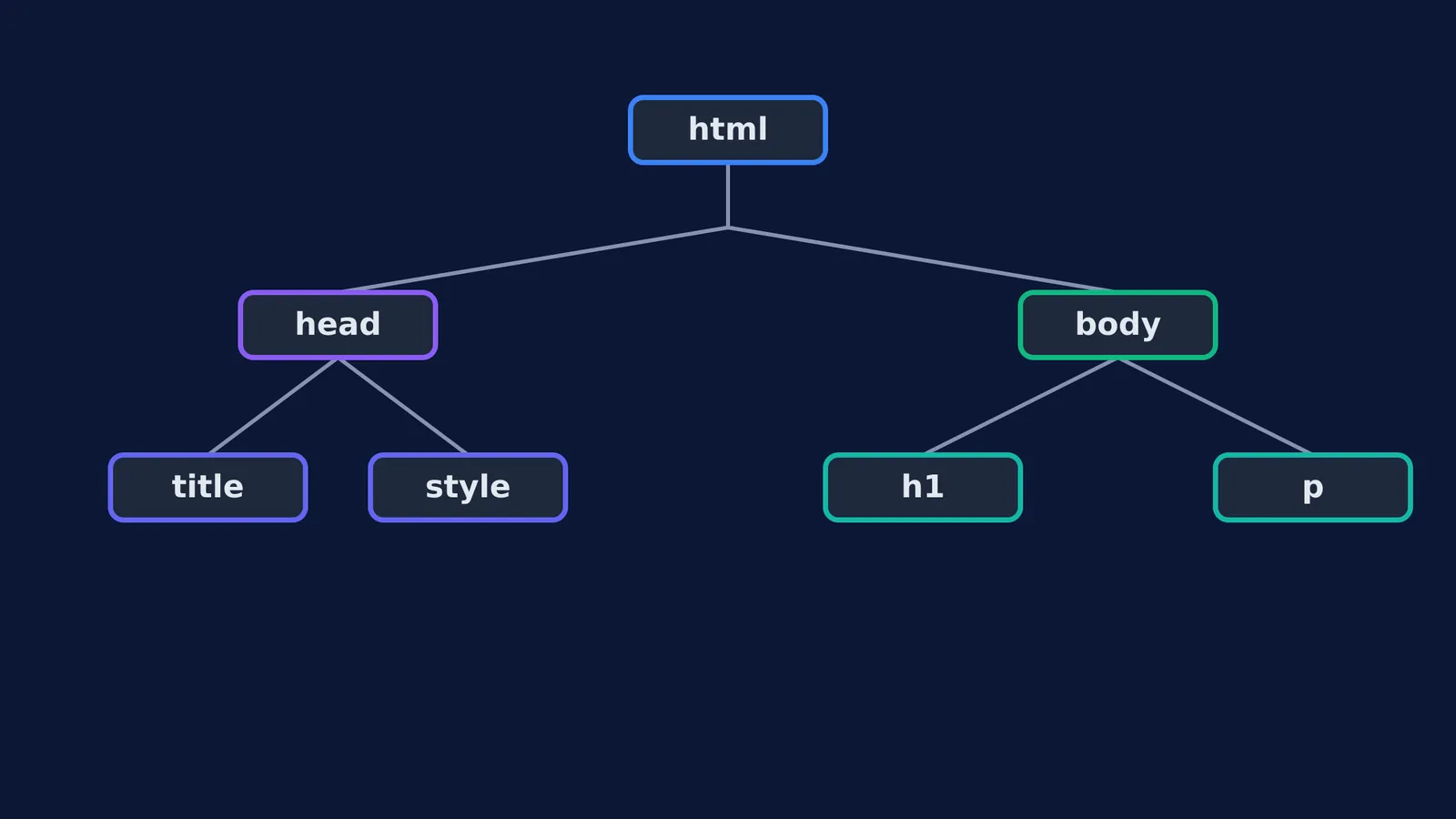
A standard webpage starts by declaring the document type, followed by the main document block. Inside this main block, you create two distinct sections: a head and a body.
The head section contains background information that the browser needs but the visitor does not see. This includes your page title and any style rules, such as setting the background colour to a light grey or choosing a clean font.
The body section contains what visitors actually see. You can add a main heading to welcome visitors and a paragraph block for a short introduction. Now, open that index file in your web browser. You should see your page come to life with the colours and text you chose.
You have just used structure blocks to create the heading and paragraph, and style rules to change the colours and fonts. If you get stuck on a specific piece of formatting, the Fermi Concept Library can help you review computing fundamentals so you understand exactly what the syntax is doing. Understanding this basic logic is just as valuable as understanding how large language models work.
What should you add next?
Once you have your basic page working, it is time to make it your own. You can add more structural elements to organise your content differently.
Links: Use an anchor element to link to other websites or other pages you create. This is what connects the entire web together.
Images: Add a photo to your folder and use an image element to show it on your page. Make sure you include the alternative text attribute to describe the image.
Lists: Use unordered or ordered list elements along with list items to create bulleted or numbered lists of your interests or projects.
Take time experimenting with colours and fonts by searching for colour codes online.
How to publish your website for free?
Your website currently lives only on your computer, meaning nobody else can see it. To share it with the world, you need to put it on a public server. This process is called web hosting.
The easiest way to do this for free as a student is using a service like GitHub Pages.
Create a free account on GitHub.
Create a new repository and name it with your username followed by the hosting domain name.
Upload your index file and any images into this new repository.
After a few minutes, you can type that web address into any browser on any phone or computer, and your website will appear.
This small personal project is proof that you can create things, not just consume them. It is a working piece of software that you built from scratch, and it is just as impressive as doing a science project that you can share with your friends, family and teachers.