

On this page
When taking a smartphone photo through a microscope eyepiece or snapping an experimental setup for a science project, it is tempting to edit it like a social media post. You might want to bump up the contrast, crop out a messy bench, or wipe away an awkward background smudge. But in scientific reporting, an image is not an illustration. It is empirical data.
The moment you edit an image for a school practical record or science fair report, you become responsible for its scientific honesty. In their landmark 2004 paper in The Journal of Cell Biology, Mike Rossner and Kenneth M. Yamada established the foundational rule for scientific images: no specific feature within an image may be enhanced, obscured, moved, removed, or introduced. Digital adjustments should clarify what your instrument recorded, never fabricate what you wish you had seen.
Why is image editing in science reports different from normal photography?
Everyday photo editing prioritizes aesthetics. In experimental science, altering an image can inadvertently falsify evidence. In a landmark study in mBio, microbiologist Elisabeth Bik and her colleagues screened 20,621 biomedical research papers across 40 scientific journals. They found that 3.8% of published papers contained problematic image modifications, with approximately half showing characteristics suggestive of deliberate manipulation.
Image issues are not confined to professional researchers. The U.S. Office of Research Integrity found that 67% of research misconduct cases closed across a five-year review involved manipulated digital images. Whether you are submitting a CBSE practical record or entering research in the IRIS National Science Fair, teachers and evaluators look for authenticity. An authentic, slightly noisy photo of an actual trial is far more credible than a retouched graphic that conceals experimental realities.
How should you crop and adjust contrast without distorting data?
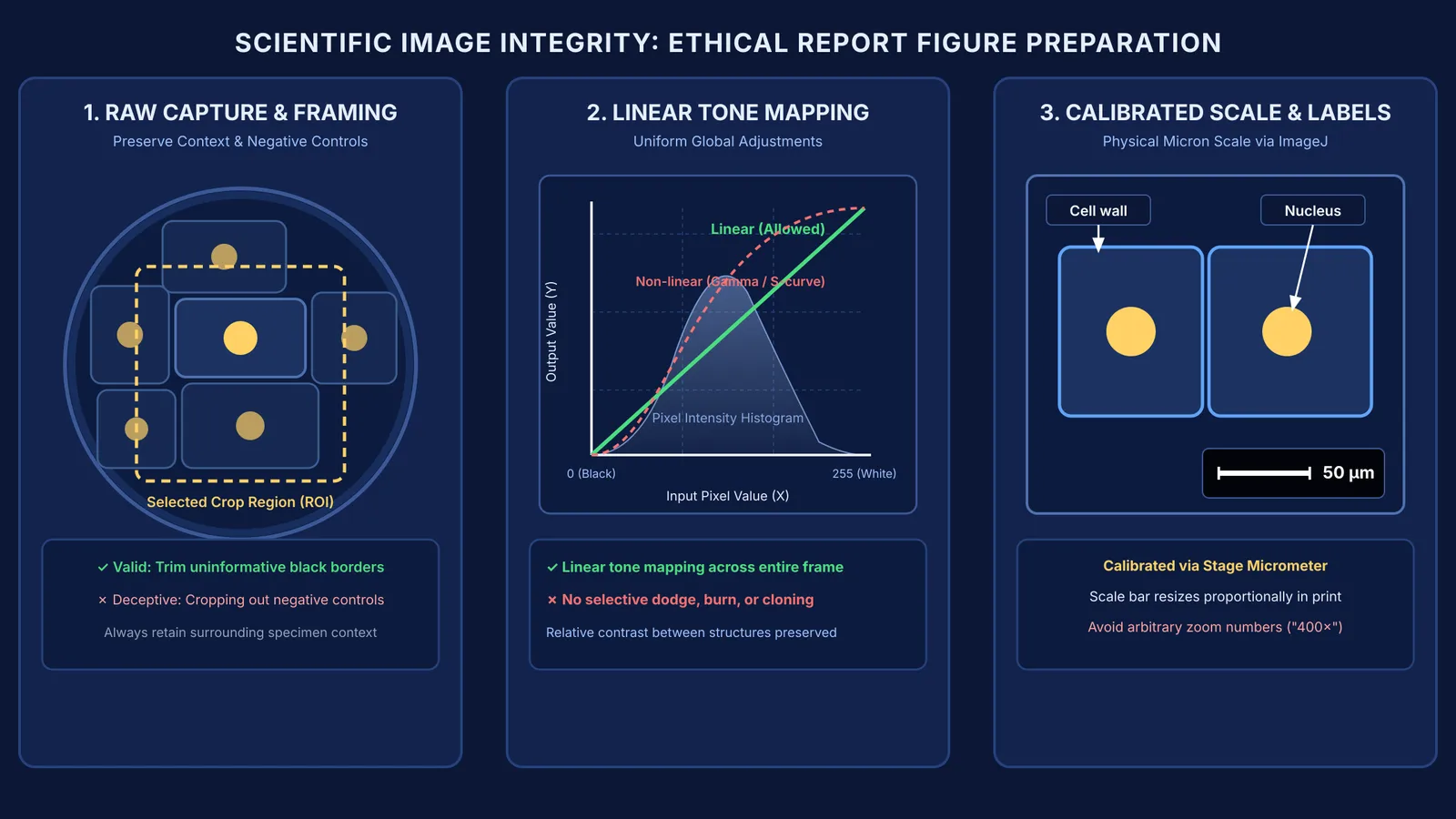
Cropping is acceptable when removing dead borders, such as the black rim of a microscope tube. However, cropping becomes deceptive if it trims away contradictory results, secondary bands on a gel, or signs of contamination. When planning a science project from a clear question, showing negative controls and full context is essential for credibility.
When adjusting exposure, stick strictly to linear adjustments across the entire frame. As noted in the Nature Portfolio editorial policy, brightness and contrast modifications must be applied uniformly to every pixel. Linear adjustments preserve the true ratios between light and dark regions. Non-linear adjustments—such as twisting gamma curves or selectively boosting shadows—distort pixel values, making faint artifacts vanish or inflating weak signals.
Never use healing brushes or clone stamps to erase dust spots or air bubbles. What looks like a blemish might be a key clue about sample preparation. If you want to explore how light refracts through lenses and how optical instruments form images, the Fermi Simulation Lab provides interactive simulations for ideas that are easier to see than to read.
How do you add accurate scale bars and labels?
Writing "magnified 400×" beneath a microscope photograph is a common mistake. While the objective and eyepiece might have produced 400× magnification, that figure becomes meaningless once the image is resized in a document or viewed across different screens.
A calibrated scale bar solves this permanently. A scale bar is a line of known physical length—such as 50 µm or 1 mm—placed directly on the image. It scales proportionally whenever the figure is resized, preserving the true physical dimensions.
To add a scale bar when photographing onion root tip mitosis slides, use NIH ImageJ following the ImageJ spatial calibration guide:
Capture a calibration shot: Photograph a stage micrometer or metric ruler under the identical magnification.
Calibrate pixel distance: Open the calibration photo in ImageJ, use the Straight Line tool to trace a known distance (such as 1 mm measuring 800 pixels), and select Analyze > Set Scale.
Apply the scale bar: Open your specimen image, select Analyze > Tools > Scale Bar, and insert a calibrated bar in a high-contrast corner.
Add clear labels: Use sans-serif text and straight arrows on a separate layer so original pixels remain untouched.
What is the step-by-step checklist before printing your report?
Before binding your report, verify your figures against this five-point audit:
Keep untouched raw files: Store original camera files named with the date and trial number.
Check resolution: Ensure figures meet the standard minimum of at least 300 dots per inch (DPI), as outlined in the Nature Portfolio editorial guidelines, so cell walls and meniscus levels print cleanly without pixelation.
Disclose adjustments in captions: State edits openly (for example, "Field cropped to central specimen; global brightness adjusted linearly across the entire frame").
Export as lossless PNG or TIFF: Avoid repeatedly re-saving lossy JPEGs, which create compression artifacts around fine boundaries.
Ensure accessible contrast: Make sure labels and scale bars contrast sharply against the specimen.
When organizing lab observations or drafting your project discussion, Fermi's AI tutor works out what you already know, notices where you are stuck, and decides whether to explain, ask, or show, building a clear session plan from your notes and lab measurements.


