On this page
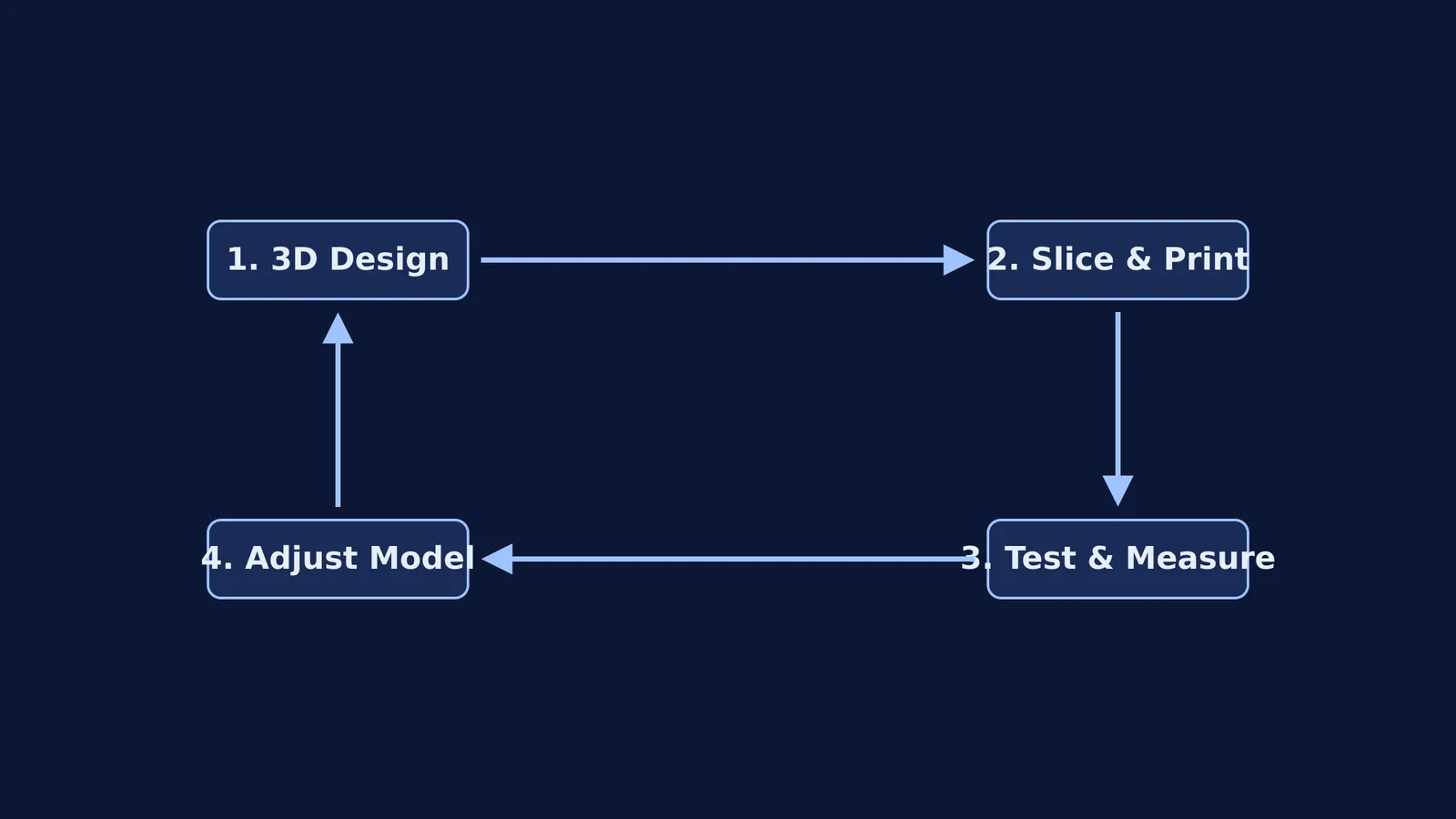
The ability to turn a digital idea into a physical object changes how you think about problems. A 2022 meta-analysis in *Medical Science Educator* (doi.org/10.1007/s40670-022-01595-w) found that studying with 3D-printed models significantly improves student knowledge acquisition compared to traditional 2D materials (SMD = 0.82). School students can learn 3D printing by starting with free browser-based design software and finding a local makerspace to print their models.
Beyond biology and medicine, 3D printing forces you to think in three dimensions and understand physical constraints. You do not need to buy an expensive machine to get started.
Which 3D design software is best for beginners?
Before you can print anything, you need a 3D model. The easiest place to start is Tinkercad, a free, browser-based computer-aided design (CAD) tool. It has become the global standard for schools; Autodesk recently announced that Tinkercad surpassed 100 million users worldwide by late 2024 (autodesk.com).
Instead of writing code or drawing complex 2D sketches, you build models in Tinkercad by dragging and dropping primitive solid shapes. You can group a solid cylinder with a "hole" cylinder to create a tube, or stack boxes to build a chassis.
Once you outgrow Tinkercad and need to design parts with exact dimensions, constraints, and moving joints, you can step up to professional software such as Fusion 360 or Onshape. These programs use parametric modelling, meaning you define the exact lengths and angles of your sketches before extruding them into 3D shapes. If you are calculating precise coordinates for your models, you might find yourself using the section formula in 3D to place holes and joints accurately.
Where can you find a 3D printer?
You do not need to own a 3D printer to use one. Schools, libraries and community centres are increasingly investing in fused deposition modelling (FDM) printers, which build objects layer by layer using melted plastic filament.
In India, the government's Atal Innovation Mission has established 10,000 Atal Tinkering Labs (aim.gov.in) in schools across the country. These workspaces give over 1.1 crore students access to 3D printers, microcontrollers and sensors. If your school has an ATL, speak to the teacher in charge about joining an introductory workshop.
If your school does not have a printer, look for a local makerspace or a fab lab at a nearby university. These community workshops often let students book time on their machines, charging only a small fee for the plastic filament used.
What are some small 3D printing project ideas?
The best way to learn the software and the hardware is to solve a real, small-scale problem. Start with these projects:
A custom keychain: This is the classic first print. It teaches you how to create a flat base, add text, and design a loop that is strong enough not to snap on your keys.
A phone stand: This project requires you to measure your phone's thickness, perhaps converting a quantity between unit systems using dimensions, and calculate a stable angle for the screen.
Replacement parts: Find something broken in your house—a battery cover for a remote control, or a bracket for a shelf. Recreating a real-world object forces you to measure accurately with calipers and account for the printer's tolerances.
If your design involves challenging mathematics and you are not sure how to calculate the dimensions, Fermi's AI tutor can work out what you already know and build a plan for the session, drawing the figure and checking your understanding as it goes. For ideas that are easier to see than to read, such as how forces will act on your printed bracket, the Fermi Simulation Lab offers interactive simulations to test the physics before you print.
How does the physics of a successful print work?
A 3D printer is a physics experiment in real time. The machine feeds solid plastic filament into a hot end, heating it until it melts. It then extrudes this plastic onto a print bed, tracing the shape of your object layer by layer.
To succeed, you must understand a few basic principles:
Bed adhesion: The first layer must stick firmly to the print bed. If the bed is too cold or the nozzle is too far away, the plastic will peel off, ruining the print.
Overhangs and supports: A printer cannot lay plastic in mid-air. If your design has an overhang that is too steep, you must generate break-away support structures underneath it.
Infill: Most 3D printed parts are not completely solid. Slicing software—the program that translates your 3D model into instructions for the printer—fills the inside with a geometric pattern, such as a honeycomb or a grid. This saves time and material while maintaining structural strength.
As you spend more time around 3D printers, you will learn to adjust temperatures, cooling fan speeds, and layer heights to get the best result. It is a practical application of thermodynamics and material science.