On this page
School apps were designed to make life easier, bringing every school notice directly to your smartphone. Yet, for many families, the constant stream of notifications has the opposite effect, creating a feeling of information overload and academic pressure.
Why do schools use multiple apps?
Many parents feel overwhelmed by the sheer number of digital tools used by schools. While one app might handle official circulars and fee receipts, teachers might use separate platforms for submitting homework or sending class updates. This fragmentation is precisely why a 2023 survey by the National School Public Relations Association (NSPRA) found that 62% of parents feel frustrated by a lack of timely information.
A true school ERP (Enterprise Resource Planning) app solves this by gathering attendance, administrative notices and grades into one dashboard. However, having all this data in your pocket requires a deliberate approach. Without boundaries, a tool meant to simplify communication can easily become a source of daily anxiety.
How frequently should parents check grades?
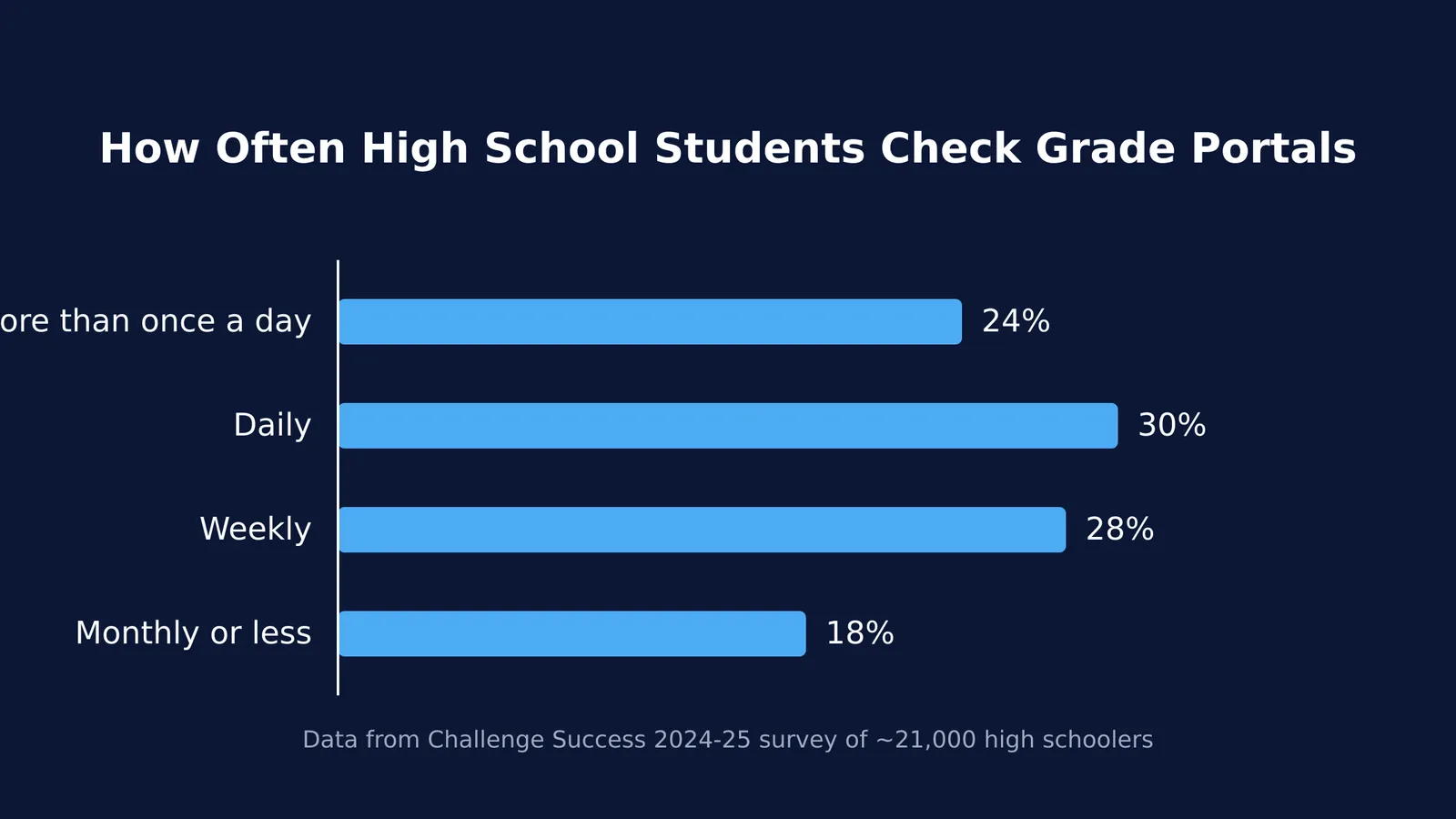
Real-time grade updates can create friction at home. According to a 2024–25 survey of nearly 21,000 high schoolers by Challenge Success, 24% of students check their online grade portals more than once a day. The same survey showed that 68% of high school students reported stressing about grades and assessments more than other common stressors.
When parents also monitor the portal daily, it can shift the ownership of learning away from the teenager. A sudden notification about a low test score on a Friday evening can spark an argument before the student even has a chance to understand where they went wrong. This constant monitoring is sometimes called "academic surveillance," and it trains students to focus purely on the points they earn rather than the material they are supposed to be mastering.
For most families, checking grades once a week is enough. It keeps you informed without creating an atmosphere of constant scrutiny. Staying involved in high school without hovering means stepping back enough to let your child manage their own deadlines and learn how to recover from a poor performance independently.
How to use school erp app as parent?
To get the most out of the app without over-checking, build a predictable weekly routine. The "Sunday App Review" is a practical framework that keeps you in the loop while protecting your family's peace of mind. By scheduling a specific time to look at the portal, you eliminate the urge to check it during the workday.
Turn off push notifications: The most immediate fix for grade panic is to disable real-time alerts on your phone. You do not need to know the exact minute a maths assignment is graded or a minor quiz is recorded.
Check the administrative tabs: Use your weekly login to review attendance records, download fee receipts and read official circulars. These are the practical tasks the app handles best, and they ensure you never miss a deadline for a field trip or an exam registration.
Let your child drive the review: Instead of reading the gradebook alone on your device, ask your teenager to log in and walk you through their portal. Have them explain what went well that week and what they need to focus on next. This keeps them in the driver's seat of their own education.
Prepare for school meetings: Use the portal's data to spot broad trends over the term rather than focusing on a single day's work. If you notice a consistent pattern of missed assignments in a specific subject, this makes it easier to ask specific parent-teacher meeting questions that lead to real follow-up.
Setting clear boundaries around the portal works best when it is part of your broader phones and homework rules.
Moving from surveillance to support
When you do review the app and notice a drop in performance, focus on the process rather than the number. The goal of the school portal is to highlight areas where a student might need more help, not to serve as a constant report card.
If your child finds a particular subject challenging, they need a strategy to fix the gap, not just a reminder that the grade is low. If they do not know where to begin, they can use Fermi's AI tutor. It can work out what they already know and build a plan for the session, giving them a clear next step instead of a blank page.
By treating the school app as a weekly administrative tool rather than a daily tracker, you leave room for your child to take responsibility for their own learning, making the technology work for your family rather than against it.