On this page
Why does my child open YouTube during online classes?
When a student is sitting at a laptop in their bedroom, they are only one click away from an infinite feed of entertainment. In a physical classroom, a teacher can see their screen and their peers are working around them. That natural social pressure acts as a guardrail, keeping them on track even when a lecture becomes challenging or dry.
When that physical space is replaced by a digital one, the guardrails disappear. A 2019 study published in *SAGE Open* by researchers at Kent State University found that students multitask significantly more during online classes than they do face-to-face. The researchers noted that without the physical presence of an instructor to set the behavioral norm, the temptation to switch to another tab is often too strong. (For a broader look at this habit, read our guide on multitasking while studying.)
Crucially, the study showed that even students who possess high self-efficacy—meaning they naturally self-regulate well in physical classrooms—struggled to maintain focus when learning online. The environment itself invites distraction, making it incredibly difficult for a young brain to choose a difficult task over an easy, rewarding one.
The 40% cost of task switching
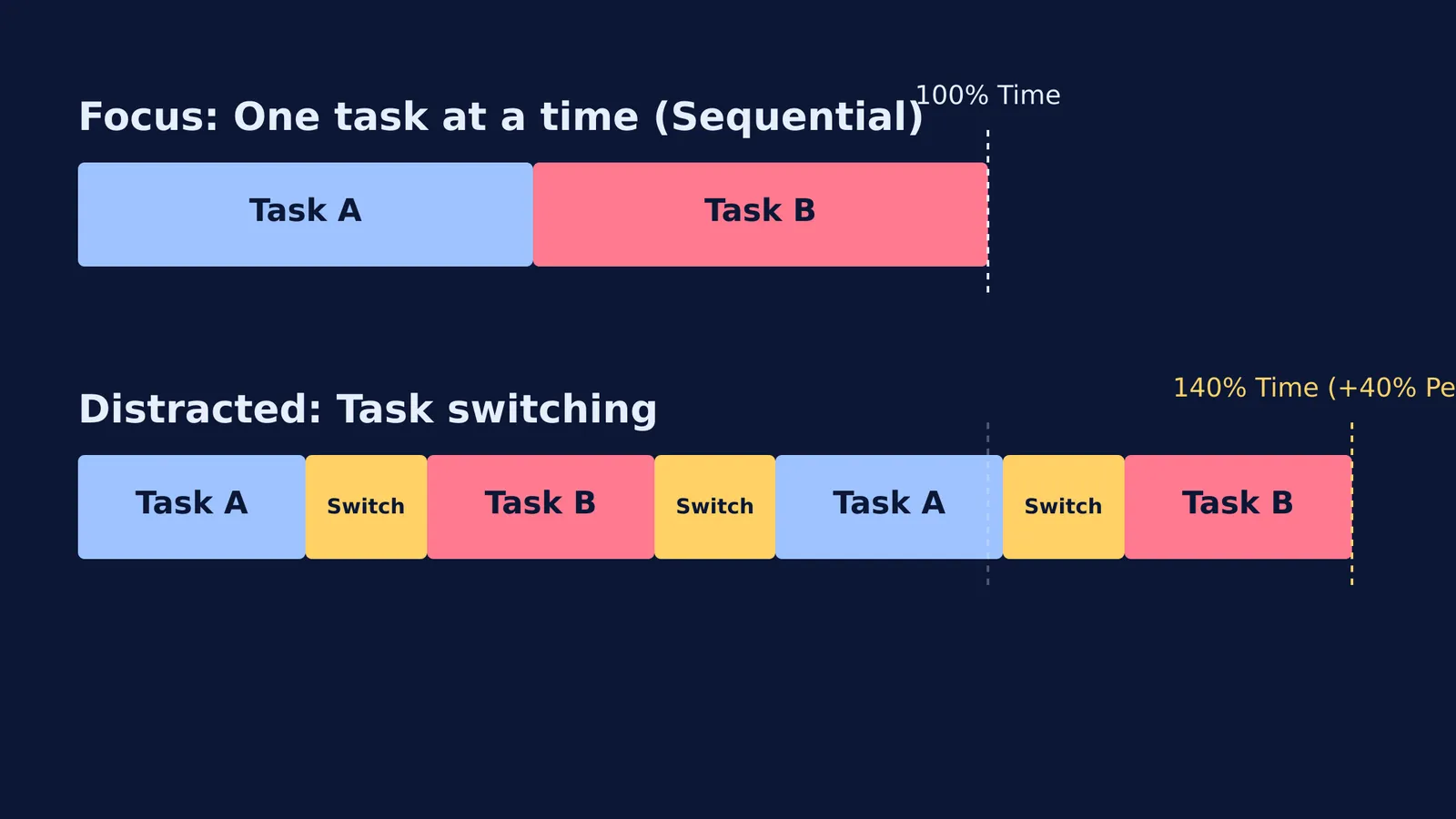
We often refer to this behaviour as multitasking, but cognitive science paints a different picture. The human brain cannot actively process a complex biology lecture and an engaging gaming video at the exact same time. Instead, it engages in what researchers call rapid task-switching, toggling its attention back and forth between the two sources.
This toggling is not free. Every time a student switches from an educational tab to YouTube, their brain has to completely shut down the cognitive rules for the first task and load the rules for the second. A 2001 study published by the American Psychological Association found that this rapid task-switching can consume up to 40% of a person's productive time. Furthermore, the researchers established that the time penalty increases significantly as the tasks become more complex or unfamiliar.
The consequences extend beyond wasted time; the distraction actively degrades what the student remembers. In 2018, a Rutgers University study found that when students used devices for non-academic reasons during class, they scored 5% lower—a drop equivalent to half a letter grade—on their end-of-term exams. Interestingly, the researchers found that these distracted students could follow the lecture well enough to answer immediate, on-the-spot questions. However, the constant disruption of their attention stopped the new information from being consolidated into long-term memories.
How can I stop the tabs from competing?
You can remove the friction by making the device and the physical environment work for the student, rather than against them.
Use single-app mode: The simplest way to stop a student from opening new tabs is to make it impossible. If they are learning on a tablet or a smartphone, turn on Guided Access (iOS) or App Pinning (Android). This built-in feature locks the device to the educational app until a parent enters a passcode. On a laptop, create a separate user account specifically for schoolwork, and use the browser's parental controls to block distracting websites during class hours.
Learn in a shared room: Move their study setup out of the bedroom and into a shared space, such as the living room or kitchen table. Position the screen so it faces outward into the room, rather than facing a wall. The passive social pressure of someone else being nearby mimics the classroom environment and makes it much easier for them to stay on the right tab. If they are older, configuring this space is a good opportunity for teaching your child to plan their time.
Check the notes after the session: Make a habit of asking to see their notebook as soon as the class ends. Knowing that they will need to present their written notes to you is a powerful incentive to listen actively and process the material, rather than just passively watching the screen.
Is there a way to make screen time active?
If a student is frequently drifting away from an online class, it is often because the format of the lesson is simply too passive. They are being asked to sit and watch a screen for an hour, without interacting with the material in any meaningful way.
When they reach a topic that requires deep focus, they might need an educational tool that actually demands their active participation. Fermi's AI tutor teaches rather than answers: it holds a line of reasoning across a whole session, notices where a student is stuck, and decides whether to explain, ask, or show. It builds a plan for the session and teaches through it—writing on a board, drawing the figure, and checking understanding as it goes. Because the platform expects a response and guides the student step by step, they have a clear next action to take instead of a passive video to zone out to.
By setting up a focused physical environment and shifting toward tools that require active learning, you can help them close the extra tabs and finally get the most out of the time they spend studying online.