On this page
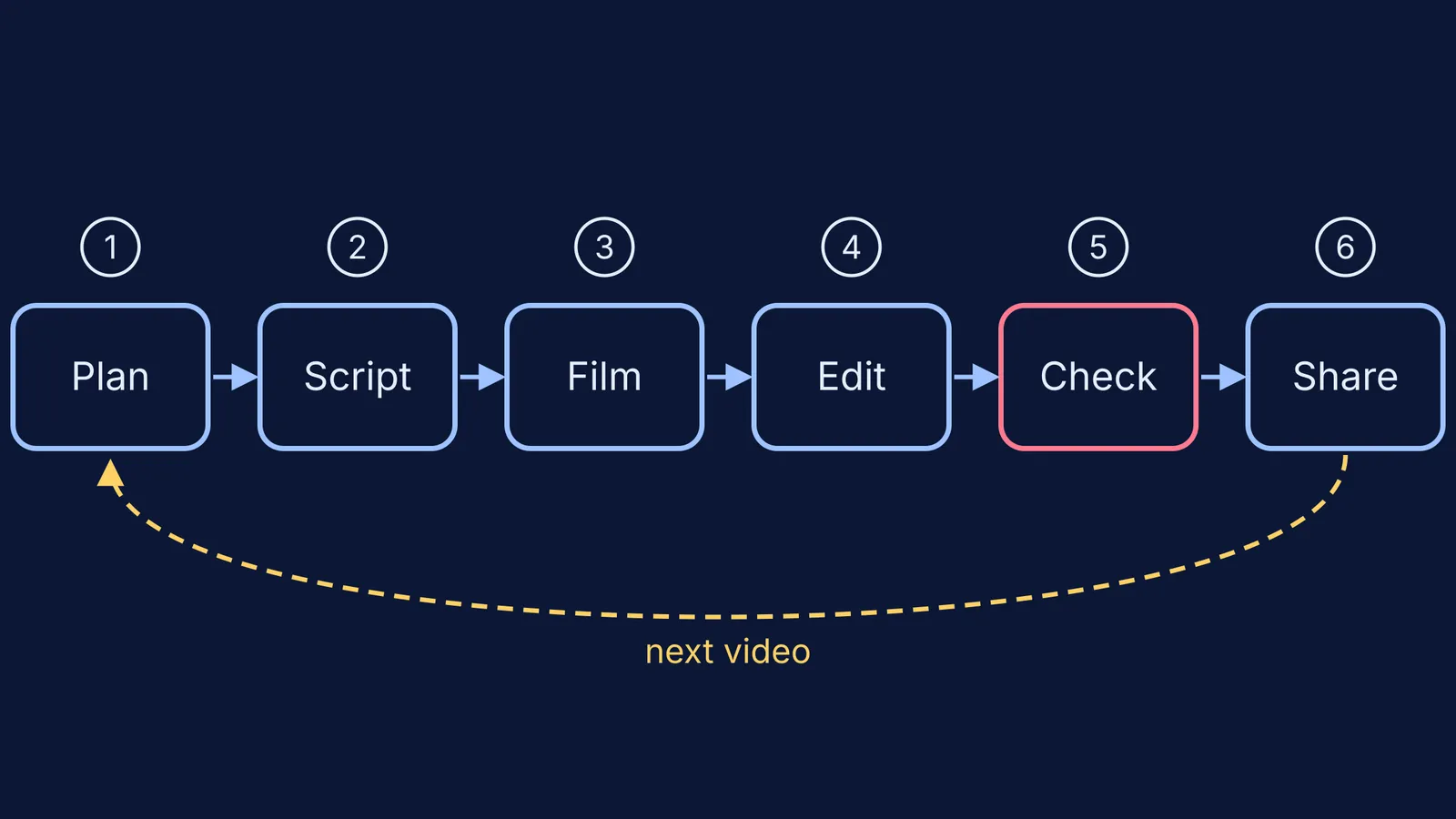
When your child says they want a YouTube channel, you don't have to choose between a flat no and handing over the phone. Run as a small project with you, a channel can teach them to plan, write, cut and check their own work. Here are the age rules, the privacy settings to switch on first, a time budget and a six-step plan.
What is the minimum age for a YouTube channel in India?
YouTube's Terms of Service for India say you must be at least 13 to use the service, though children of any age may use YouTube and YouTube Kids if a parent or legal guardian enables it. The same terms say a minor must have a parent's or guardian's permission, and a parent who allows it is "responsible for your child's activity on the Service."
So a child under 13 should not have their own channel. Run a family channel from your account instead: you hold the password and press publish.
Indian law adds its own rules. Under the Digital Personal Data Protection Act, 2023, consent for anyone under 18 comes from a parent or guardian, and organisations handling a child's data must not track, behaviourally monitor or target ads at them (PRS Legislative Research summary). The DPDP Rules were notified in November 2025, and the rule on verifiable parental consent is scheduled to apply from May 2027 (SCC Online).
If children are the main audience, YouTube requires the video to be marked "made for kids" (YouTube Help), which switches off comments, notifications and personalised ads (YouTube Help: features).
What privacy settings should a teen's channel use?
For teens old enough to manage their own account, YouTube sets uploads to the most private option by default, and Take a Break and Bedtime reminders are on by default (How YouTube Works: kids and teens). In most countries, parents and teens aged 13 to 17 can also link accounts in an optional supervised experience. Before the first upload, go through this list together:
Publish the first few videos as private or unlisted and share them only with family.
Use a channel name, not their full name, school or birthday.
Keep out school uniforms, the outside of your home, street signs and vehicle number plates.
Decide together whether their face appears. Voice-over, hands at work or a screen recording are fine.
Hold comments for review, or switch them off to begin with.
Turn on two-step verification and keep the recovery phone number as a parent's.
For the wider question of what apps collect, see our guide to checking privacy in learning apps.
How much time should a YouTube channel take?
The American Academy of Pediatrics' family media plan guidance suggests screen-free zones such as the dinner table, homework time and before bed, and reminds parents that they are role models for digital habits. YouTube also lets parents set a daily time limit on Shorts scrolling, including zero (How YouTube Works).
A sensible school-term budget: one video every two weeks, made in three sessions of about 45 minutes outside homework hours, with a pause in board exam months agreed in advance. Our post on family rules for phones and homework has more on making limits stick.
How do you turn the channel into a learning project?
Here is a worked example: a 14-year-old wants to make a four-minute video on why a steel ship floats.
Plan (session 1). Write a one-sentence promise ("By the end you'll know why a heavy ship floats"), name the viewer (a Class 7 student), and outline three points. Our guide to teaching your child to plan their time breaks this down further.
Script (session 1). Write every word. Read it aloud with a timer and cut until it fits four minutes. Check each fact against two sources. If they get stuck on the physics, the Fermi Concept Library has a lesson for every concept in physics, chemistry, biology, mathematics and computing.
Film (session 2). A quiet room, window light, the phone on a stack of books, one point per take.
Edit (session 3). Cut pauses and repeats, then watch once on mute to check the visuals.
Check (you). Go through the privacy list above, and ask: is anything in the video untrue, unkind or too personal?
Share. Publish it unlisted to family first. Ask one viewer what they learned, then decide whether to make it public.
After each video, ask: what will you do differently next time? That is where the writing and editing skills grow.
What should you say to your child?
Try something like: "Yes, we can do this as a project together. You'll be in charge of the ideas, the script and the editing. I'll be the producer: I check every video before it goes out, and I keep the password. We'll make one video every two weeks and stop during exams. After three videos, we'll sit down and decide what to change."
Start with one private video this weekend.