

On this page
Your method is right and your formula is right, but the answer is off by a factor of ten, or a billion, or it has the wrong sign. Usually the calculator did exactly what you typed, which was not what you meant. An AI helps because it can read your exact keystrokes back to you. Then you test the calculator on a number you already know.
The examples below use the Casio fx-991ES PLUS. Key names come from its official user's guide. Other models put the same functions on different keys, so check your own manual.
How do I enter powers of ten on a scientific calculator?
Use the ×10ˣ key (marked EXP on some models). It does not mean "multiply by ten". It belongs to the number itself. To enter Planck's constant, which NIST lists as exactly 6.62607015 × 10⁻³⁴ J s, you type 6.62607015, then ×10ˣ, then (−) 34. Two slips are very common:
Typing 6.626 × 10 ×10ˣ (−) 34. That means 6.626 × 10 × 10⁻³⁴, so every answer comes out ten times too big.
Using the power key instead, as in ÷ 500 × 10 ^ (−9). The Casio guide's calculation priority table (pp. 75-76) puts × and ÷ on the same level and works them left to right, so this divides by 500 and then multiplies by 10⁻⁹. It does not divide by 500 × 10⁻⁹.
Here is a worked example. Find the energy of a 500 nm photon, E = hc/λ, using c = 299 792 458 m/s exactly. Typed with ×10ˣ, it gives 3.97 × 10⁻¹⁹ J. Divide that by the elementary charge, 1.602176634 × 10⁻¹⁹ C, and you get about 2.48 eV, a sensible size for visible light. Typed the second wrong way, the same sum gives 3.97 × 10⁻³⁷ J, which is out by a factor of 10¹⁸. Refresh how to write large and small numbers in standard form first.
Why does my calculator give the wrong answer for sin 30?
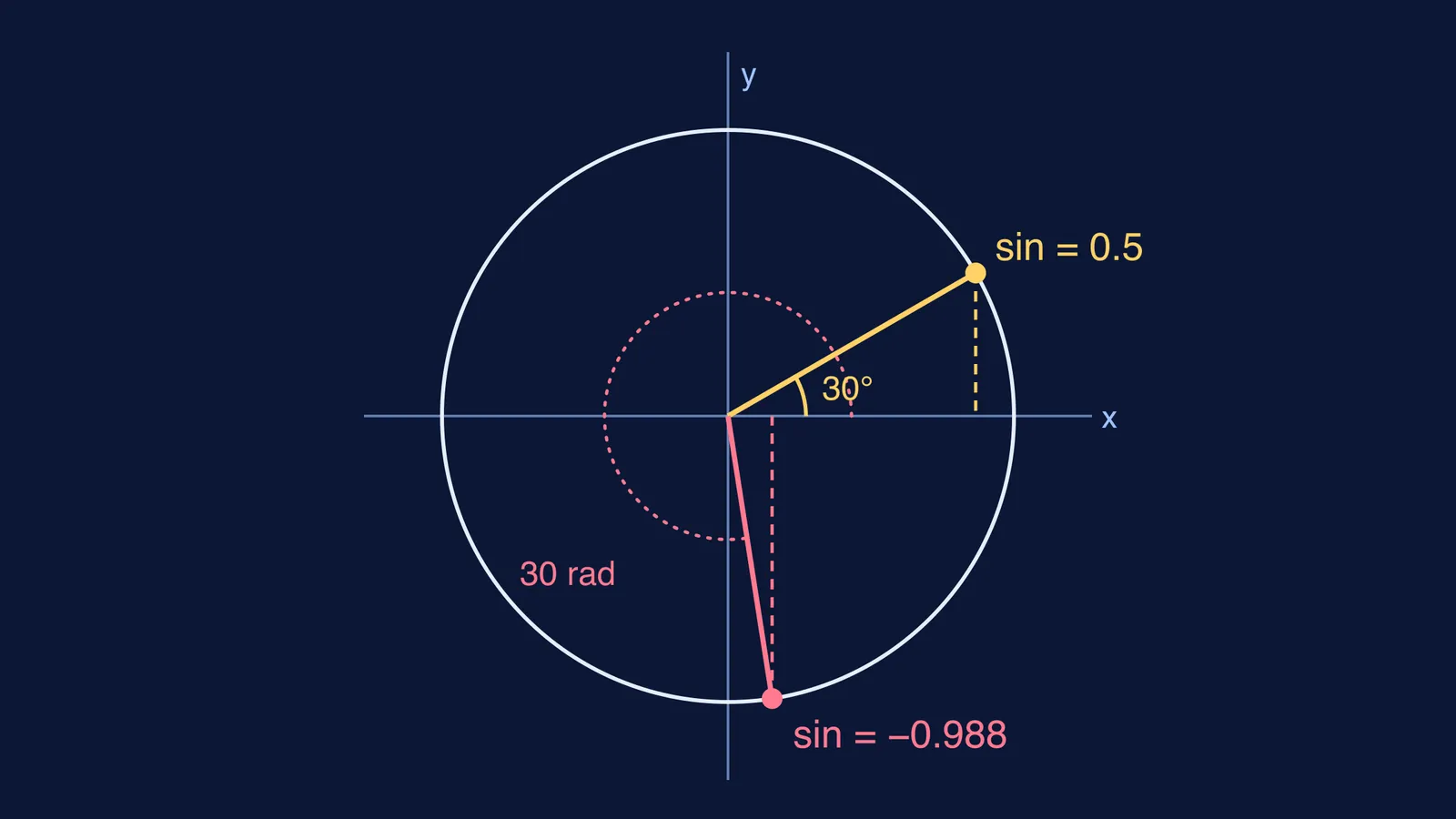
It is probably in radian mode. Casio's guide says to "specify the angle unit before performing calculations", and it shows sin 30 = 0.5 with the angle unit set to Deg (user's guide, p. 27). On that model you change the unit with SHIFT, MODE (SETUP), then 3 for Deg or 4 for Rad, and a small D or R appears at the top of the screen. In radian mode the same keystrokes give sin(30 rad) ≈ −0.988, because 30 radians is more than four full turns.
Use degrees when the question gives angles in degrees (inclines, projectiles, Snell's law). Use radians when the angle is ωt, a phase or kx in SHM and waves. Our explainer on degrees, radians and arc length shows why 90° is π/2.
Should I use log or ln in physics formulas?
The log key is base 10 and ln is base e. The manual's own example is log 1000 = 3, and it says the calculator uses e = 2.71828182845904 internally (user's guide, pp. 27-28). Radioactive decay uses ln: half-life = ln 2 ÷ decay constant, and ln 2 ≈ 0.693. If 0.301 turns up in your working, you pressed log. Decibels and pH use log. For the algebra slips that come before the keypress, see logarithm rules and how to check them.
Two more traps from the same priority table:
(−) 2 x² gives −4, because squaring comes before the negative sign. Type ( (−) 2 ) x² to get 4.
A multiplication with no × sign comes before ÷, so 1 ÷ 2π is worked out as 1/(2π), about 0.159. It is not (1 ÷ 2) × π, about 1.571.
What should I ask the AI, and how do I check it?
Use this four-step script:
Paste the formula, your calculator model and your exact keystrokes: "I typed 6.626 ×10ˣ (−)34 × 3 ×10ˣ 8 ÷ 500 ×10ˣ (−)9."
Ask: "In what order will the calculator work this out, and is any number entered differently from how I meant it?"
Ask: "Without working it out, what power of ten should the answer have, and should the angle be in degrees or radians?"
Test your calculator yourself: sin 30 = 0.5, log 1000 = 3, ln e = 1, and 1 ×10ˣ 3 = 1000. Then run the real sum and compare its power of ten with step 3.
An AI can mix up keys between calculator models, so the known-value test on your own calculator has the final say. Fermi's AI tutor holds your line of reasoning across a session, so you can bring the whole numerical, not only the keystrokes, and it checks your understanding as you work. If the setup is the problem rather than the arithmetic, the Fermi Problem Library has worked problems with a step-by-step solver that explains the reasoning.
Tonight, take one solved numerical from your notebook and run the four-step script on it.