On this page
Type "a cat reading a physics textbook" into an image generator and a picture appears in seconds. Nothing was searched: the picture was built out of random static, one small clean-up at a time. That explains the six-fingered hands, the misspelt labels, and why an AI diagram needs checking before it goes into your project file.
How do AI image generators actually work?
Many of today's image generators, including Stable Diffusion, are diffusion models. The idea comes from a 2015 paper that proposed destroying the structure in data with noise, then learning to reverse it (Sohl-Dickstein et al., 2015).
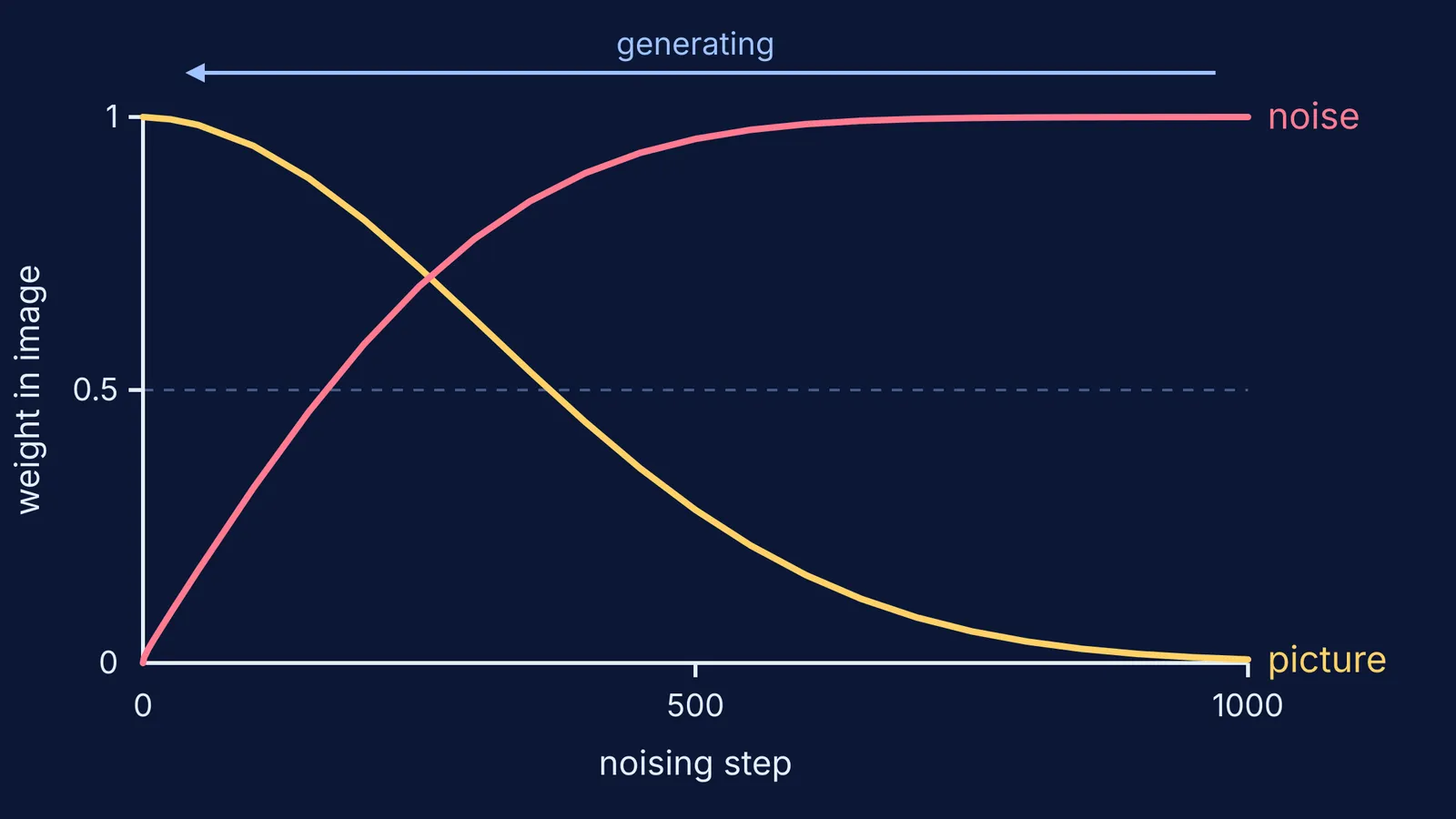
Training works like this: take a real image and keep adding a little random noise until only static is left. In the 2020 paper that made the approach produce high-quality images, Jonathan Ho, Ajay Jain and Pieter Abbeel used 1,000 noising steps, with the amount of noise added per step rising from 0.0001 to 0.02 (Ho et al., 2020). A neural network is shown images from every step and trained to guess the noise that was added.
Generating runs the film backwards. The model starts from pure static, predicts the noise in it, removes a bit, and repeats until a picture is left. Working through that 2020 schedule, as in the diagram at the top of this post, the original picture's weight in the mix falls to about 0.28 by step 500 and below 0.01 by step 1,000.
Your words steer every step. The latent diffusion design by Robin Rombach and colleagues runs the process on a compressed version of the image to cut computing costs, and feeds the text prompt into the network through a mechanism called cross-attention (Rombach et al., CVPR 2022).
The model learns what pictures look like from huge collections of images paired with captions. One open collection, LAION-5B, holds 5.85 billion image-text pairs gathered from the web (Schuhmann et al., 2022).
If you have read how large language models predict the next word, this is a cousin of that idea: both produce what is likely, and neither, on its own, checks the result against the facts.
Why do AI image generators get hands wrong?
A diffusion model learns patterns of pixels, not anatomy. It has no rule that says a hand has five fingers.
A 2023 paper on repairing generated hands says diffusion models "suffer from generating accurate human hands, such as incorrect finger counts or irregular shapes" (Lu et al., HandRefiner). The authors trace this to how hard it is to learn hand structure from training images, which "involves extensive deformations and occlusions": in photos, hands are bent, overlapping or half hidden.
Why are labels and text in AI images often wrong?
The same weakness shows up in writing. In a 2022 paper on their unCLIP image model, OpenAI researchers reported that it "struggles at producing coherent text". Asked for "a sign that says deep learning", it made signs reading things like "Deinp Lerpt" (Ramesh et al., 2022). They suggested that the model's internal summary of a caption may not precisely encode spelling.
The same paper found the model mixing up which colour belonged to which object when asked for "a red cube on top of a blue cube". In a science diagram, which label points to which part is the content.
Can you use AI-generated diagrams for school work?
Use them for ideas, not as answers: a project cover or a rough poster layout, if your school allows it and you say you used AI. Our guide to where AI help ends and copying begins covers how to declare it. In board exams you draw diagrams yourself, so practise the CBSE Class 10 science diagrams you need to draw and label.
How do you check an AI-generated diagram?
Say you ask for "a ray diagram of a convex lens with the object beyond 2F". Run five checks before you use it:
Count the parts: one lens, one principal axis, F and 2F on both sides.
Follow each ray: a ray parallel to the axis bends through F on the far side; a ray through the optical centre goes straight on.
Check the image: between F and 2F on the other side, upside down and smaller than the object.
Read every label letter by letter against your NCERT textbook.
Check the arrows: light goes from the object, through the lens, to the image.
If any check fails, draw it yourself from the textbook rules.
Parents can make this a quick conversation. Show your child an AI image of something they are studying and ask: "Find one thing here that is wrong, and tell me why." If they can explain it, they understand the topic.
For ideas that are easier to see than to read, the Fermi Simulation Lab has interactive simulations. Fermi's AI tutor draws the figure as part of teaching and checks your understanding as it goes, so the diagram comes with its reasoning.
Next time an AI picture looks perfect, count the fingers and read the labels before you trust it.