On this page
When you ask an AI to solve a calculus problem, the response usually looks perfect. The algebra is neatly formatted, the steps flow logically, and the final answer sits confidently in a box. But if you try to submit that answer in an exam, you might find it is completely wrong.
Calculus requires rigorous, multi-step logic, and current AI models often hallucinate algebraic steps or drop negative signs. This is why you must learn how to check an AI limit answer numerically with a calculator. By testing the function with real numbers, you can instantly see if the AI's algebraic conclusion matches the mathematical reality, saving you from relying on a flawed explanation.
Why check an AI limit answer numerically with a calculator?
AI chatbots predict the next most likely word; they do not internally "calculate" numbers in the way a dedicated computer algebra system does. While they are improving rapidly, they still struggle with the strict logic required for advanced mathematics. In November 2024, the research organisation Epoch AI found that leading AI models correctly solved less than 2% of expert-level mathematics problems (Epoch AI, 2024).
When calculating limits, an AI might correctly identify an indeterminate form like 0/0, but then apply Guillaume de l'Hôpital's rule incorrectly or misapply a trigonometric identity. If it concludes that the limit is 5, the generative model will not automatically double-check its own algebraic work. A numerical check takes thirty seconds and bypasses the algebra entirely, giving you a completely independent way to verify the result before you write it down on your homework.
How do you test a limit numerically with a calculator?
The formal epsilon-delta definition of a limit formalises the idea of "getting closer" to a specific point. You can mimic this exact process on a standard scientific calculator.
Identify the limit point: Note the value that x is approaching, let's call it a.
Choose your test values: Pick three numbers approaching a from below (such as a - 0.1, a - 0.01, and a - 0.001) and three numbers approaching from above (such as a + 0.1, a + 0.01, and a + 0.001).
Set the correct calculator mode: If your expression includes trigonometric functions like sine or cosine, ensure your calculator is set to radians. This is a common trap that will ruin a numerical check.
Evaluate the function: Plug your chosen values into the original expression on your calculator.
Observe the numerical trend: Look at the resulting y-values. Do they converge steadily towards a single number? If they converge to 4, but the AI confidently stated the answer was 5, you have proven the AI wrong.
What does a numerical check look like in practice?
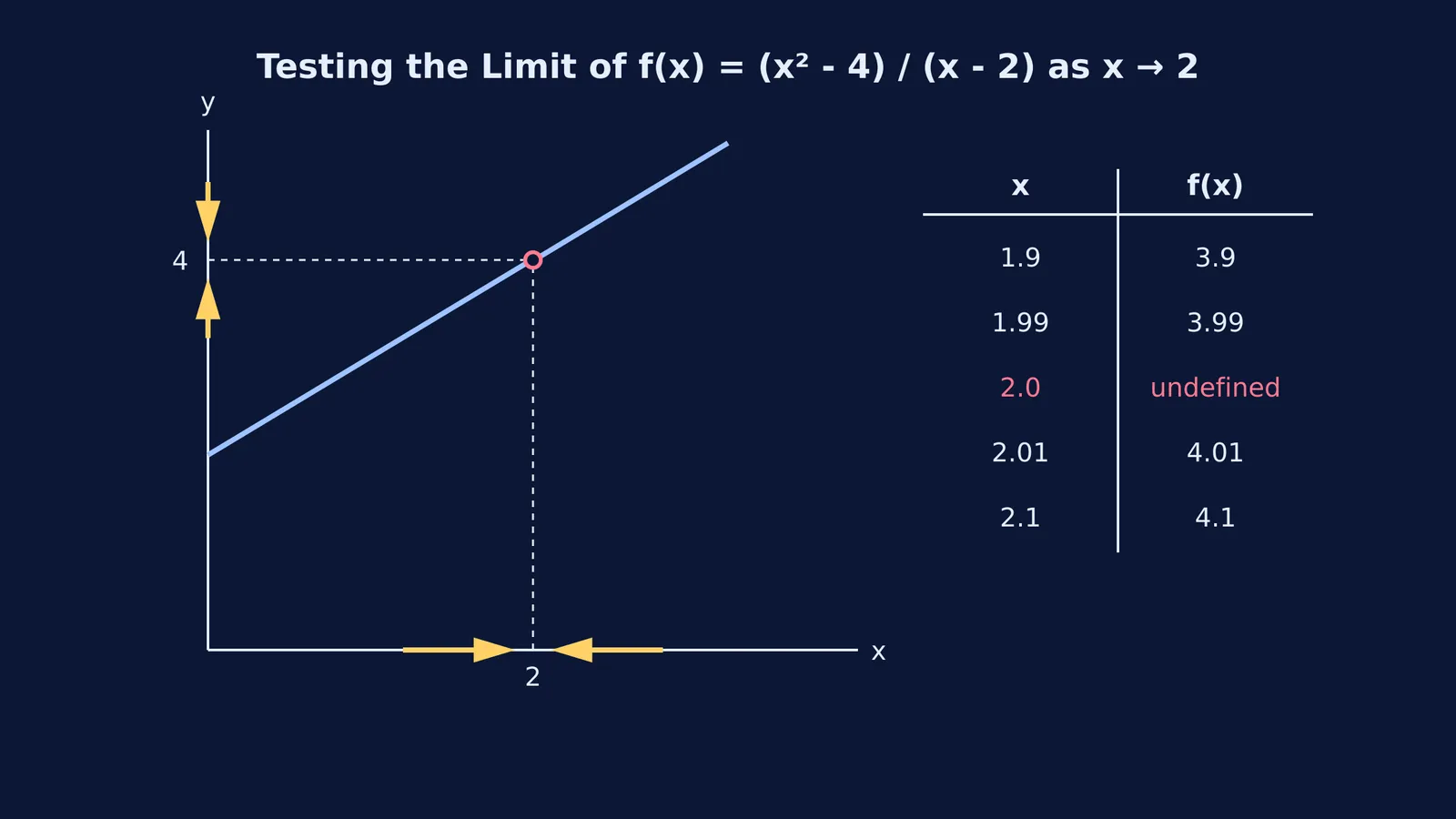
Let us test a classic limit problem: finding the limit of f(x) = (x² - 4) / (x - 2) as x → 2.
If you plug x = 2 directly into the expression, you get 0/0, which is undefined. Suppose an AI hallucinates a factoring step and tells you the limit is 5. Instead of wasting time re-reading its flawed algebra, pull out your calculator and test values close to 2.
Test x = 1.9: y = 3.9
Test x = 1.99: y = 3.99
Test x = 2.01: y = 4.01
Test x = 2.1: y = 4.1
This straightforward trick also works for limits at infinity of rational functions. If you are asked to find the limit as x → ∞, you do not need decimal values. Simply plug in large, increasing numbers like x = 100, x = 1000, and x = 10000 to see where the fraction finally settles.
Can numerical checks fail on an AI answer?
A numerical check is a powerful defensive tool, but it is not flawless. Calculators can suffer from rounding errors when dealing with extremely small decimals. Furthermore, rapidly oscillating functions, such as sin(1/x), might trick you into seeing a false pattern depending on which numbers you happen to choose. More importantly, simply knowing that the AI gave you the wrong final number does not help you understand the calculus steps required to find the right one.
When you are stuck on a difficult problem and need to find the correct algebraic method, you need a tool built for active learning rather than generic text generation. Fermi's AI tutor teaches rather than answers. Instead of giving you a final number to doubt, it holds a line of reasoning across a session, noticing where you are stuck and working out what you already know to build a plan for the session.
If you just need to check your own algebraic steps, the Fermi Problem Library features a step-by-step solver that explains the reasoning rather than simply printing a final answer. By combining independent numerical checks with a reliable tutor, you can catch errors instantly and focus entirely on mastering the underlying mathematics.