

On this page
If you are deaf or hard of hearing, AI captions can turn a fast lecture or a YouTube explainer into text you can read as it happens. That help reaches a lot of students: the World Health Organization estimates that around 95.1 million children aged 5 to 19 live with hearing loss worldwide. But captions only help if they are right, and technical terms are where they slip. Here is what research measured, why technical words fail, and a plan to fix it.
How accurate are AI live captions in a real class?
Caption accuracy is usually reported as word error rate: the share of words the software got wrong, missed or added, compared with a correct transcript.
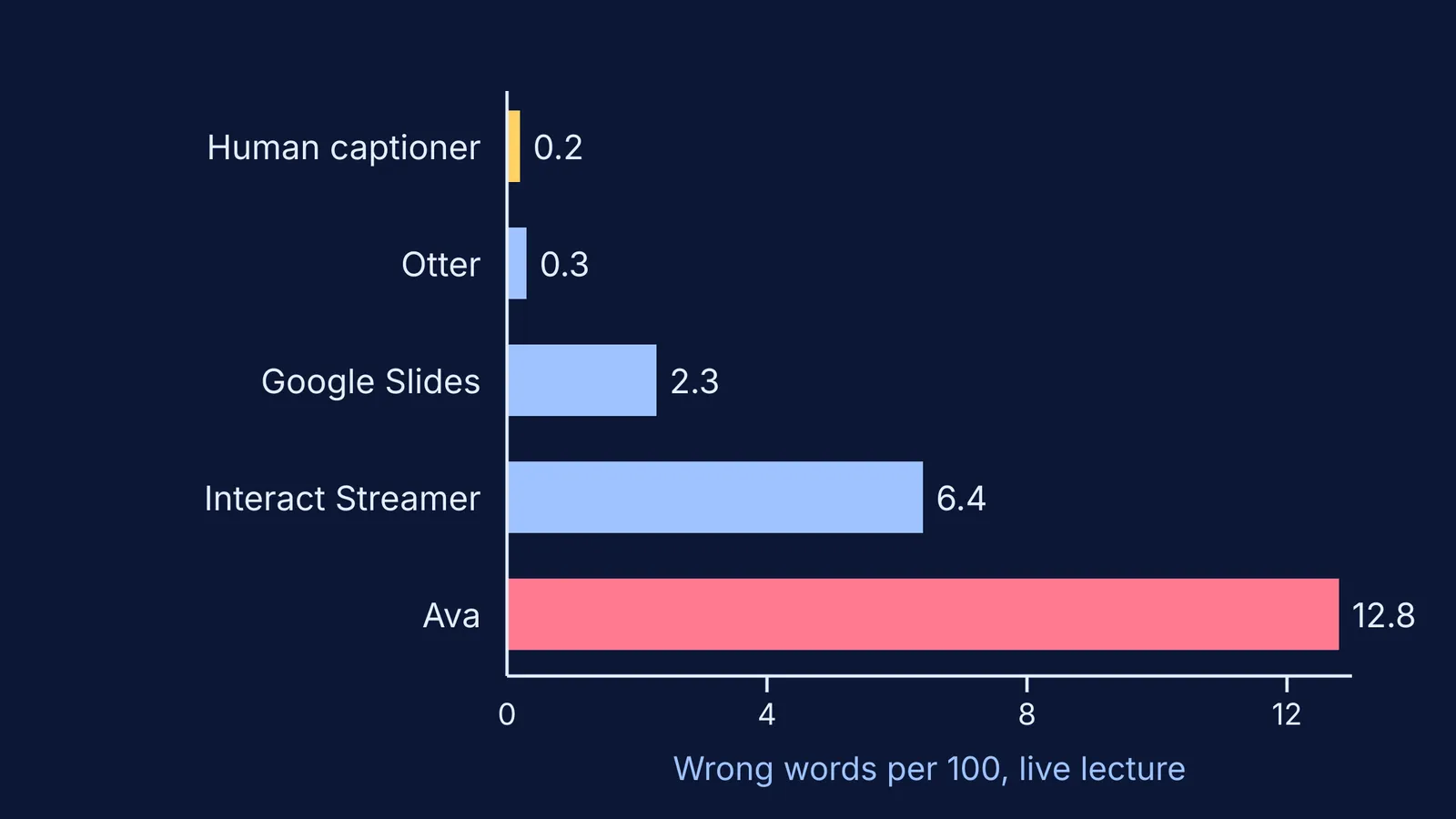
In a study published in the Journal of Educational, Pediatric and (Re)Habilitative Audiology, Pam Millett of York University tested caption apps on a 15-minute university lecture, delivered live from a script in a quiet, acoustically treated classroom. A human real-time captioner scored 99.8% accuracy. The automatic tools scored 99.7% (Otter), 97.7% (Google Slides), 93.6% (Interact Streamer) and 87.2% (Ava). At 87.2% accuracy, roughly 13 words in every 100 are wrong.
Millett notes that the lecture was given by a native English speaker with excellent audio and essentially no noise, and that accuracy is predicted to be significantly lower in real classrooms. A larger test by Korbinian Kuhn and colleagues at Stuttgart Media University, in ACM Transactions on Accessible Computing, ran eleven speech recognition services on recordings of university lectures and talks. On the English lecture recordings, the average word error rate across services was 7.0%, ranging from 2.9% for the best service to 20.1% for the worst, according to the full paper. Live (streaming) captions had a higher error rate than captions made after the fact, 10.9% against 9.4%.
Why do captions get science terms wrong?
Speech recognition picks the most likely words for the sounds it hears, so rare subject words can lose to common everyday ones. Millett's transcripts show this: "aided audiogram" became "dated audiogram", "six sound test" became "six pound test", and "listening environment" became "listing apartment". Homophones such as "here" for "hear" occurred frequently in all the tools she tested, and misplaced punctuation made some correct words hard to read.
Adding a custom vocabulary helps less than you might hope. In Kuhn's study, the eight services that accepted word lists went from 8.6% to 8.1% error, a difference that was not statistically significant, and no service recognised every word on the list.
How can you fix captions for science lessons?
No single setting fixes captions; the gains come from stacking small ones.
Move the microphone, not the phone. Millett concluded that a high-quality microphone worn by the teacher is likely needed for reasonable accuracy, and that a phone placed on the desk is unlikely to give meaningful captions. Microsoft's own PowerPoint captions guide also recommends a headset microphone.
Add the chapter's terms. Google's Live Transcribe lets you add custom words and use an external microphone. Load the week's terms on Sunday, but expect some misses.
Prefer recorded video where you can. In Millett's video test, YouTube's automatic captions reached 98%. YouTube's own help page says creators should always review and edit automatic captions, so ask teachers who post videos to do that.
Get the term sheet before class. A list of the day's technical words lets you recognise a garbled caption and repair it in your head.
Save the transcript and fix it the same evening. Live Transcribe keeps your history for up to three days and lets you export it.
Worked example: one chemistry period. Topic: haloalkanes. The night before, you add "haloalkane", "nucleophile", "carbocation", "SN1" and "SN2" to your custom words. In class, the captions write "carbon cat ion". Because you have the term sheet, you mark it and keep going. That evening you correct the transcript, test yourself on it using the pause, predict and test method for video lectures, and look up anything still unclear in the Fermi Concept Library, which covers every concept in physics, chemistry, biology, mathematics and computing, each with its own lesson.
What should students and parents ask the school for?
A short, specific request works better than a general one. You could say:
"My child is hard of hearing and uses live captions. Could the teacher wear a clip-on microphone connected to the captioning device, share the list of key terms a day before each chapter, and check the captions on any videos posted for the class?"
For exams, practicals or long lectures, ask whether a human captioner is possible, since that was the most accurate option in Millett's live lecture test. Questions about hearing itself, hearing aids or cochlear implants belong with an audiologist or ENT doctor.
Captions also work better alongside visual teaching. See Richard Mayer's multimedia principles and staying focused in live online classes. Fermi's AI tutor teaches by writing on a board and drawing the figure, so the working is on screen rather than only spoken.
Start with one change this week: the microphone, then the term sheet.


