

On this page
It is completely normal for a smartphone to feel warm when it is plugged into the wall. The warmth you feel against your hand is the physical consequence of pushing electrical energy into a chemical cell.
By understanding the physics of a charging battery, you can distinguish normal operation from an overheating risk.
Why does a phone get hot while charging?
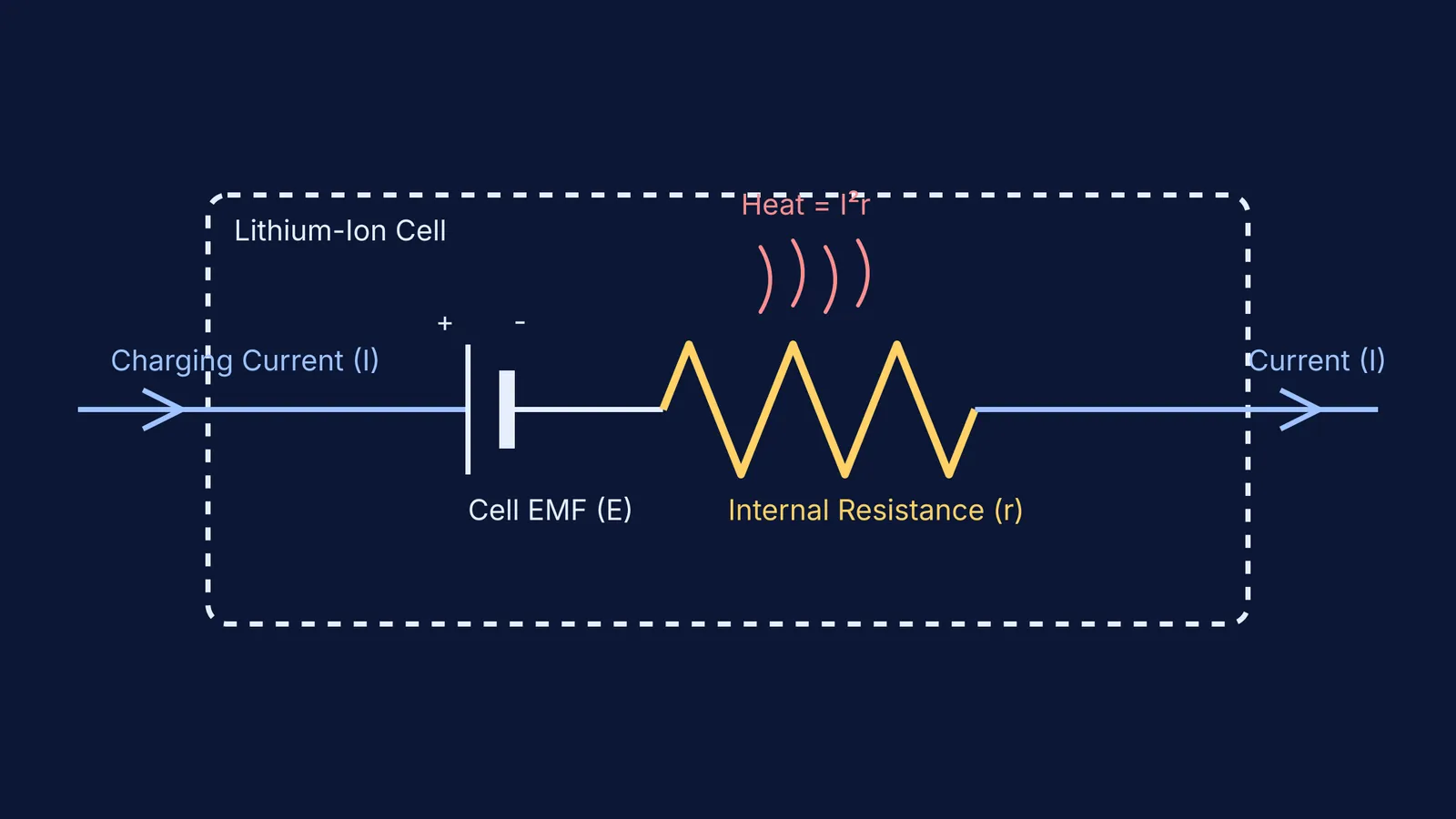
A lithium-ion battery is not a perfect container. Every component inside the cell, including the viscous liquid electrolyte through which lithium ions must travel, and the solid metallic contacts, naturally opposes the flow of electricity. This opposition is collectively called internal resistance.
When an electric current flows through any material that has resistance, it produces thermal energy. This phenomenon is known as Joule heating. The heating effect of current obeys a strict physical law: the heat produced is proportional to the square of the current, multiplied by the resistance.
Because heat scales with the square of the current (OpenStax), doubling the charging speed creates four times as much heat. This is why plugging your phone into a modern 30-watt or 60-watt fast charger makes the back panel significantly hotter than using an older, slower plug. The rapid influx of energy forces a massive increase in the thermal output of the cell.
Alongside the battery's internal resistance, the phone's power management circuitry also generates warmth. The buck converter components that perform this voltage step-down shed some energy directly into the phone's motherboard as heat.
When studying electrical resistance and heat dissipation in physics, visualising the relationship between current, voltage, and temperature can be difficult. The Fermi Simulation Lab provides interactive simulations for the ideas that are easier to see than to read, allowing students to experiment with different resistor values and watch how quickly Joule heating scales up.
What is a normal charging temperature?
While the outside of the phone warms up and feels concerning to the touch, the internal engineering is specifically designed to handle and dissipate it effectively. The surrounding ambient air temperature matters heavily for this heat dissipation process. If you charge your device in direct sunlight or a hot environment, the phone cannot effectively reject its own generated heat into the surrounding air.
Inside the chassis, the battery itself gets much warmer than the glass or metal surface. During high-speed wireless or wired fast charging, the internal temperature rises significantly as the charging controller pushes the maximum possible current into the depleted cell.
To protect the volatile lithium-ion chemistry from degrading, modern smartphones constantly monitor this heat. If the internal temperature exceeds safe limits, the phone's operating system will deliberately throttle the charging current or pause the charge entirely until the device returns to a safe baseline.
When should you worry about an overheating phone?
While warmth is a sign of normal energy transfer, excessive heat is a severe safety hazard. If a phone becomes painful or highly uncomfortable to hold, it has exceeded its thermal limits and risks irreversible battery failure.
Use this checklist to identify and resolve dangerous charging temperatures:
Check for software warnings: Look for a full-screen alert reading "iPhone needs to cool down" or a Samsung notification stating "Phone is overheating". Disconnect the cable immediately if you see these.
Remove thick cases: Heavy, thick, or rubberised cases act as thermal insulators. Taking the case off allows the aluminium or glass back of the smartphone to radiate heat away into the surrounding air.
Stop heavy usage: Playing graphically intense games, rendering video, or using GPS navigation forces the CPU and GPU to draw heavy current at the same time the battery is charging. This layers processor heat on top of Joule heating.
Move to a hard surface: Charging a phone under a pillow, on a sofa, or on a soft bed traps heat around the device. Always place a charging phone on a flat, hard surface like a wooden desk or a tiled table to allow air circulation.
Inspect for physical damage: If you notice the back panel bulging, hear a hissing sound, or detect a sharp, sweet chemical smell, the lithium-ion battery is structurally failing. Unplug the device immediately, do not use it, and seek professional repair.
When studying the principles of current, voltage, and energy transfer, if you ever feel stuck on the mathematics behind heat generation, Fermi's AI tutor works out what you already know, builds a plan for the session, and teaches through it — writing on a board and drawing the figure alongside you.
By keeping your phone in a cool room, removing thick cases, and avoiding heavy tasks while plugged in, you minimise Joule heating, maintain normal temperatures, and protect the long-term lifespan of your battery.


