

On this page
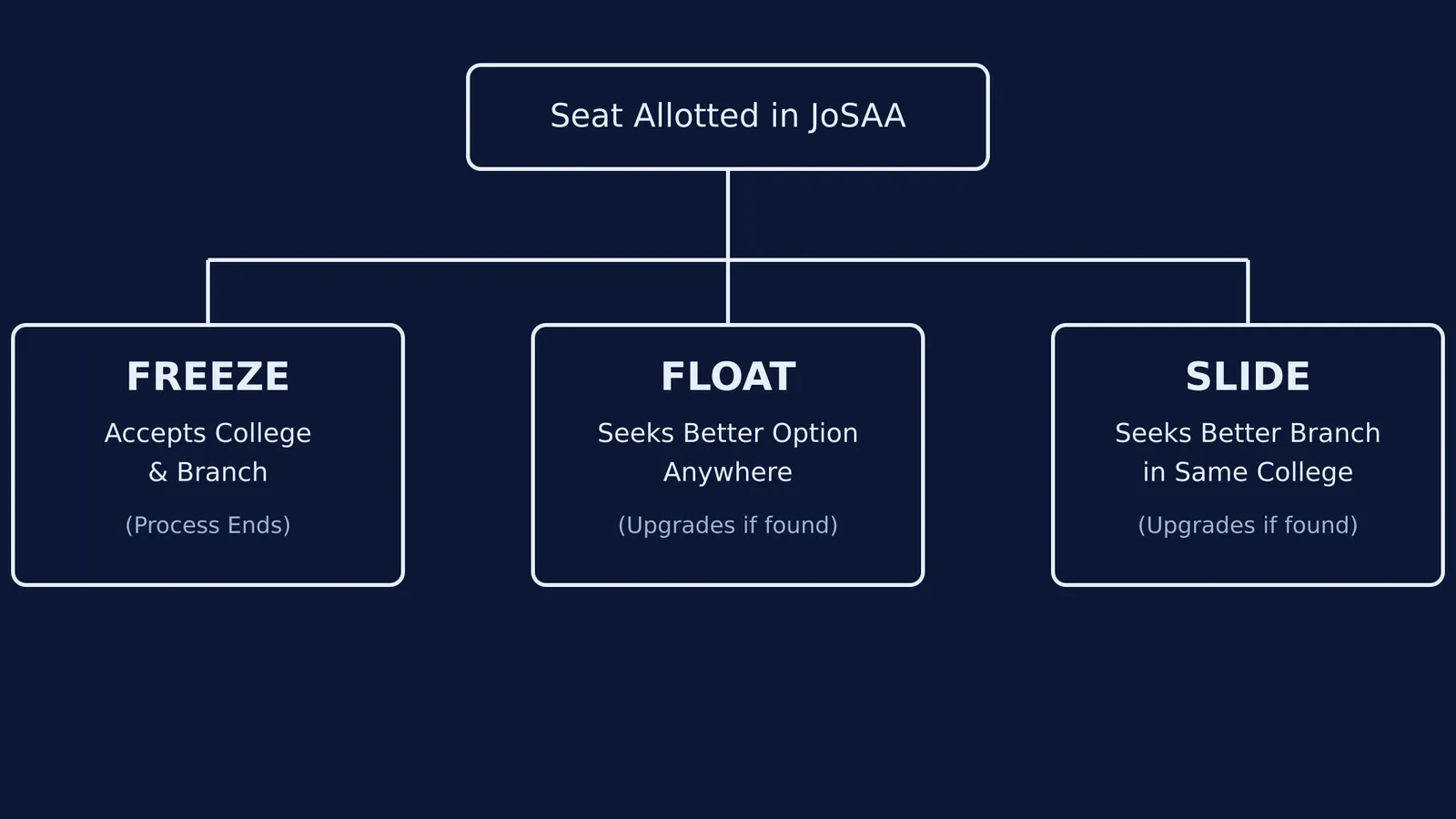
When you are finally allotted a seat in the Joint Seat Allocation Authority (JoSAA) counselling for IITs, NITs, IIITs, or GFTIs, the system asks you to make a crucial choice. You must select one of three "willingness" options: Freeze, Float, or Slide.
Choosing the wrong option can inadvertently end your counselling early or lock you into a branch you did not intend to keep. JoSAA typically conducts multiple rounds of seat allocation, so understanding these choices is essential for navigating the entire process. This guide explains what each option does, who should choose it, and what happens to your seat in the subsequent rounds.
What is the Freeze option in JoSAA?
The Freeze option means you are completely satisfied with both the college and the academic program you have been allotted.
By choosing Freeze, you accept the current seat and immediately exit the seat allocation process. You will not be considered for any further upgrades in subsequent rounds. The seat you have is firmly locked in, and your next step is simply to pay the seat acceptance fee, upload your documents, and complete the final reporting formalities.
Who should pick it: Choose Freeze only if you have secured your absolute top choice, or if you are completely certain that you do not want to risk a change to any other college or branch on your preference list. (If you are allotted your No. 1 preference, the JoSAA system will automatically Freeze it for you, as there is nothing higher to upgrade to).
What does Float mean in JoSAA counselling?
The Float option means you accept the allotted seat, but you want to be considered for a seat of higher preference in any institute during the next rounds.
If you choose Float, your current seat acts as a safety net. If a seat higher up on your preference list becomes available in a later round—whether it is a better branch in the same college or a seat in a completely different college—your current seat is cancelled, and you are automatically moved to the new one. If no better seat opens up across the remaining rounds, you keep your current seat.
Who should pick it: This is the most popular choice. Choose Float if you are happy to have secured a seat but still want to try for a better college or a better branch anywhere else on your list. You will need to check the portal during each round to see if your seat has been upgraded.
How does the Slide option work?
The Slide option means you accept the allotted seat and the college, but you want to be considered for a higher-preference branch within the same institute.
When you select Slide, you are effectively telling JoSAA: "I like this campus, but I want a better course here." You will only be upgraded if a higher preference opens up at that specific college. You will not be considered for seats at any other institutes, even if they were listed higher on your original preference sheet.
Who should pick it: Choose Slide if you have your heart set on a specific campus (for example, you want to stay in your home state's NIT) and you do not want the system to upgrade you to a different college, but you are still hoping for a more preferred branch at that campus.
What are the mandatory steps for all three options?
No matter which of the three options you choose, the immediate next steps are identical and mandatory. To secure your provisional allotment, you must complete the following on the JoSAA portal:
Pay the Seat Acceptance Fee (SAF).
Upload all required documents for online verification, including your Class 12 mark sheet, medical certificate, and any applicable category certificates.
Respond promptly to any queries raised by the verifying officers.
If you fail to pay the fee or upload the documents by the deadline, your allotted seat will be cancelled, and you will be removed from the JoSAA counselling process entirely.
If you are preparing for future exams or looking to strengthen your mathematics foundation before college begins, you might want to brush up on concepts like the limits of the form 1^∞ or the discriminant test for a positive quadratic. If you find yourself struggling with these or other core topics, the Fermi Concept Library can help you explore the fundamental ideas behind different STEM fields.
Finally, remember that you can change your willingness option in later rounds. You can generally move from Float to Slide, Float to Freeze, or Slide to Freeze. However, you cannot move backwards: once you Freeze a seat, you cannot unfreeze it to Float or Slide again.


