

On this page
Whether you are navigating high-pressure high school exams or long university semesters, your hostel room is more than just a place to sleep. It is your primary learning environment. When space is limited, setting up an ergonomic study desk prevents neck pain and ensures you can focus for hours without fatigue.
Why does your study environment matter?
Hostel life is famous for improvised study setups—reading on the bed, sitting cross-legged on the floor, or balancing a laptop on a pile of textbooks. While these habits feel comfortable in the short term, they force your spine into unnatural curves and require your muscles to work constantly just to hold you upright. Over the course of an academic year, this physical toll accumulates, turning minor discomfort into chronic fatigue that directly competes with your ability to learn.
When you deliberately design your study corner, you are not just arranging furniture; you are signaling to your brain that it is time to work. An optimized desk setup removes physical distractions, allowing you to sustain active learning and high-concentration tasks for longer periods. It separates your rest zone from your focus zone, which is crucial when both zones exist in the exact same small room.
What is the best desk height for studying?
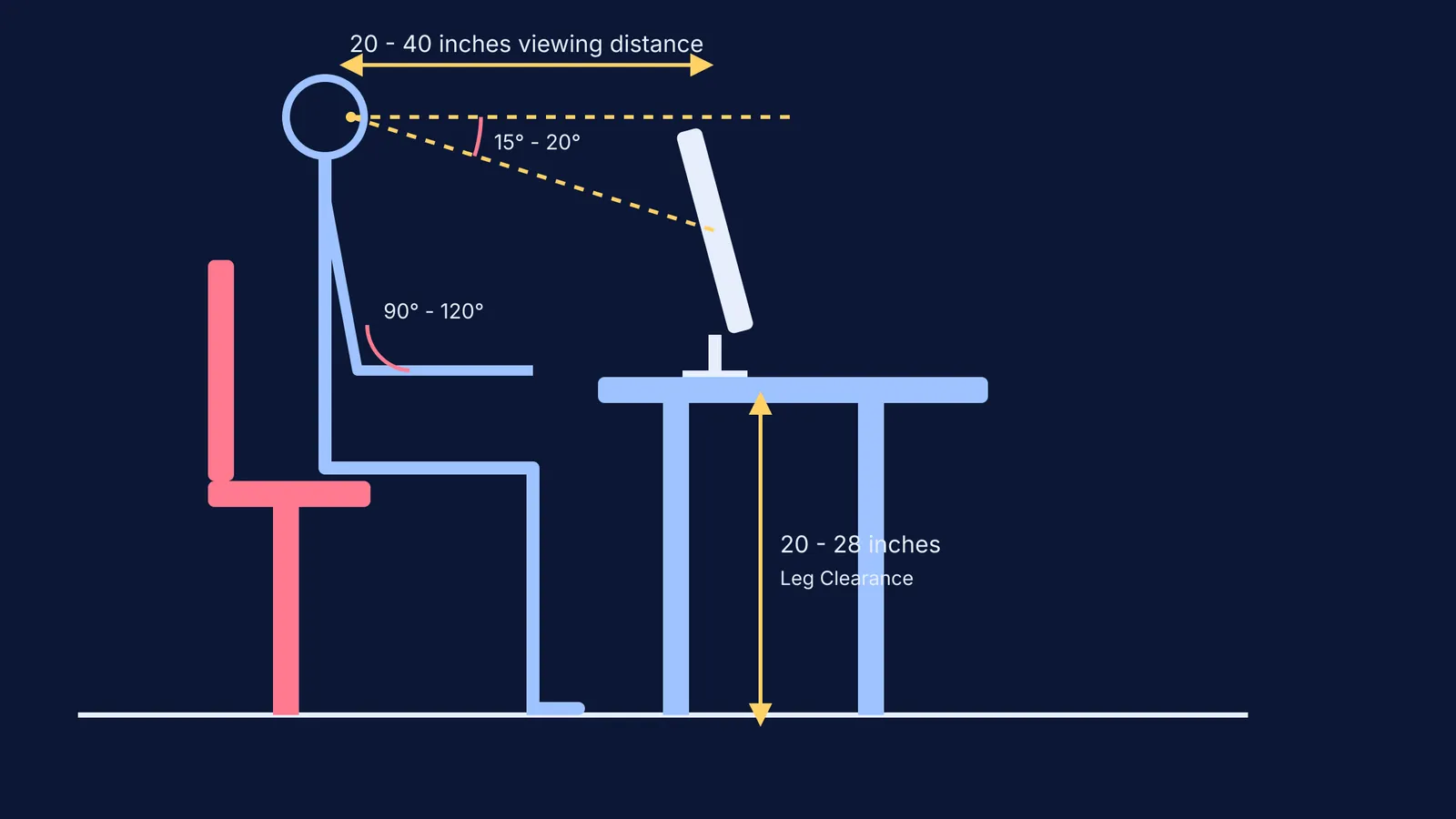
Your physical setup forms the foundation of a productive study habit. The Occupational Safety and Health Administration (OSHA) recommends a desk clearance of 20 to 28 inches for your legs. This specific height range allows you to sit close to your books without cramping your thighs.
Most standard hostel desks are fixed in height. If your desk is too high, elevate your chair and use a stable footrest so your feet remain flat on the floor. OSHA's neutral posture guidelines suggest that your elbows should bend at an angle between 90 and 120 degrees when your hands rest on the keyboard or your notebook. The area under the desk must be kept strictly free of clutter to allow for frequent posture changes, so avoid stuffing old boxes or suitcases near your feet.
How should I position my monitor and chair?
Long hours of reading or running online modules can strain your eyes and neck. To prevent discomfort, position your monitor or laptop at an appropriate distance and angle. OSHA guidelines state that the optimal viewing distance to your screen is between 20 and 40 inches.
Your monitor's top edge should sit at or slightly below your horizontal eye level. The center of the screen should normally be located 15 to 20 degrees below your horizontal line of sight. If you are using a laptop, relying on an external keyboard and a laptop stand makes a significant difference in maintaining this angle. For example, if you are visualizing electric fields in the Fermi Simulation Lab, a properly elevated screen keeps your neck neutral so you can spend your energy on the physics, rather than adjusting your posture.
What is the best lighting for a study room?
Hostel rooms often come with single, harsh fluorescent overhead lights that cause glare or dim bulbs that induce sleepiness. The light source you choose directly impacts your alertness and cognitive processing. A study measuring student alertness found that an illuminance level of 500 lux significantly improves morning wakefulness and focus.
You should supplement your room's main light with a dedicated desk lamp. The color temperature of the bulb matters just as much as its brightness. The same study demonstrated that blue-enriched white light at a color temperature of 6,500 K effectively decreases melatonin levels compared to warm 3,500 K light.
When you are deep in exam preparation, positioning a 500-lux, 6500 K task light opposite your dominant hand prevents shadows from falling across your page. Keep the light angled directly at your work surface to avoid glare on your monitor.
How to organize books in a small hostel room?
A cluttered desk actively drains your cognitive bandwidth. When your visual field is full of unstructured objects, your brain expends energy filtering out the mess instead of focusing on the task at hand. Keep your primary work zone—the area you can easily reach while keeping your elbows at your sides—clear of everything except the materials you are currently using.
Store reference textbooks, supplementary notes, and extra stationery on a small bookshelf or in a desk drawer. When you are working through complex equations in the Fermi Problem Library, a clear desk ensures you have room to stretch out your rough work notebook and think clearly without knocking over water bottles or stacks of paper.
Hostel Desk Ergonomics Checklist
Before your next major study session, run through this quick setup routine:
Check your feet: Are they resting flat on the floor or a firm footrest?
Check your elbows: Are they resting at an angle between 90 and 120 degrees?
Check your screen: Is the top of your monitor exactly at your eye level, placed roughly an arm's length (20 to 40 inches) away?
Check your light: Is your desk lamp illuminating your notes without causing screen glare?
Check your clutter: Is the area under your desk empty to allow leg movement, and is your immediate desk surface clear of unused textbooks?
By systematically addressing your desk height, monitor angle, and lighting, you take control of your environment. A properly arranged hostel desk is a powerful asset for academic endurance.


