

On this page
Many students hear that cloud computing is a good career and go straight to a certificate exam. The people who hire for these jobs rate something else higher: proof that you can build and fix real systems. Here is what cloud work is, which basics to learn first, and a 12-week plan that ends with a project you can show.
What does cloud computing work actually involve?
The US National Institute of Standards and Technology defines cloud computing as “a model for enabling ubiquitous, convenient, on-demand network access to a shared pool of configurable computing resources” that can be set up and released quickly (NIST SP 800-145).
Put simply, a company rents servers, storage and networks from a provider instead of buying its own machines. NIST names three service models: Infrastructure as a Service (you rent raw servers and storage), Platform as a Service (you deploy your own code on the provider's tools) and Software as a Service (you use a finished app, such as web email).
Cloud work is what keeps those rented systems running: setting up servers and networks, deciding who can access what, deploying code, watching for failures and keeping the bill under control. Employers are still short of people for it. In the Linux Foundation's 2026 survey of 400 people who hire, train or manage technical staff, 29% of organisations rated themselves understaffed in cloud computing, down from 47% the year before (2026 State of Tech Talent Report).
What should you learn first for a cloud career?
Cloud products get renamed often; the ideas underneath change slowly. Learn these first, roughly in this order:
Linux and the command line: files, permissions, processes.
Networking: IP addresses, DNS, ports, HTTP and firewalls.
One programming language, usually Python, for small scripts.
Git, so your work is saved, versioned and visible.
Basic security: keys, passwords and giving each user only the access they need.
Databases: what a table is and how an app reads from it.
University courses assume the same base. The NPTEL Cloud Computing course from IIT Kharagpur lists “Basics of Computer Architecture and Organization, Networking” as its prerequisites (NPTEL course syllabus).
When one of these ideas will not stick, the Fermi Concept Library has a lesson for every concept in physics, chemistry, biology, mathematics and computing, each with its place in the map.
Are cloud certifications worth it for students?
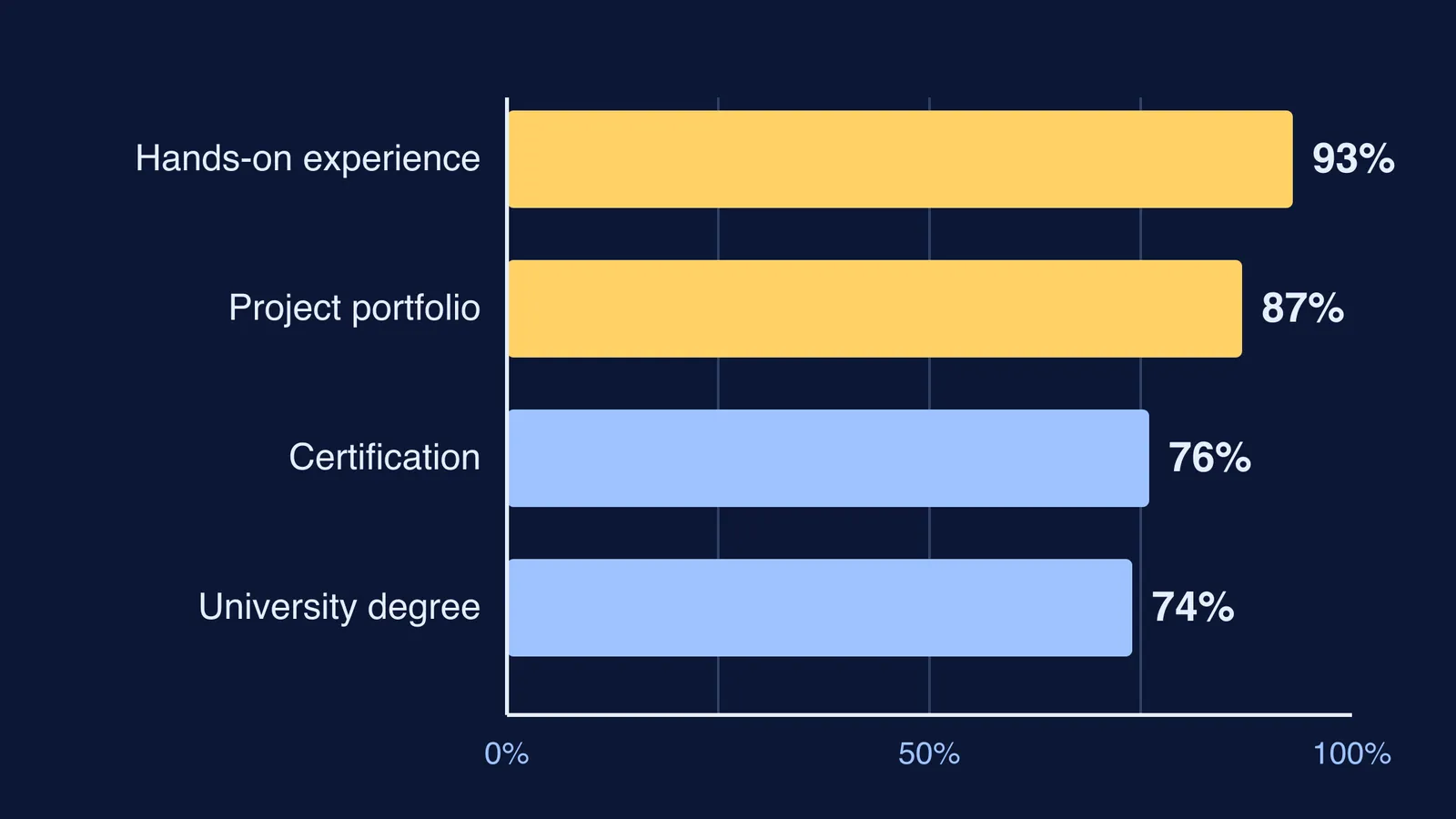
They help, but they are not what employers weigh most. In the Linux Foundation's 2026 survey, 93% of respondents rated hands-on experience from prior jobs as important when assessing a candidate's technical skills (2026 State of Tech Talent Report). The same survey found 87% rated a portfolio of IT project work as important, 76% rated certifications and 74% a university degree.
As a student you have no job history yet, so the portfolio is the part you control. In the report's foreword, Clyde Seepersad, Senior Vice President and General Manager of Education at the Linux Foundation, writes: “Employers are placing greater weight on demonstrated, job-relevant skills and on credible ways to validate them.”
He names industry certifications and hands-on experience as two such ways. A certificate is a useful syllabus; one project you can explain line by line shows you can do the work.
How can a student start with cloud computing in 12 weeks?
Plan on about five hours a week. Each block ends with something you can show.
Weeks 1 to 3, Linux and Git: use Linux or a free online terminal, practise files and permissions, write one short shell script and keep it all in a Git repository.
Weeks 4 to 6, networking and Python: trace what happens when you type a web address, from DNS to HTTP, then write a Python script that fetches a page and saves part of it.
Weeks 7 to 9, first cloud project: put a small website or app on a provider's free tier. Azure for Students gives “$100 credit to use on Azure services within 12 months” with no credit card, but only to full-time university students (Azure for Students). School students should set up any account with a parent. Set a cost alert first: AWS Budgets, for example, can email you when costs pass a limit you choose.
Weeks 10 to 12, portfolio: write a README that explains what you built, sketches how the parts connect, and lists what broke and how you fixed it. Only then, if you want, choose a beginner certificate that matches it.
Parents, a fair question at the end of week 12 is not “which certificate did you get?” but “show me what you built, and what went wrong?”
If you are not sure where your gaps are, Fermi's AI tutor can work out what you already know and build a plan for the session, so each block starts with a clear next step.
Start this week: open a terminal and make your first Git commit.