

On this page
When you first look at a solderless breadboard, it is just a block of plastic with hundreds of tiny holes. Because you do not need to solder wires together, it is the standard tool for testing and prototyping electronics.
However, moving from a paper schematic to a physical board can be jarring. In a schematic, lines show exactly where electricity flows. On a physical board, the connections are invisible.
How do the rows on a breadboard connect?
A breadboard is built around a standardized grid that matches almost all modern electronics. Its holes are spaced exactly 0.1 inches (2.54 mm) apart to fit most standard components (SparkFun, 2024).
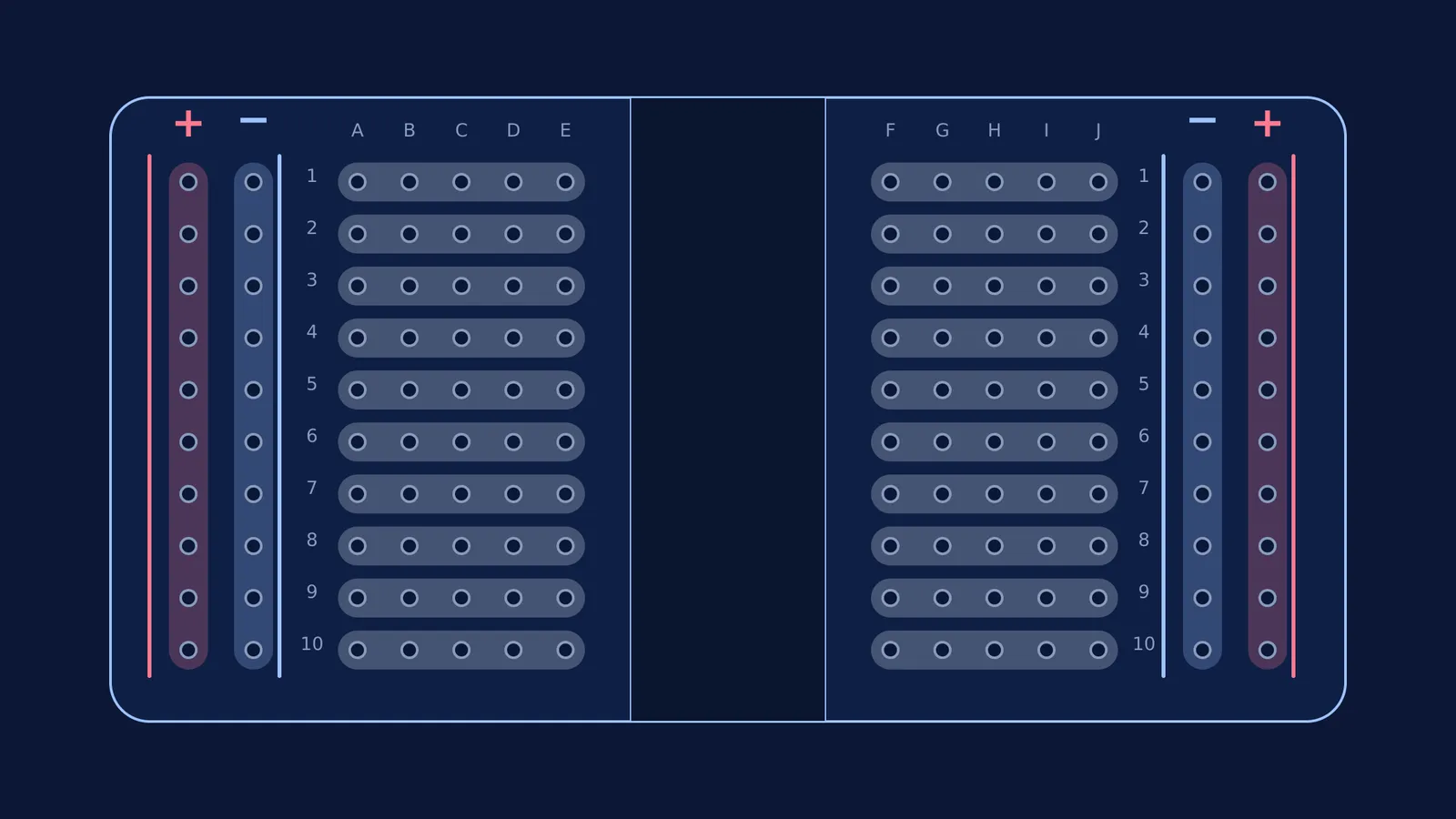
Beneath the plastic surface, metal clips grip your wires and link the holes together. These connections follow two strict rules:
Power rails run vertically: The long columns on the far left and far right (often marked with red and blue lines) are connected from top to bottom. These distribute power and ground to the whole board.
Terminal strips run horizontally: The main area is divided into short rows, usually numbered. Every hole in a group of five (for example, row 1, holes A through E) is electrically connected.
A central gap, or "ravine," runs down the middle of the board. This gap isolates the left side of the terminal strips from the right side. It is designed so that you can plug in integrated circuits (microchips) without their opposite pins shorting together.
Because these metal strips are hidden, beginners often struggle to build their first circuits. A 2023 study found that 15- and 16-year-old students learn circuit layout design better using flat paper circuits made of copper tape than using breadboards, largely because a breadboard's internal connections cannot be seen (Peppler et al., 2023).
If visualizing hidden rows gets frustrating, trying the layout digitally first can save time. The Fermi Simulation Lab offers interactive simulations for the ideas that are easier to see than to read, letting you watch the current flow before you push any real wires into place. You can also read more about learning DC circuits with a simulation to test common misconceptions.
How do you build a simple LED circuit?
Building a basic LED circuit requires translating a loop into parallel vertical and horizontal connections. Before wiring, you might want to review how to tell if a circuit will work to confirm you have a power source, a path, and a load.
Here is a plan to build your first LED circuit safely:
Connect power: Run a wire from your battery pack's positive terminal to the red power rail, and the negative terminal to the blue ground rail.
Place the LED: Insert the longer leg (anode) of the LED into row 10 (hole A) and the shorter leg (cathode) into row 11 (hole A). They must be in different rows.
Add the resistor: Push one end of a resistor into row 11 (hole C) so it connects to the LED's shorter leg. Push the other end into the blue ground rail.
Close the loop: Run a small jumper wire from the red power rail into row 10 (hole C). Your LED should now light up.
Why do short circuits happen on a breadboard?
A short circuit happens when electricity finds a path of zero resistance back to the power source. On a breadboard, this almost always occurs due to component misplacement.
If you plug both legs of an LED into row 10, the hidden metal clip underneath connects the two legs directly together. The current will flow entirely through the metal clip—ignoring the LED—and head straight to ground, creating a short circuit. This will fail to light the LED and may overheat your wires or battery. Always ensure that a component spans across two different rows or crosses the central ravine.
Many beginners also accidentally cross wires when their circuit becomes crowded. As your projects grow, keeping your wiring neat and trimming jumper cables to the right length will prevent accidental shorts. If a component feels unusually hot or a battery drains quickly, disconnect the power immediately and check your row alignments.
Once you are comfortable with single LEDs, you can start combining multiple components. If you need to refresh your understanding of voltage and current before moving on, the Fermi Concept Library covers every concept in physics, chemistry, biology, mathematics and computing, so you can design more complex setups safely.


