On this page
A histogram looks like a plain fact: count the data, draw the bars. But bar width can turn the same numbers into very different pictures. Here you will redraw one real data set three ways, predict each picture before you see it, and finish with a checklist for spotting a misleading histogram.
What does bin width do to a histogram?
A histogram is made by splitting the range of the data into equal-sized bins (also called classes) and counting how many values fall into each one, as the NIST Engineering Statistics Handbook defines it. Bin width is the size of each class interval, what Class 10 grouped-data chapters call the class size.
Claus Wilke's open textbook Fundamentals of Data Visualization puts the trade-off simply: if the bin width is too small, the histogram becomes "overly peaky and visually busy" and the main trends may be hidden; if it is too large, smaller features of the distribution "may disappear". In his example on Titanic passenger ages, 1-year bins were too small, 15-year bins too large, and 3 to 5 years worked well.
One data set, three bin widths: what changes?
The data: 272 waiting times, in minutes, between eruptions of the Old Faithful geyser in Yellowstone, from the faithful data set in R. The waits run from 43 to 96 minutes. We counted every value from the published CSV copy ourselves.
Before you read on, write down a guess for each picture: how many peaks will it have, and where?
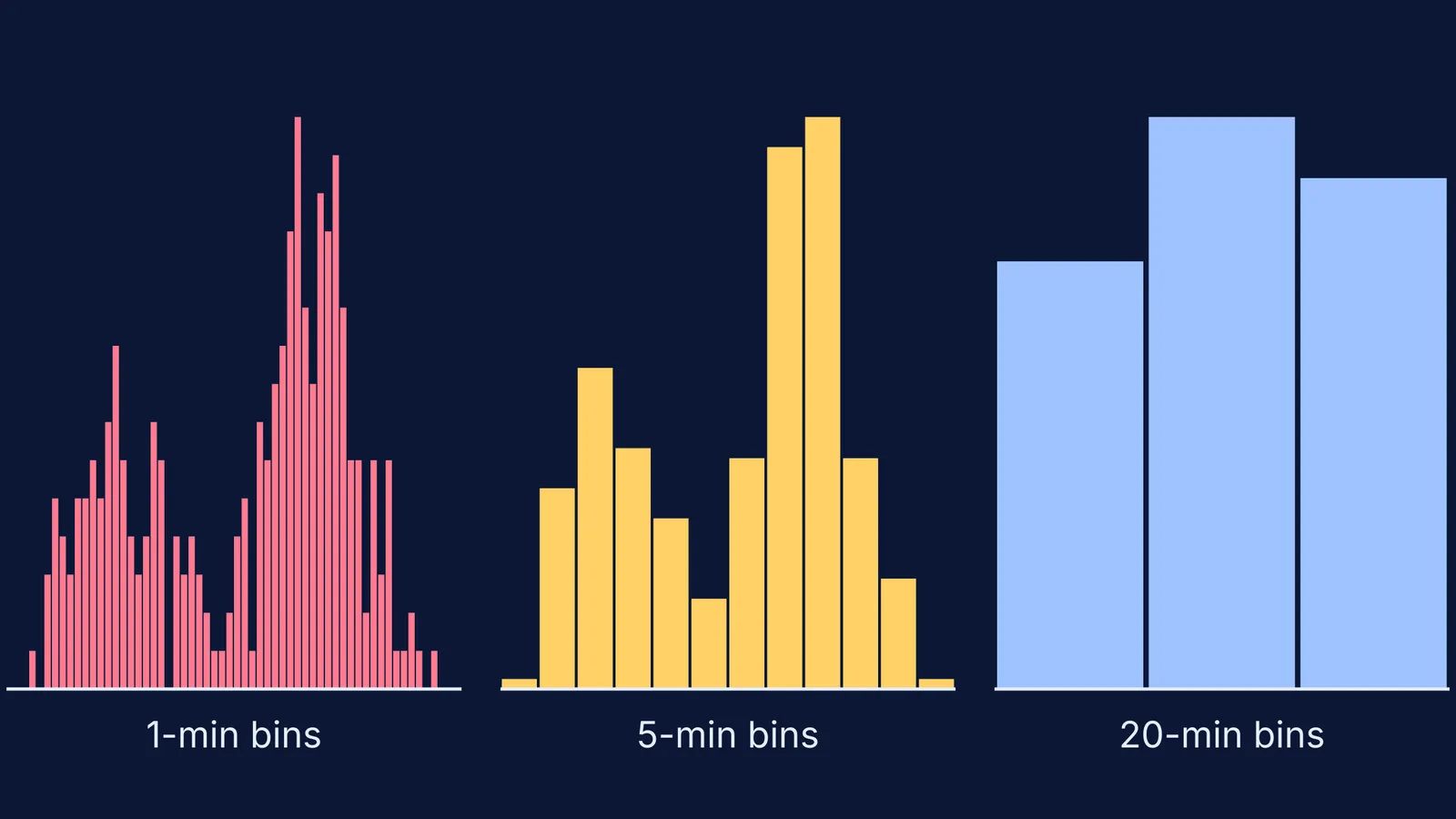
Narrow, 1-minute bins. Jagged. 78 minutes has 15 waits, 72 minutes just 1, 73 minutes 7, and 61 minutes none. You see two crowds, but also gaps that are probably just chance.
Medium, 5-minute bins. Two clear peaks: 32 waits in 50-54 minutes and 57 waits in 80-84 minutes, with a dip to 9 waits in 65-69 minutes. The story: short waits and long waits, not one typical wait.
Wide, 20-minute bins. Three bars: 77 waits in 40-59, 103 in 60-79 and 92 in 80-99. Now it looks like one hump with the middle bar tallest, and the tallest bar spans the dip.
How do you choose a good bin width?
There are rules of thumb, and the NumPy documentation lists the common ones with their formulas.
Sturges' rule: number of bins = log2(n) + 1. It is R's default and works best for roughly bell-shaped data.
Freedman-Diaconis rule: bin width = 2 x IQR / n^(1/3), where IQR is the interquartile range, from Freedman and Diaconis (1981).
Scott's rule: bin width from the standard deviation, from Scott (1979) in Biometrika.
Worked example: n = 272, and from our counts of the faithful CSV the quartiles are 58 and 82 minutes, so IQR = 24. The cube root of 272 is about 6.5, so Freedman-Diaconis gives 2 x 24 / 6.5, roughly 7.4 minutes. Sturges gives about 9 bins across the 53-minute range, roughly 6 minutes each. Both land near our medium picture.
Treat these as starting points: try two or three widths and trust the story that survives. If you are learning to draw histograms in code, our post on line, bar and histogram plots in Matplotlib for Class 12 IP shows where the bins setting goes, and mean, median and mode of grouped data in Class 10 covers class intervals by hand.
How can you spot a misleading histogram?
The starting point of the bins matters too. Keep 20-minute bins but start them at 30 instead of 40, using the same Old Faithful data, and the counts become 21, 82, 157 and 12: one big lump at 70-89 minutes. Same width, a third story.
Run this checklist on any histogram in a news report, a marks sheet or a project:
Bin width: is it stated? Would narrower or wider bins change the number of peaks?
Starting edge: do bins start at a natural value, or one that flatters a claim?
Axis from zero: bars must start at 0. Wilke's principle of proportional ink says shaded areas must be proportional to the values they show.
Unequal bins: if some bins are wider, area, not height, should match the count.
Sample size: with few values, every bump may be chance.
Try it yourself in 10 minutes
Take 30 or more numbers you care about, such as mock test scores or daily study minutes.
Predict the shape before drawing.
Draw it with three bin widths, by hand or in a spreadsheet or Python.
Write one sentence per picture, then circle the claim that holds in all three.
Predict, change one setting, check: the same loop makes interactive simulations useful. The Fermi Simulation Lab has interactive simulations for the ideas that are easier to see than to read, and the Fermi Concept Library gives each mathematics concept its own lesson if grouped data still feels shaky.