On this page
A chatbot can write a confident paragraph and still get a long multiplication wrong. The fix: ask it to write a short program, run it, and show you the code and the printed output.
Why do AI chatbots get calculations wrong?
A language model has no calculator inside unless it is given one. The researchers behind PAL, a 2023 ICML paper, put it plainly: language models "often make logical and arithmetic mistakes in the solution part, even when the problem is decomposed correctly" (Gao et al., PMLR). A study of multi-digit multiplication and similar multi-step tasks suggests that models tend to match familiar patterns rather than work through each step systematically (Dziri et al., 2023). We cover the wider reasons in why AI chatbots get maths wrong.
Handing the arithmetic to code helps. In the PAL paper, a model that wrote Python and let an interpreter compute the answer beat a much larger model reasoning in words by 15 percentage points on GSM8K, a set of school maths word problems (Gao et al., PMLR). A related method, Program of Thoughts, reported an average gain of around 12% over step-by-step reasoning in words across eight maths and finance datasets (Chen et al., TMLR 2023).
How do you make AI calculate using code?
First, check that your chatbot can actually run code. Some can: Google's Gemini API documentation says its code execution tool lets the model generate and run Python, may regenerate the code up to 5 times after an error, and stops after 30 seconds (Gemini API docs). If your app shows no run step or output box, the "result" is still a guess; run the code yourself, as in our guide to writing a projectile simulation in Python.
Then use a prompt like this:
"Solve this with Python. Run the code; do not work out numbers in your head."
"Put every given value, with its unit, in a named variable at the top."
"Print each intermediate result, not just the final answer."
"Show me the full code and the exact printed output."
"If you make a plot, label both axes with units."
Worked example: a projectile, checked with code
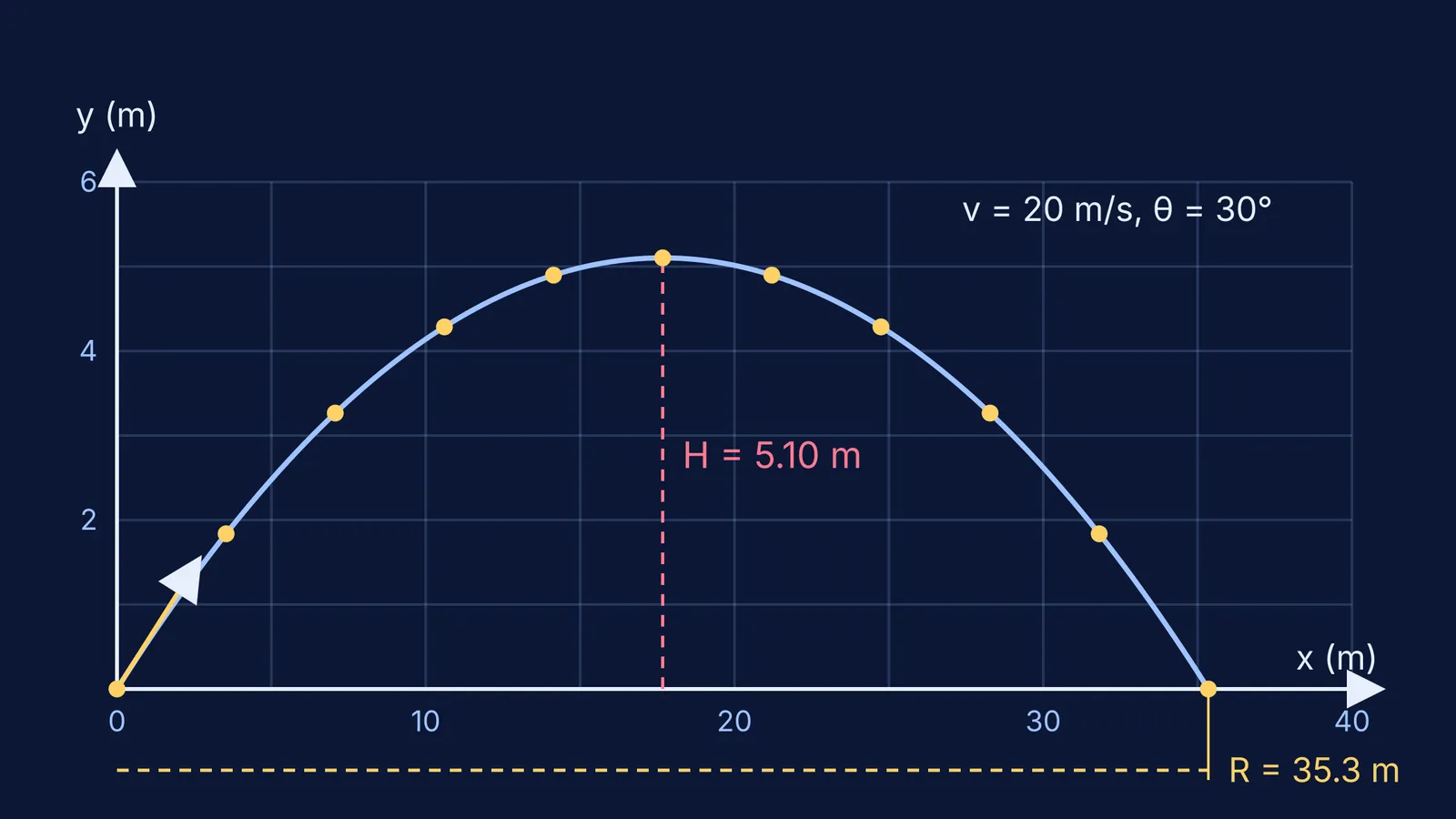
Try this: a ball is thrown at 20 m/s at 30° above the horizontal; take g = 9.8 m/s². Find the range, maximum height and time of flight, and plot the path.
Good code sets v = 20, theta = radians(30) and g = 9.8, then uses R = v² sin 2θ / g, H = v² sin² θ / 2g and T = 2v sin θ / g. It should print about 35.3 m, 5.10 m and 2.04 s. The diagram at the top of this post is that plot, drawn from the same equations.
Now the bug to look for. Python's math.sin takes its angle in radians, not degrees (Python docs). If the code writes sin(30) without converting, it computes the sine of 30 radians, about −0.99, and the range comes out near −12.4 m. The code ran without an error and the answer is still wrong. A negative range is easy to spot; a slightly wrong one is not, so read the code.
What should you check in the code a chatbot shows?
Read it top to bottom with this checklist:
Inputs: every number and unit matches the question (g = 9.8 or 10, cm or m, grams or kilograms).
Angles: degrees are converted before sin, cos or tan.
Formula: the equations are the right ones for this situation. Code computes a wrong formula perfectly.
Output: the answer in the chat matches the printed output, digit for digit.
Rounding: computers store most decimals approximately; in Python, 0.1 + 0.1 + 0.1 == 0.3 is False (Python tutorial). Round only at the end, to the significant figures the question asks for.
Sense: units work out and the size is believable (at 45°, the range should beat 30°).
When does asking for code still fail?
The problem was misread. If the chatbot missed "from a height of 10 m" or misread a figure, the code solves a different problem.
Nothing actually ran. A chatbot can write code and then type an answer without running it. No output block means no check.
The plot misleads. Automatic axes can start away from zero or stretch one axis. Read the axis labels and numbers.
You learn less. JEE Main, JEE Advanced and board exams give you no code to run. Solve one numerical by hand first, then ask for code and compare it line by line with your method. Our five quick ways to check you understood an AI explanation help here.
If your own method was the problem, an explanation helps more than another number. The Fermi Problem Library has worked problems with a step-by-step solver that explains the reasoning rather than printing an answer, and Fermi's AI tutor can draw the figure and run the simulation as it teaches.