

On this page
When your CBSE practical program crashes, the quick move is to paste the code into a chatbot and ask it to fix it. That works until the lab test or the viva, where there is no chatbot and the examiner asks why your fix works. A better habit: paste the error, ask what it means, and make the change yourself.
What does a Python error message actually tell you?
The official Python tutorial on errors and exceptions splits problems into two kinds. Syntax errors, also called parsing errors, mean Python could not read your code at all. Exceptions are errors detected while the program runs, even when the code's syntax is correct.
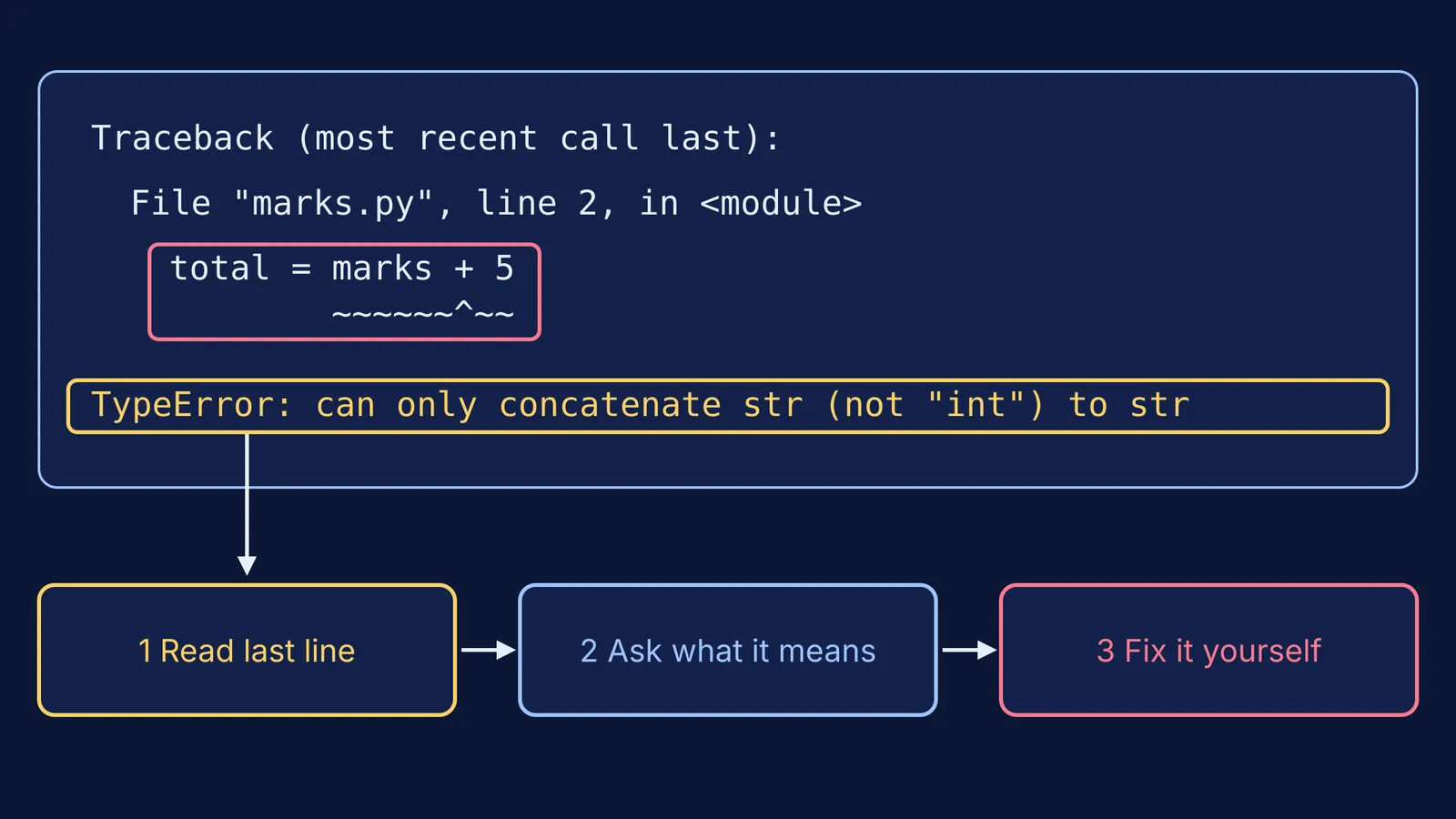
The same page explains how to read the output. The last line of the error message says what happened, starting with the exception type, such as `TypeError` or `NameError`. The part above it, called the traceback, shows the context: the file and line Python was running when it failed.
So read from the bottom up. The last line tells you *what* went wrong; the lines above tell you *where*.
This matters for marks. The CBSE Computer Science curriculum for 2026-27 lists syntax errors, logical errors and run-time errors as a Class 11 topic. In the Class 12 practical, the Python program in the lab test carries 8 marks, judged 60% on logic, 20% on documentation and 20% on code quality, and the viva carries 3 marks. In Class 11, the lab-test Python program is worth 12 marks.
How do you ask AI to explain an error without copying a fix?
Give the AI three things: your code, the full error (not only the last line) and what you expected to happen. Then paste this:
Then follow four steps:
Read the last line yourself and guess the cause before asking.
Ask for the meaning, not the fix, using the prompt above.
Change your code yourself, one line at a time, and run it again.
Write one sentence in your notebook: the error, the cause and the fix.
That sentence is your viva answer; see our guide to the CBSE computer science practical file and viva.
Worked example: a TypeError in a marks program
Say your program reads a student's marks and adds 5 grace marks:
Line 1: `marks = input("Enter marks: ")`
Line 2: `total = marks + 5`
Typing 80 gives a traceback that ends with this line:
`TypeError: can only concatenate str (not "int") to str`
Read it bottom up. The type is `TypeError`, and the traceback points to line 2. A good AI explanation sounds like this: `input()` always gives back text, so `marks` holds the string "80", and Python cannot join text and a number with `+`. A good follow-up question from the AI: "What type should `marks` be before you add 5?"
Now you make the fix: `marks = int(input("Enter marks: "))`. Run it again, then type `abc` on purpose. The new `ValueError` is your cue to use `try` and `except`. Our guide to exception handling in Python for CBSE walks through it.
Why not just ask AI for the corrected code?
Researchers from Aalto University and three other universities tested OpenAI's Codex, a 2022 AI model, on Python error messages that earlier studies rated least readable for beginners, in a study presented at SIGCSE 2023. In their paper, 88% of the AI's explanations were judged comprehensible, but only 47% of the fixes it proposed were correct. Today's models are newer, so treat these numbers as a baseline, not a verdict. Either way, check what AI tells you against your own code.
A 2025 field experiment published in PNAS gave nearly a thousand high school maths students access to GPT-4. With a standard ChatGPT-style interface, grades during practice rose by 48%. When access was taken away, those students scored 17% lower than students who never had it. A version with tutoring safeguards largely avoided that drop. Help that does the work for you leaves with the chatbot; see what tutoring research says about hints versus answers.
What should you check before your practical?
Can you name the error type from the last line without help?
Can you find the line the traceback points to?
Did you type the fix yourself and run the program again?
Can you explain in one sentence why the fix works?
Did you test one bad input on purpose?
If an error keeps coming back because the idea behind it is fuzzy, such as data types or variable scope, the Fermi Concept Library has a lesson on every concept in computing, as well as physics, chemistry, biology and mathematics. Fermi's AI tutor teaches rather than answers: it notices where you are stuck and decides whether to explain, ask or show.


