

On this page
Yes, you can ask a chat assistant to write a pendulum simulation that opens in any browser. The catch is that a simulation can look smooth and still be wrong. Here is how to ask for one and how to check it before class.
Can AI make a physics simulation for my class?
It can write the code. A single HTML file with a canvas, a few sliders and some JavaScript is well within what current assistants produce, and you need nothing installed: save the file and double-click it.
Whether the code is correct is a separate question. In the EvalPlus study, Liu and colleagues (2023) extended a standard coding benchmark with 80 times more test cases. The extra tests caught significant amounts of previously undetected wrong code written by AI models, reducing pass rates by up to 19.3–28.9%. A simulation is harder: wrong physics shows no error message.
How should you ask for a pendulum simulation?
Vague prompts get vague physics. Paste something like this and adjust the ranges for your class:
“Write one self-contained HTML file with no external libraries.”
“Simulate a simple pendulum using the full equation θ'' = −(g/L) sin θ, not the small-angle version.”
“Use the semi-implicit Euler method with a fixed time step of 1/240 s, and run as many steps per frame as the real elapsed time requires.”
“Use the requestAnimationFrame timestamp for timing, and cap the elapsed time after a pause so the pendulum does not jump.”
“Add sliders for length (0.1 to 2 m), g (1 to 25 m/s²) and starting angle (1° to 170°).”
“Show the measured period, and the kinetic, potential and total energy, as numbers on screen.”
“Comment the line where the equation of motion is applied.”
Point 6 matters most. Numbers on screen turn “it looks right” into something you can check.
How do you check that the physics is right?
Each of these four tests takes a minute or two.
Period at a small angle. Set L = 1 m, g = 9.8 m/s² and a 5° start. The small-angle formula T = 2π√(L/g) gives about 2.0 s (HyperPhysics on the pendulum). Time ten swings with your phone's stopwatch; you should get close to 20 s.
Scaling. Change the length from 0.5 m to 2 m, four times longer. The formula says the period should double, from about 1.4 s to 2.8 s. If it stays the same or quadruples, the code is wrong.
Large swings. The same HyperPhysics page notes that the small-angle formula is off by less than one percent for amplitudes below 22 degrees. Well above that, the period should grow visibly longer. If a 150° swing keeps the same period as a 5° one, the code has quietly used sin θ ≈ θ.
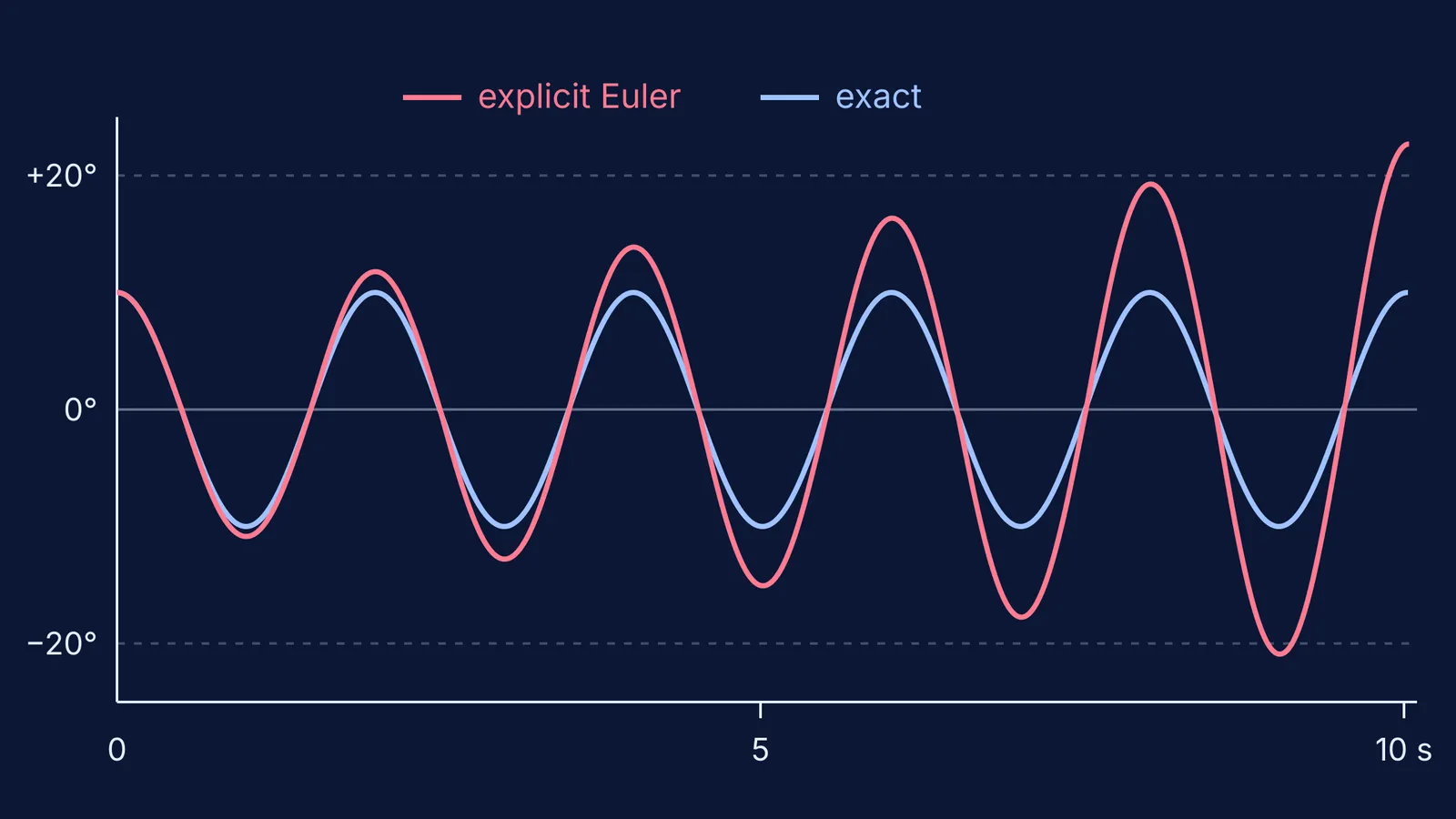
Energy. Leave it running for two minutes. Total energy should stay almost flat. If it creeps upward and the swing grows, see the first error below.
Which silent errors should you test for?
These bugs do not crash the page, so you have to look for them.
Energy drift. With the standard (explicit) Euler method the energy often increases steadily, while the semi-implicit version almost conserves it (semi-implicit Euler method). The fix is small: update the velocity first, then use the new velocity to update the angle.
Speed tied to the screen. requestAnimationFrame generally fires at the display's refresh rate, and MDN warns that animations which ignore its timestamp run faster on high refresh-rate screens (MDN). Test on the classroom laptop, not only your phone.
Background tabs. The same MDN page says these calls are paused in most browsers when the tab is in the background. Switch tabs for 30 seconds and come back. A pendulum that leaps or spins over the top needs the cap from point 4 of your prompt.
Degrees and radians. JavaScript's Math.sin takes an angle in radians (MDN on Math.sin). If the slider says 30 and the code passes 30 straight to Math.sin, the swing will not match the slider.
Edge values. Try 1° (an almost still bob), 170° (slow near the top, but no explosion) and the shortest length (fast, but stable).
The same habit applies to an AI's written answers; our guide to checking an AI's physics solution walks through it. For students who want to write the code themselves, try a projectile simulation in 30 lines of Python.
What should you do with it in class?
A simulation earns its place when students predict before they press play. Ask “if we make the string four times longer, what happens to the period?” and collect written answers before running it. For what simulations do well, and where they fall short, read what PhET research says interactive simulations are good for.
If you do not have time to build and test one yourself, the Fermi Simulation Lab has interactive simulations for the ideas that are easier to see than to read, so you can start the lesson from a working model.


