

On this page
If you have ever snapped a quick photo of your handwritten maths homework, uploaded it to an AI, and watched it completely misunderstand your working, you are not alone. AI tutors are brilliant at finding where a calculation went wrong, tracing your logic step by step, but only if they can accurately read your handwriting first.
Most students simply grab their phone and take a picture from their desk chair, naturally tilting the device to avoid casting a shadow over the page. That slight tilt, combined with uneven room lighting, is the single biggest reason AI misreads mathematical symbols. Here is how to properly photograph your rough work so an AI can read every fraction, exponent, and subscript exactly as you wrote them.
Why does camera angle matter so much?
Optical Character Recognition (OCR) engines—the computer vision systems that turn an image of your writing into digital text—rely heavily on horizontal baselines to make sense of mathematical equations. They need to know exactly where the main line of text sits to tell the difference between x2 (x times two) and x² (x squared), or to correctly align the top and bottom halves of a complex fraction.
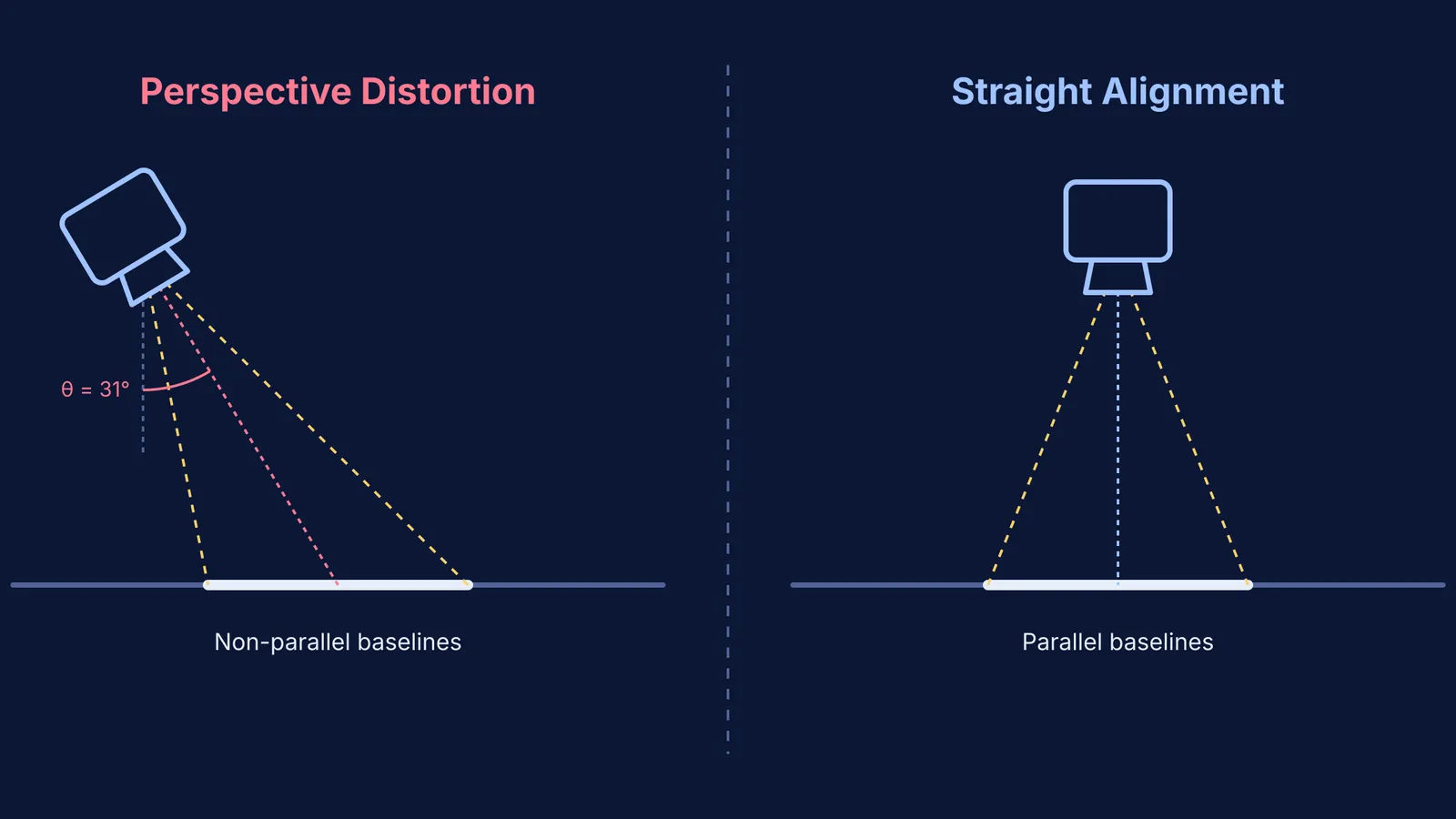
When you hold your phone at an angle, you introduce perspective distortion. This creates a "keystone effect" where the text at the top of the page appears smaller and further away than the text at the bottom. The baselines are no longer parallel, and the spatial relationships the AI depends on break down. A technical review of OCR accuracy shows that a camera tilt of just 5 degrees can increase the word error rate by 15% or more (imagetotable.ai). Past 10 degrees, many engines fail to parse multi-line fractions or matrices altogether, returning a scrambled mess of numbers.
To fix this, treat your phone like a flatbed scanner. Stand up, hold the phone directly above the paper, and keep the lens perfectly parallel to the desk. If you are using a tool like the Fermi Problem Library to check your step-by-step reasoning, giving it a straight, distortion-free image ensures it spends its time checking your physics logic rather than guessing your handwriting.
How does lighting affect contrast and glare?
Lighting is just as critical as the angle, but many people approach it the wrong way. You do not necessarily need maximum absolute brightness; you need maximum contrast. Before an AI reads your image, it typically binarises it—converting everything to stark black (ink) and stark white (paper).
If you use a single bright desk lamp placed directly over your work, your hand or phone will cast harsh shadows across the page. The OCR software might misinterpret the edges of these shadows as pen strokes. Similarly, if you write with a glossy gel pen or pencil, a bright camera flash can create pure white glare right over a symbol, effectively erasing it. Using even, diffuse lighting drastically improves text detection accuracy by providing a clean, noise-free background.
Instead of using your phone's flash, move your paper to a window to capture soft, natural daylight. If you are studying at night, try positioning two lamps on opposite sides of your desk at roughly 45-degree angles to cancel out each other's shadows.
Why is 300 DPI important for mathematical symbols?
Maths is much harder for an AI to read than a simple paragraph of English text. Mathematical notation uses highly similar characters (such as 0 vs. O, x vs. ×, t vs. +, and l vs. 1) and relies heavily on precise spatial arrangement.
While standard printed text can often be processed perfectly well at 200 DPI (dots per inch), reading handwritten mathematical equations requires much higher fidelity. A resolution of 300 DPI is the industry standard for high-quality OCR, as dropping down to 150 DPI typically results in a 15–20% loss in accuracy (imagetotable.ai). A crisp 300 DPI scan provides the AI with enough pixel data to distinguish the gentle curve of an integral sign ∫ from an elongated S.
When taking the photo, tap your phone screen to lock the focus and ensure the text is razor-sharp. Then, crop your image tightly around the specific problem you want help with. Stripping away the surrounding clutter, desk background, and doodles helps the AI focus its entire context window purely on your equation.
A quick checklist for scanning your rough work
Before you send a photo of a tricky mechanics problem or integration by parts step to an AI tutor, run through this mental checklist to guarantee a good result:
Parallel Lens: Is the phone perfectly flat and parallel to the page, or is it tilted?
Diffuse Light: Are there harsh shadows cutting across the text or glare reflecting off the ink?
Tight Crop: Have you cropped out the desk, the margins, and any unrelated questions?
Clear Spacing: Did you leave a clear physical gap between the numerator and denominator of your fractions so they do not bleed together?
AI tools are uniquely capable of helping you figure out why you are stuck rather than just giving you the final answer. When you are studying for exams and reviewing why you made common mistakes in rotational motion, or using Fermi's AI tutor to build a plan for the session from a scanned assignment, a clean, high-contrast, straight-on photo ensures the AI sees exactly what you wrote.


