On this page
Before 1963, computers were mostly number crunchers that took their instructions through punched cards or paper tape. They were vast cabinets of vacuum tubes and relays designed to calculate ballistics or process census data. Then Ivan E. Sutherland submitted his doctoral thesis, *Sketchpad: A Man-Machine Graphical Communication System*, at the Massachusetts Institute of Technology (ACM). His work turned the Lincoln TX-2 computer into a canvas you could converse with visually.
It was a radical shift in how people thought about machines. Just as Alan Turing's 1936 paper: what a computer can and cannot do redefined computation by formalising algorithms, Sutherland's Sketchpad redefined how humans could interact with the results of those algorithms. It was the first step toward the screens and interfaces we use every day.
How did Ivan Sutherland's Sketchpad change computer graphics?
Before Sketchpad, generating an image on a computer required typing in long strings of coordinates and waiting for a plotter to draw the result on paper. Sutherland’s system changed this entirely by allowing a user to draw directly onto a cathode-ray tube screen in real time.
Because the computer mouse had not yet been invented, the system relied on a "light pen." This was a hand-held stylus connected to the computer by a wire. The tip of the pen contained a photoelectric cell that detected the scanning electron beam of the display. When the pen sensed a burst of light from a specific point on the screen, the computer immediately registered exactly where the pen was pointing.
This direct, instantaneous interaction was the birth of the graphical user interface. The user could draw points and lines, and the computer would track the pen to update the image dynamically.
What were the key innovations of the Sketchpad program?
The true power of Sketchpad was not just that it left a digital mark on a screen, but that it actively understood the underlying geometry of what was being drawn. It introduced several structural concepts that are still central to computer science and engineering today.
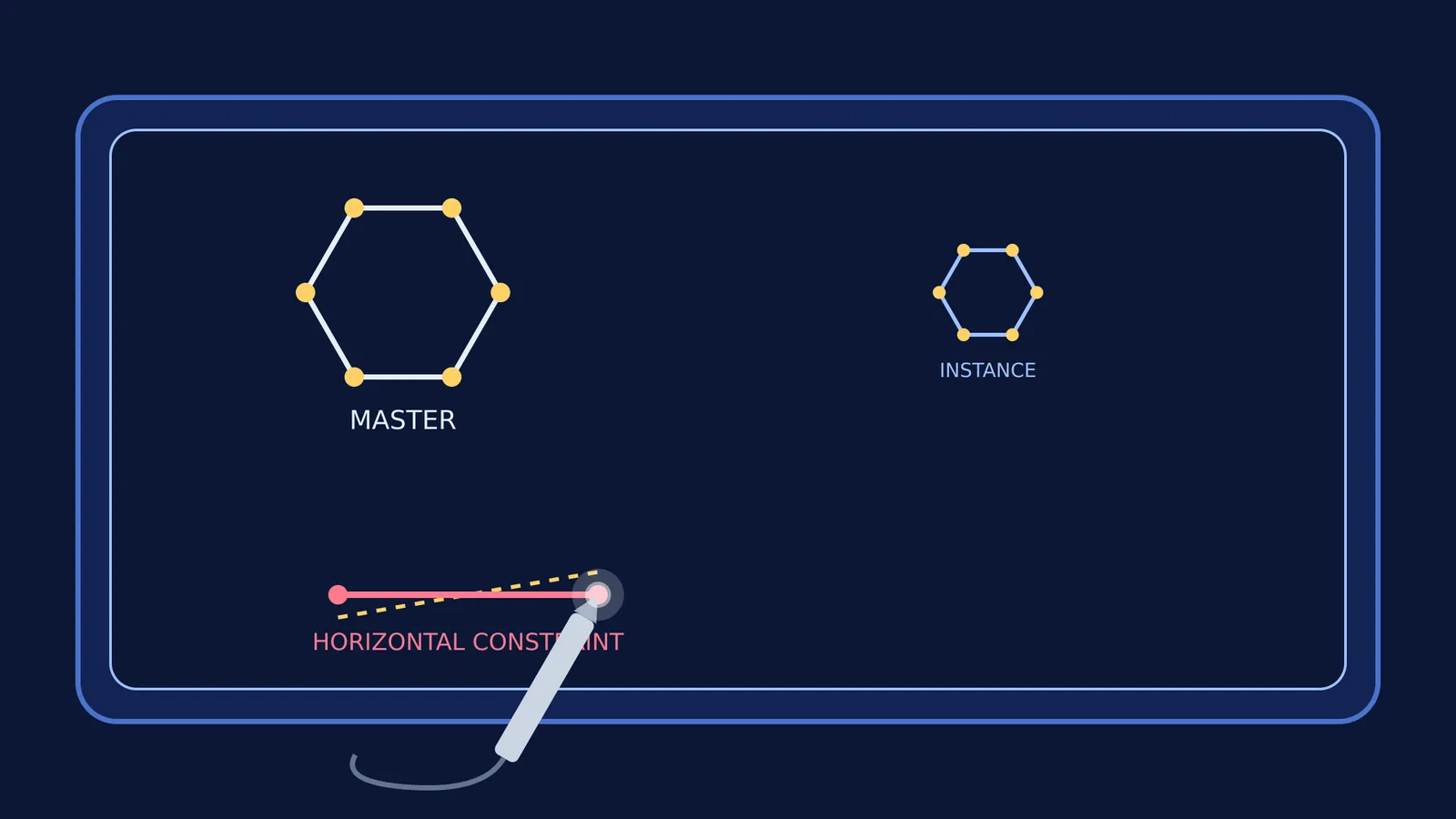
Geometric constraints: If a user drew a rough, wobbly line with the light pen, they could instruct Sketchpad to make it perfectly horizontal. The system would automatically calculate the required coordinates and snap the points into a perfect line. Users could define mathematical constraints to make lines parallel, perpendicular, or of equal length, and the computer would solve the equations behind the scenes to satisfy those rules (University of Cambridge).
When you study coordinate geometry today, you are essentially solving the same constraints by hand. If you are struggling with a geometric proof or diagram, you can use a constraint-based checklist to break the problem down just as a computer would:
Identify the fixed points: What coordinates cannot change under any circumstances?
List the rules: Are two lines parallel (meaning they have equal slopes)? Are they perpendicular (meaning their slopes multiply to -1)?
Set up the equations: Write an algebraic equation for each geometric rule.
Solve the system: Use substitution or elimination to find the new coordinates that satisfy all the equations at once.
This is exactly the mathematics Sketchpad solved behind the scenes. It was a dynamic, moving version of the static graphs first imagined centuries earlier in Rene Descartes and the coordinate plane: algebra meets geometry.
Masters and instances: Sketchpad also pioneered the idea of creating a "master" drawing—for example, a complex mechanical gear or a circuit component—and then placing multiple "instances" of it onto the screen. If the user changed the geometry of the master drawing, every single instance on the screen updated automatically to reflect that change. This foundational idea evolved into object-oriented programming, where a single class defines the behaviour and structure of many individual objects.
How can you explore graphics and geometry today?
Sketchpad proved that computers could be used for interactive design, architecture, and simulation, rather than just raw arithmetic. Today, computer-aided design (CAD) software relies entirely on the principles Sutherland laid out in 1963.
When you need to understand how mathematical rules and constraints govern a system, reading about them in a textbook is often not enough. In the Fermi Simulation Lab, you can interact with physical and geometric systems directly, changing variables to see how the constraints update the environment in real time. And if you are studying the mathematics behind these graphics, Fermi's AI tutor can work out what you already know and build a plan for the session, guiding you step-by-step through the geometry of lines, curves, and constraints.