

On this page
Why are digital camera sensors naturally colour-blind?
Every digital image sensor, from early charge-coupled device (CCD) sensors developed by Willard Boyle and George Smith to modern CMOS chips, relies on silicon photodiode junctions that convert incoming photons into electron-hole pairs. Silicon absorbs visible light whenever photon energy exceeds its bandgap of 1.12 electron-volts. However, the photodiode registers only an accumulated electrical charge. It measures how many photons arrived during an exposure, but it cannot determine their wavelength.
In early television, recording colour required splitting incoming light with glass prisms onto three separate monochrome sensors. While three-sensor systems produced accurate colour, they were bulky, heavy, and too expensive for consumer devices. Another option, rotating a mechanical colour filter wheel in front of a single tube, created severe motion blur and worked only for static scenes.
Why does the Bayer filter use twice as many green pixels?
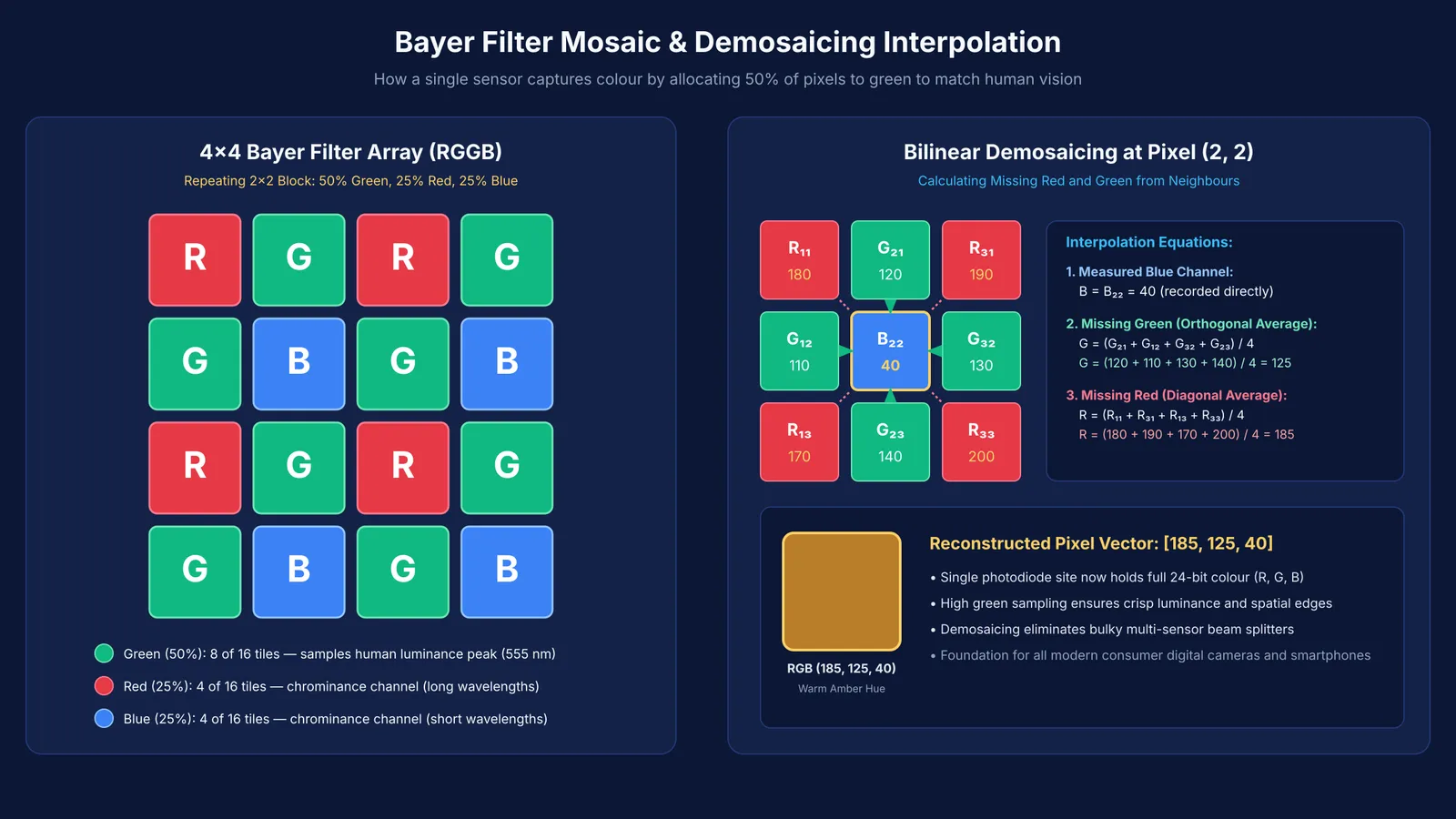
In 1975, Eastman Kodak research scientist Bryce Bayer solved this problem by designing a single-sensor mosaic. In U.S. Patent 3,971,065, granted on July 20, 1976, Bayer placed a microscopic grid of selective colour filters directly over the sensor. Instead of dividing pixels equally among red, green, and blue, Bayer allocated 50% of the array to green, 25% to red, and 25% to blue.
Bayer arranged the green filters in a checkerboard pattern, alternating with red and blue lines. He based this distribution on human eye physiology. The retina's cone cells are not equally sensitive to all wavelengths; visual sharpness and luminance perception depend primarily on green light. Under the standard photopic luminous efficiency curve evaluated by Ikeda, Yaguchi, and Sagawa in the Journal of the Optical Society of America, human daylight sensitivity peaks at 555 nanometres.
By giving green twice the sampling density of red or blue, Bayer ensured that the luminance channel captured fine edges and detail, while the sparser red and blue channels supplied colour hue.
How does demosaicing calculate the missing colours?
Because each pixel in a Bayer filter records only one primary colour, two-thirds of the colour information is missing from the raw sensor data. Reconstructing a full-colour image requires an algorithm known as demosaicing, as reviewed by Gunturk and colleagues in IEEE Signal Processing Magazine.
Demosaicing algorithms interpolate the missing channels for each pixel using its immediate neighbours:
At any red or blue site, the missing green value is calculated by averaging the four adjacent orthogonal green neighbours.
At a green site in a red-green row, the missing red value is the average of its two horizontal red neighbours, and the blue value is the average of its two vertical blue neighbours.
At a green site in a blue-green row, the red value is the average of its two vertical red neighbours, and the blue value is the average of its two horizontal blue neighbours.
At a red pixel, the blue channel is the average of the four diagonal blue neighbours, and vice versa.
While basic bilinear interpolation is fast, modern cameras use edge-aware gradient filters to prevent colour fringing along high-contrast boundaries.
How do you calculate RGB values from a raw pixel?
To see how demosaicing works in practice, consider the bilinear reconstruction methods reviewed by Gunturk and colleagues applied to a 3×3 patch where the central pixel is blue (B22) with a raw measured brightness of 40 on an 8-bit scale from 0 to 255.
The surrounding measured raw values are:
Row 1: R11 = 180, G21 = 120, R31 = 190
Row 2: G12 = 110, B22 = 40, G32 = 130
Row 3: R13 = 170, G23 = 140, R33 = 200
To reconstruct the full colour triple at pixel (2, 2):
Measured Blue channel: B = 40.
Interpolated Green channel: Average the four orthogonal green neighbours:
G = (G21 + G12 + G32 + G23) / 4 = (120 + 110 + 130 + 140) / 4 = 500 / 4 = 125.
Interpolated Red channel: Average the four diagonal red neighbours:
R = (R11 + R31 + R13 + R33) / 4 = (180 + 190 + 170 + 200) / 4 = 740 / 4 = 185.
The reconstructed colour vector is (R=185, G=125, B=40), producing a warm amber tone from a single blue detector.
How to explore wave optics and sensor physics with Fermi
Understanding how silicon detects photons and how optical filters shape sensor data connects Class 12 wave optics with semiconductor physics.
When studying optical spectra, p-n junction carrier generation, or signal sampling:
The Fermi Simulation Lab provides interactive simulations for the ideas that are easier to see than to read, helping you visualize wave propagation and semiconductor behaviour under illumination.
If you get stuck on numerical problems involving photon energies or carrier concentration, the Fermi Problem Library offers worked problems with a step-by-step solver that explains the reasoning rather than printing an answer.
To see how optical filtering links to the broader curriculum, the Fermi Concept Library maps every concept in physics, chemistry, biology, mathematics, and computing.


