

On this page
Your router sends data through the air using invisible electromagnetic waves. When you sit in the same room as the router, these waves travel freely through the open space. But when you move to a different room, your device has to catch waves that have passed through physical obstacles like doors, furniture, and walls.
If you are trying to study for an upcoming exam and the connection keeps dropping, understanding how different materials interact with these waves can help you map out and fix the dead zones in your house.
Why is Wi-Fi weaker in some rooms and through walls?
Wi-Fi relies on radio waves, which are a form of electromagnetic light that our eyes cannot see. Just as a tinted window dims visible light, physical walls act as filters that dim radio waves.
The energy density and intensity of an EM wave dictate how much data can reliably reach your device. When these waves hit a wall, three things happen: some energy bounces back into the room (reflection), some passes through to the other side (transmission), and some is absorbed by the material and converted into microscopic heat (absorption).
Lightweight materials like drywall, glass, and thin wood absorb very little energy, allowing the majority of the signal to pass through unimpeded. But dense, heavy materials like concrete and solid brick are formidable barriers. As the radio waves try to push through the concrete, they excite the atoms and any trapped moisture inside the wall structure. This takes energy away from the wave itself, severely dropping its intensity.
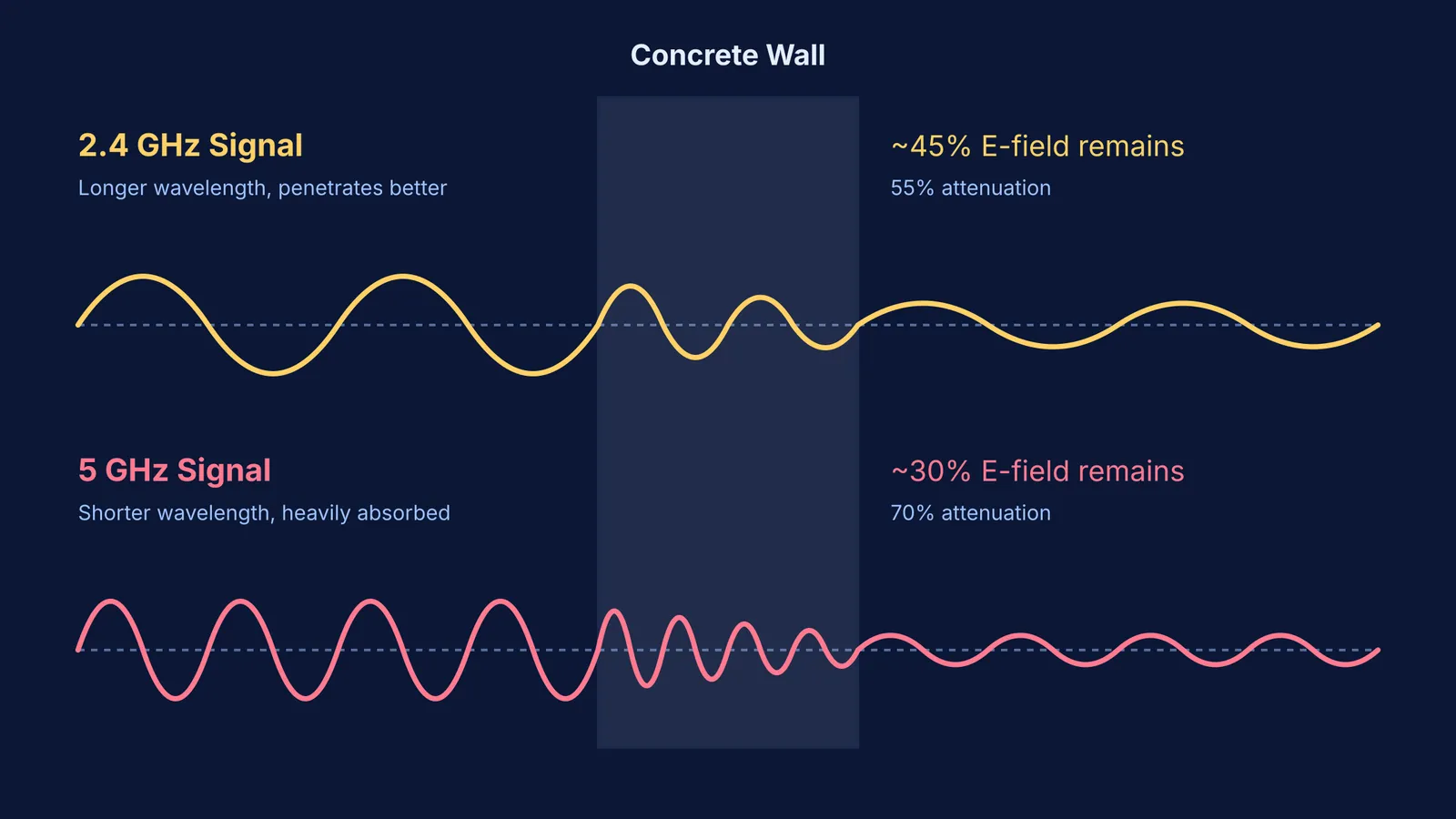
A 2024 study published in the *Journal of Computer and Communications* measured this effect directly: a standard concrete wall causes a 70.12% reduction in electric field strength for 5 GHz signals. If your house has solid concrete walls separating your bedroom from the living room, the signal is physically blocked from reaching your device.
Why is 5 GHz weaker through walls than 2.4 GHz?
Most modern routers offer two frequency bands for you to connect to: 2.4 GHz and 5 GHz. While the 5 GHz band provides much faster speeds and higher bandwidth in the same room, it is notorious for dropping out as soon as you walk down the hall.
The reason lies in the physical wavelength of the signal. A 2.4 GHz wave is physically longer than a 5 GHz wave, allowing it to bend around edges and push through obstacles with far less interaction. Because the 5 GHz wave is roughly half the size, its shorter wavelength interacts much more frequently with the dense molecular structure of building materials.
Just as you see when light enters glass, radio waves slow down and their wavelength compresses inside the wall, losing energy to the medium. Because the 5 GHz waves are shorter and oscillate more times per second, they transfer a greater proportion of their energy to the concrete. The 2024 study confirms this difference: while the concrete wall blocked 70.12% of the 5 GHz signal, it only blocked 55.22% of the 2.4 GHz signal.
How to fix Wi-Fi dead zones?
If your study desk is located in a Wi-Fi dead zone, you can use basic physics to optimize your setup. Here is a simple framework to improve your connection and keep your study sessions uninterrupted:
Switch frequency bands: If you are separated from the main router by a thick concrete wall, manually connect your laptop to the 2.4 GHz network. It will have a lower maximum speed, but the connection will be much more stable than the 5 GHz band.
Clear the line of sight: Do not hide your router behind books or tuck it away inside a metal cabinet. Paper holds moisture, and thick stacks of books absorb radio waves almost as well as solid wood. Ensure the router is placed high up and in the open.
Map the dead zones: Use the Wi-Fi icon on your phone or laptop to map the signal strength around your desk. You might find that moving your laptop just a few feet avoids a thick supporting pillar or a water pipe hidden inside the wall.
Use a wired connection for heavy lifting: If you absolutely need to watch high-definition video lectures without buffering, a cheap Ethernet cable routed under the door will bypass the walls entirely, providing a perfect signal.
When the signal is weak and you cannot stream heavy video lectures, text-based interactive tools are a reliable alternative. Fermi's AI tutor holds a line of reasoning across a session and notices where you are stuck, rather than just printing an answer. If you struggle to picture how electromagnetic waves move and attenuate through different materials, you can see it in action in the Fermi Simulation Lab.


