

On this page
It happens to everyone: you press a button on the TV remote, and nothing happens. Are the batteries dead, or is the remote broken? The quickest way to find out lies right in your pocket. By using your smartphone camera, you can turn an invisible physical phenomenon into a practical, everyday diagnostic tool.
Whether you are a parent trying to fix the family television or a student connecting classroom physics to the real world, this simple trick is a brilliant demonstration of science. There is no magic involved—just the fascinating rules of the electromagnetic spectrum and the hardware tucked inside modern phones.
Can a phone camera see a TV remote's infrared light?
Yes, your phone camera can see the infrared light emitted by a TV remote. If you point a working remote at your phone's camera lens and press a button, the screen will display a faint, pulsing light—usually pale purple or white.
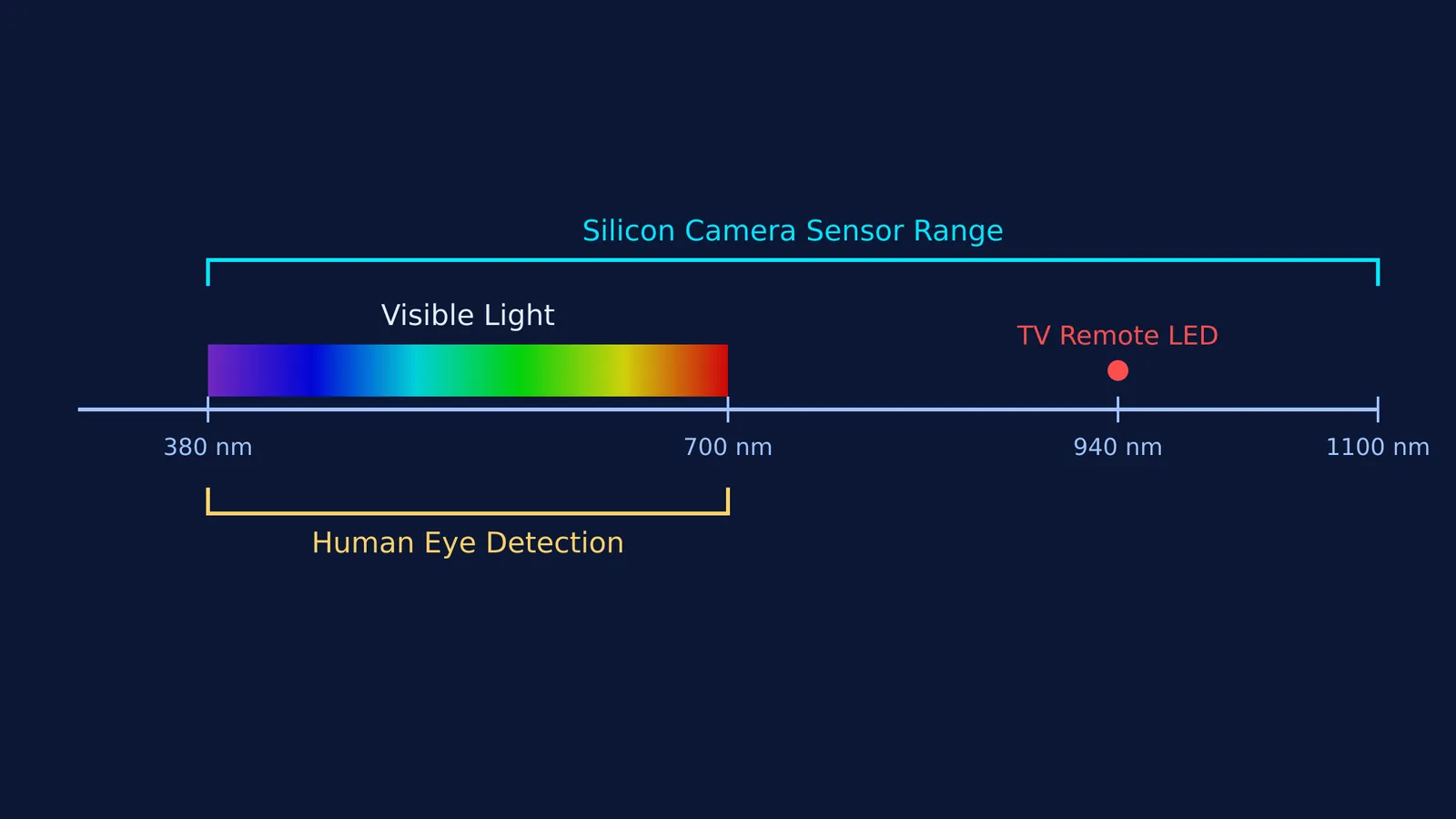
To understand why this happens, you have to look at the electromagnetic spectrum. According to NASA, the human eye detects visible light wavelengths from 380 to 700 nanometers (NASA Science). Because of this strict biological limit, everything beyond the deep red end of the spectrum is entirely invisible to us.
Why can cameras see infrared when we cannot?
The answer comes down to what is capturing the light. Human vision relies on biological photoreceptors, whereas your smartphone uses a semiconductor silicon sensor.
A typical television remote control uses infrared energy at a wavelength of approximately 940 nanometers (NASA Science). Because this wavelength falls into the near-infrared band—which is just beyond the visible light spectrum—our eyes register nothing. However, some digital and cell phone cameras are naturally sensitive to that specific wavelength and can "see" it. The silicon in the camera sensor responds to near-infrared light just as readily as it does to visible colors, converting those invisible photons into an electrical signal.
You might wonder why the light appears purple or white on your screen instead of "infrared." Digital cameras use tiny color filters (red, green, and blue) over their pixels to interpret the visible world. Because the camera software does not have a designated color for near-infrared, the intense light from the remote bleeds through these tiny filters. The image processor mixes these overlapping signals and displays them as a bright, pulsing purplish-white glow.
If you are exploring how waves behave or preparing for physics exams, visualizing this gap between human perception and sensor technology can make abstract concepts click. The Fermi Simulation Lab provides interactive simulations for the ideas that are easier to see than to read.
How to try the remote control test at home
This simple experiment is entirely safe and serves as a great practical demonstration of the electromagnetic spectrum. Here is a quick checklist to perform the test yourself:
Gather your tools: You need a standard TV or air conditioner remote and a smartphone.
Open the camera app: Turn on your phone's camera. If the rear camera does not work, switch to the front-facing (selfie) camera, as these often have weaker infrared-blocking filters.
Point and press: Aim the small LED bulb at the top of the remote directly into the camera lens.
Watch the screen: Press and hold any button on the remote. You should see a pulsing, purplish-white light on your phone screen.
Exploring light and waves
The remote control test is a perfect starting point for understanding how energy moves. It shows that just because we cannot see something does not mean it is not there. Infrared radiation acts identically to visible light—it can reflect, refract, and be blocked by obstacles. In fact, dispersion of white light by a glass prism works on the same underlying principles, where different wavelengths interact with materials in predictable ways.
For students tackling energy density and intensity of an EM wave in physics class, grounding these equations in real-world examples builds intuition. You can also calculate the exact energy of these invisible remote control photons using the E = 1240/λ quick photon-energy formula.
Whether you are debugging a dead remote or revising for your next physics test, this quick phone trick is a brilliant reminder of the physics happening all around us. If you hit a roadblock while studying wave properties, Fermi's AI tutor works out what you already know, builds a plan for the session, and teaches through it — writing on a board, drawing the figure, running the simulation, and checking understanding as it goes.
Next time your TV refuses to turn on, reach for your phone before you reach for new batteries.


