

On this page
When a student first learns to multiply fractions, the standard rule is usually a relief: simply multiply the top numbers, then multiply the bottom numbers. But this algorithmic shortcut often masks a serious conceptual gap. When you multiply two whole numbers, the result gets larger. When you multiply two proper fractions, the result gets smaller. Without a visual framework, this contradiction is deeply counterintuitive.
Mathematical research shows that relying purely on numerical algorithms leaves students struggling to apply fraction logic to word problems. In a 2009 study on teaching methods, researchers Jenny Tsankova and Karmen Pjanic noted that while the standard algorithm is taught by asking students to notice number patterns, introducing an area-model approach explicitly extends a student's conceptual understanding.
This is why modern curricula, including the widely adopted Common Core State Standards for Mathematics (Standard 5.NF.B.4), specifically require students to use rectangular area models to interpret fraction products. By drawing a rectangle and shading its parts, you are no longer just pushing numbers around on a page—you are literally finding a fraction of a fraction.
Why does multiplying fractions make them smaller?
When we write 2/3 × 3/4, what we are actually asking is: "What is two-thirds *of* three-quarters?"
If you start with only a part of something (three-quarters), and you take only a piece of that part (two-thirds of it), your final amount must be smaller than both your starting piece and the fraction you took of it.
The rectangular area model is the right tool for multiplication because it physically overlaps the two dimensions, giving a clear picture of why the product shrinks. It allows students to map out the base unit, partition it into equal parts, and clearly see the overlapping section that represents the final product.
How do you draw the area model for 2/3 × 3/4?
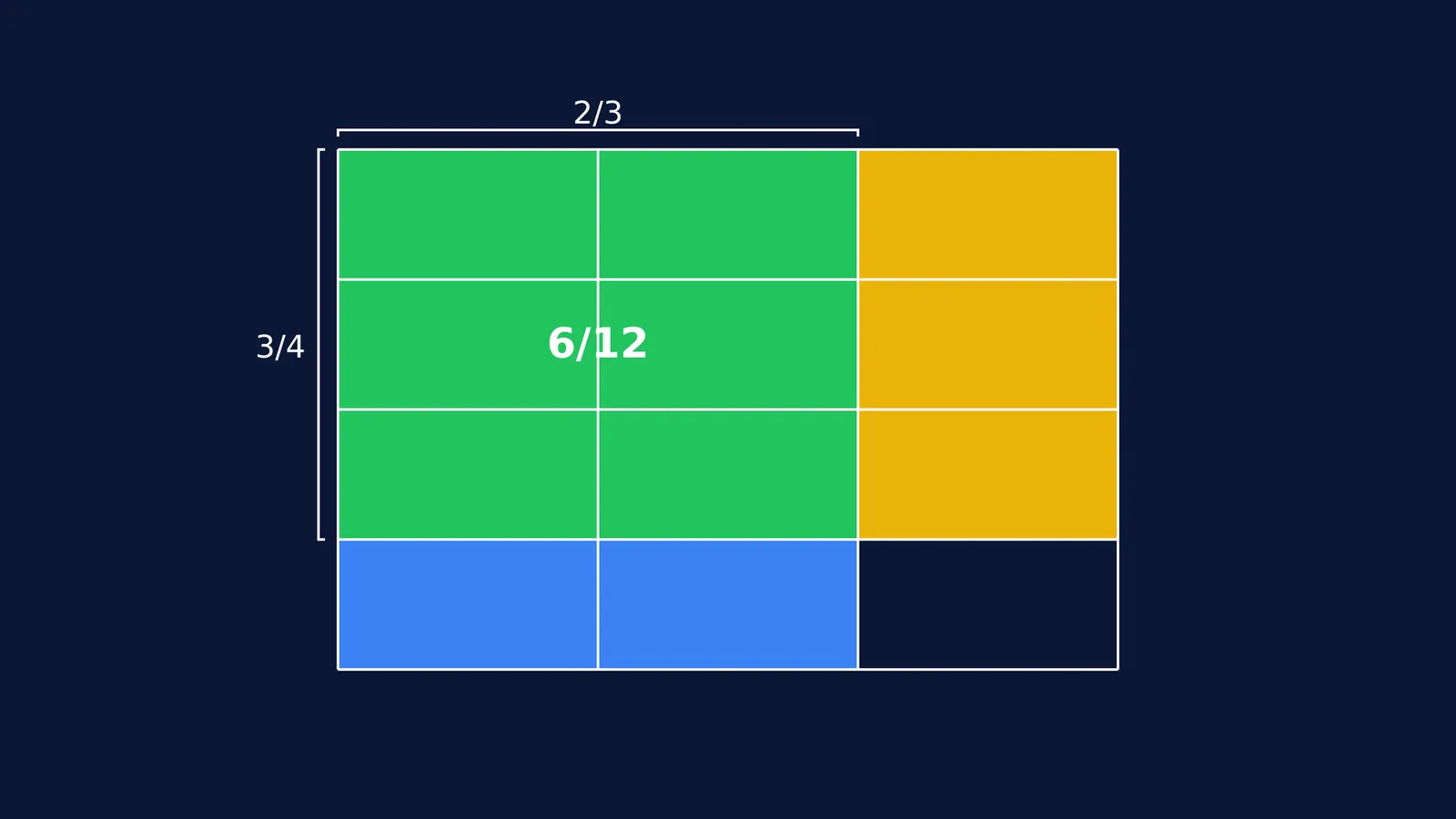
To see why 2/3 × 3/4 equals 6/12, you can map the problem onto a single rectangle.
Draw the whole: Draw a large, blank rectangle. This represents exactly 1 whole.
Partition the first fraction: Look at the first fraction (2/3). Divide your rectangle into 3 equal vertical columns. Shade 2 of those columns. You have now represented 2/3 of the whole.
Partition the second fraction: Look at the second fraction (3/4). Using the exact same rectangle, draw horizontal lines to divide it into 4 equal rows. Shade 3 of those rows in a different pattern or colour.
Find the overlap: The magic happens where the two shadings overlap. Count the small rectangles that are shaded both ways. There are 6 overlapping boxes (this is your numerator, 2 × 3).
Count the total: Count the total number of small boxes the entire whole is now divided into. There are 12 boxes in total (this is your denominator, 3 × 4).
The answer is exactly the overlapping region: 6 out of 12 boxes, or 6/12 (which simplifies to 1/2).
Can you use the area model for word problems?
The goal of mathematics education is not just to get the right answer, but to understand why the answer is right. A student who only knows the "multiply across" rule will struggle when word problems ask them to scale a recipe or calculate the area of a room with fractional side lengths.
Imagine a recipe that calls for 3/4 of a cup of sugar, and you only want to make 2/3 of the recipe. If you understand the area model, you can instantly visualize that you need to take the 3/4 cup of sugar and partition it further into thirds, selecting two of those thirds. You can mentally perform the operation and know that you will end up with less than a full cup, and even less than 3/4 of a cup.
By taking the time to draw the area model, students anchor the abstract numbers to a concrete reality. They stop memorizing and start seeing.
If you want to practice this logic across more complex mathematics, the Fermi Concept Library covers every concept in mathematics, each with its own lesson. And if you are struggling with a specific word problem, the Fermi Problem Library has worked problems with a step-by-step solver that explains the reasoning rather than printing an answer, helping students build the visual frameworks they need before they reach for the shortcut.


