

On this page
The simplest camera in the world has no lens. A pinhole camera is just a light-proof box with a tiny hole on one side and a screen on the opposite face. When you point it at a bright object, a full-colour image appears on the screen inside.
But that image is always upside down. The physics behind this inversion is exactly what makes the camera work in the first place.
Why is a pinhole camera image inverted?
The inversion happens because light travels in straight lines—a principle known as rectilinear propagation. In a uniform medium like air, light does not bend around corners or curve on its own.
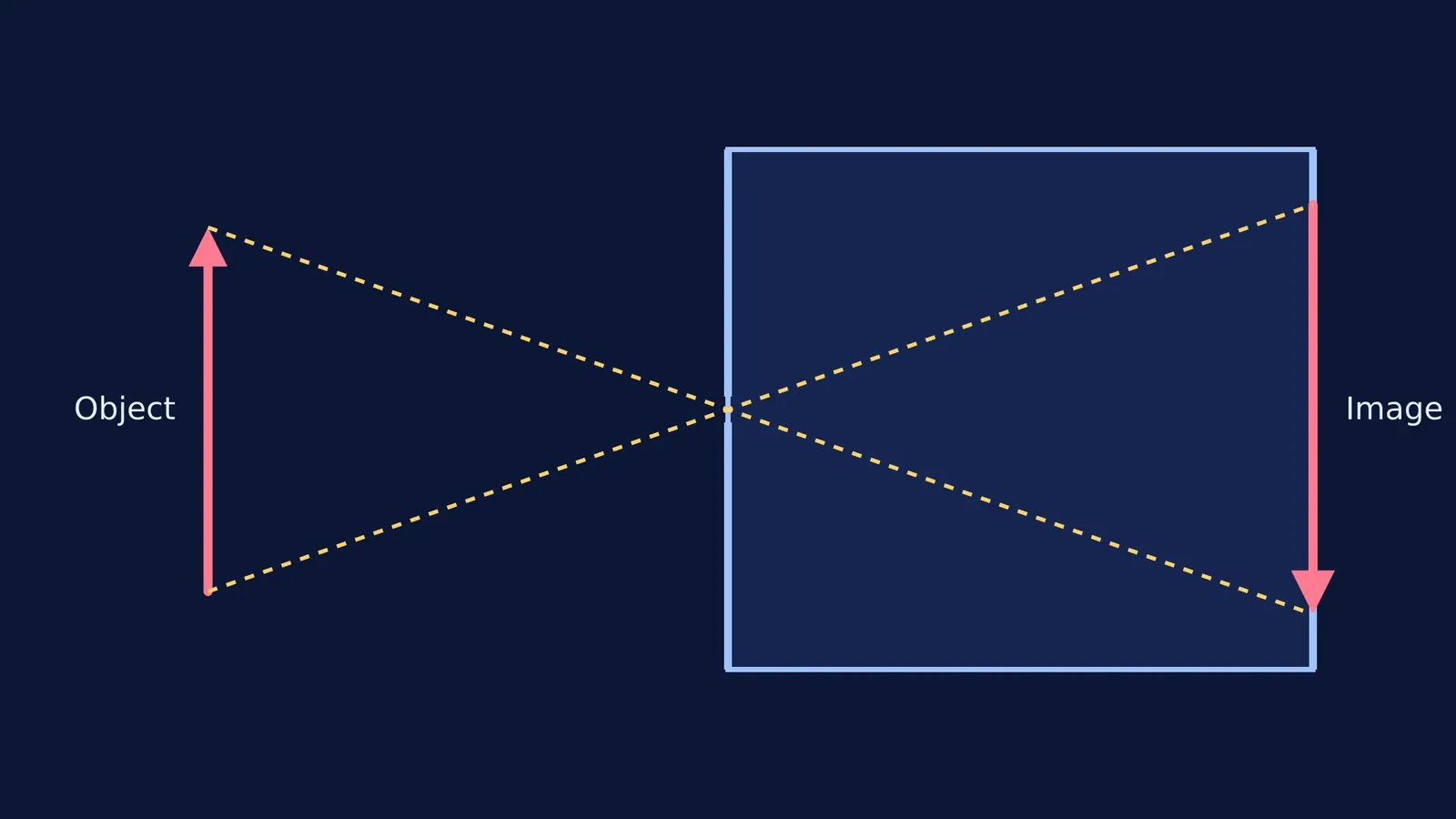
The pinhole acts as a tiny gatekeeper. Light rays reflecting off the top of an object travel in a straight diagonal line, pass through the hole, and hit the bottom of the screen. Meanwhile, light rays from the bottom of the object travel in a straight line upward, passing through the same hole to hit the top of the screen.
Because the rays from the top and bottom (and the left and right) must cross each other at the tiny hole, the entire image projected on the back wall is flipped vertically and horizontally.
You can see this without building a box. As taught in the Class 6 NCERT science curriculum, the dappled sunlight you see on the ground under a leafy tree is actually a collection of natural pinhole images of the Sun. The small gaps between the leaves act as pinholes, projecting circular solar images onto the ground (Vedantu).
How does the size of the pinhole affect the image?
The size of the hole controls a strict trade-off between the sharpness of the image and its brightness.
If the pinhole is very small, it strictly limits the light. Only a narrow beam from any single point on the object makes it through. This creates a highly focused, sharp image, but because so little light enters, the image is dim.
If you make the hole larger, more light enters the box, making the image brighter. However, a larger hole allows light rays from the same point on the object to spread out and hit multiple overlapping spots on the screen. These overlapping circles of light (often called circles of confusion) make the resulting image blurry.
How does screen distance change the image?
The distance from the pinhole to the screen (the image distance, v) compared to the distance from the pinhole to the object (the object distance, u) determines the magnification.
The ratio of the image height to the object height is exactly equal to the ratio of the image distance to the object distance. If you slide the screen further away from the pinhole, the image grows larger.
However, the amount of light entering the pinhole remains the same. When you move the screen back, that fixed amount of light has to cover a larger area, making the image fainter.
This geometry is much simpler than tracing a ray through a glass slab or finding the minimum distance for a lens's real image, but the straight-line principle remains the foundation of optics. The Fermi Concept Library has a lesson for every concept in physics and its place in the map, so you can master rectilinear propagation before tackling complex refraction problems.
If you are working through magnification problems, the Fermi Problem Library has worked problems with a step-by-step solver that explains the reasoning rather than printing an answer. And if you are struggling to picture why a larger hole creates overlapping circles of light, the Fermi Simulation Lab provides interactive simulations for the ideas that are easier to see than to read.
A quick way to test it
You can build a sliding pinhole camera to see these effects yourself:
Take two cardboard boxes where one slides snugly inside the other.
Cut one face off both boxes.
On the intact face of the larger box, pierce a small pinhole.
On the intact face of the smaller box, cut a square and tape over it with translucent tracing paper.
Slide the smaller box into the larger one (tracing paper side first) and look through the open end.
Point the pinhole at a bright window or tree. As you slide the inner box back and forth, you will see the inverted image grow and shrink in real time.


