

On this page
When you spend hours reading on a smartphone or a backlit tablet, your eyes feel the burn. LCD and OLED screens blast light directly into your retinas. But electronic ink, found on e-readers like the Kindle, looks and acts just like ink printed on paper. It reflects the light in the room, and its battery lasts for weeks.
So, how does a screen made of glass and circuits behave so much like a printed page?
How do e ink screens on e readers work?
The secret behind electronic paper is a process called electrophoresis: the motion of dispersed particles relative to a fluid under the influence of an electric field.
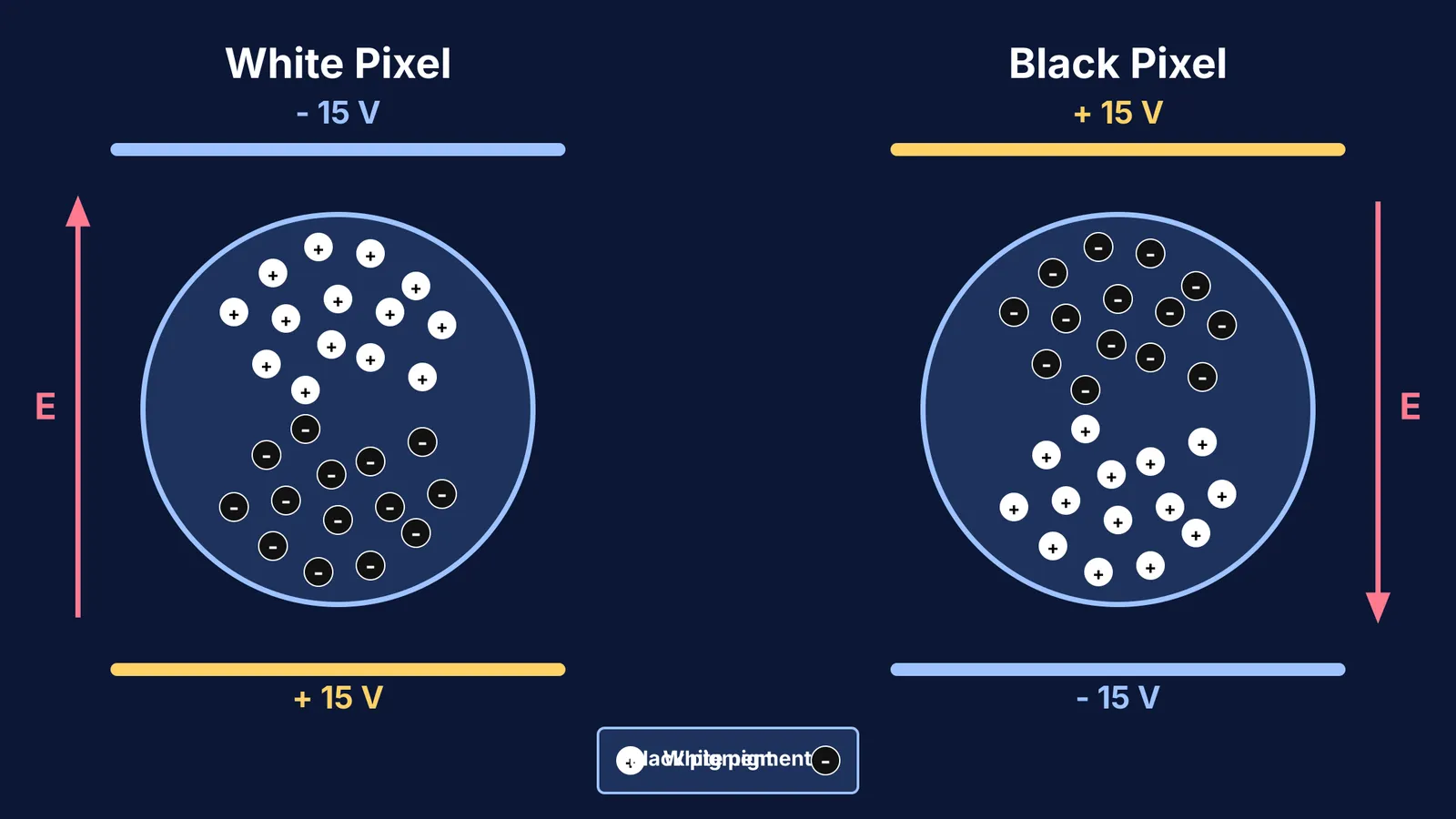
Inside an e-ink display is a layer of millions of clear microcapsules. According to the foundational 1998 Nature paper that pioneered the technology, these capsules are roughly 30 to 300 micrometers in diameter, which is about the thickness of a single human hair. The displays are driven by an operating voltage of typically ±15 V.
Each capsule contains a clear fluid and hundreds of nanoscale pigment particles:
White particles: made of titanium dioxide, these are positively charged.
Black particles: made of carbon black, these are negatively charged.
The display is sandwiched between two thin electrode layers. When the screen wants to show a white pixel, it applies a negative voltage to the top electrode and a positive voltage to the bottom one. The resulting electric field pulls the positively charged white particles to the surface and pushes the negatively charged black particles to the bottom. When you look at the screen, you see a crisp, white dot. Reverse the voltage, and the black particles rise to the top to form dark text.
Why does an e-reader battery last for weeks?
If you unplug an LCD monitor, the screen instantly goes black because it requires constant power to keep the backlight on and the liquid crystals aligned.
E-ink screens are entirely different. They are bistable. Once the electric field moves the particles into place, they stay there. The fluid inside the microcapsules is thick enough that the particles do not drift back down when the power is cut.
The screen draws absolutely zero power to maintain an image. The battery is only drained during the fraction of a second it takes to turn the page and shuffle the particles to new positions.
The physics: how strong is the electric field?
The voltage used to drive these particles is surprisingly low, but because the microcapsules are microscopic, the electric field pushing them is immense.
Let's calculate the electric field inside a single microcapsule. If the distance d across the gap is 50 micrometers (50 × 10⁻⁶ m) and the applied voltage V is 15 V, the field strength is:
E = V / d E = 15 / (50 × 10⁻⁶) = 300,000 V/m
A field of 300,000 volts per metre is incredibly strong, which is why the particles snap into their new positions so quickly. Understanding how voltage creates a field across a gap is a cornerstone of physics. If you want to dive deeper into this relationship, you can explore Where is potential zero near two charges? or calculate the Energy density in an electric field.
If you struggle to picture how charges accelerate under these conditions, try the Fermi Simulation Lab. It provides interactive simulations for physics ideas that are easier to see than to read, letting you watch exactly how positive and negative charges drift.
How does a distraction-free screen improve study habits?
Beyond the physics of capsules and electric fields, e-ink screens offer a significant cognitive advantage: they strip away distractions. A modern tablet or smartphone is an ecosystem of notifications, pop-ups, and background apps designed to grab your attention.
When you read on a dedicated e-reader, you engage in single-tasking. Without the constant urge to check messages or switch to a web browser, your brain can sustain the deep focus required for complex subjects like physics or literature. This distraction-free environment promotes active learning, allowing you to mentally process the material without breaking your train of thought. Mastering the discipline of uninterrupted reading is just as important as the material itself.
How can you reduce eye strain during long study sessions?
Because e-ink reflects ambient light, it is far gentler on your eyes than an emissive display. But if you are studying on a laptop or tablet, your eyes work much harder. Use this checklist from the American Academy of Ophthalmology to protect your vision:
Look away: occasionally look up from your screen and focus on a distant object to relax your eye muscles.
Match the room lighting: your screen should not look like a bright lightbulb in a dark room. Adjust the brightness so it matches the ambient light around you.
Keep your distance: sit about an arm's length (roughly 25 inches or 60 cm) away from your screen.
Remember to blink: humans normally blink about 15 times a minute, but we blink half as often when staring at digital screens. Consciously blink to keep your eyes from drying out.


