

On this page
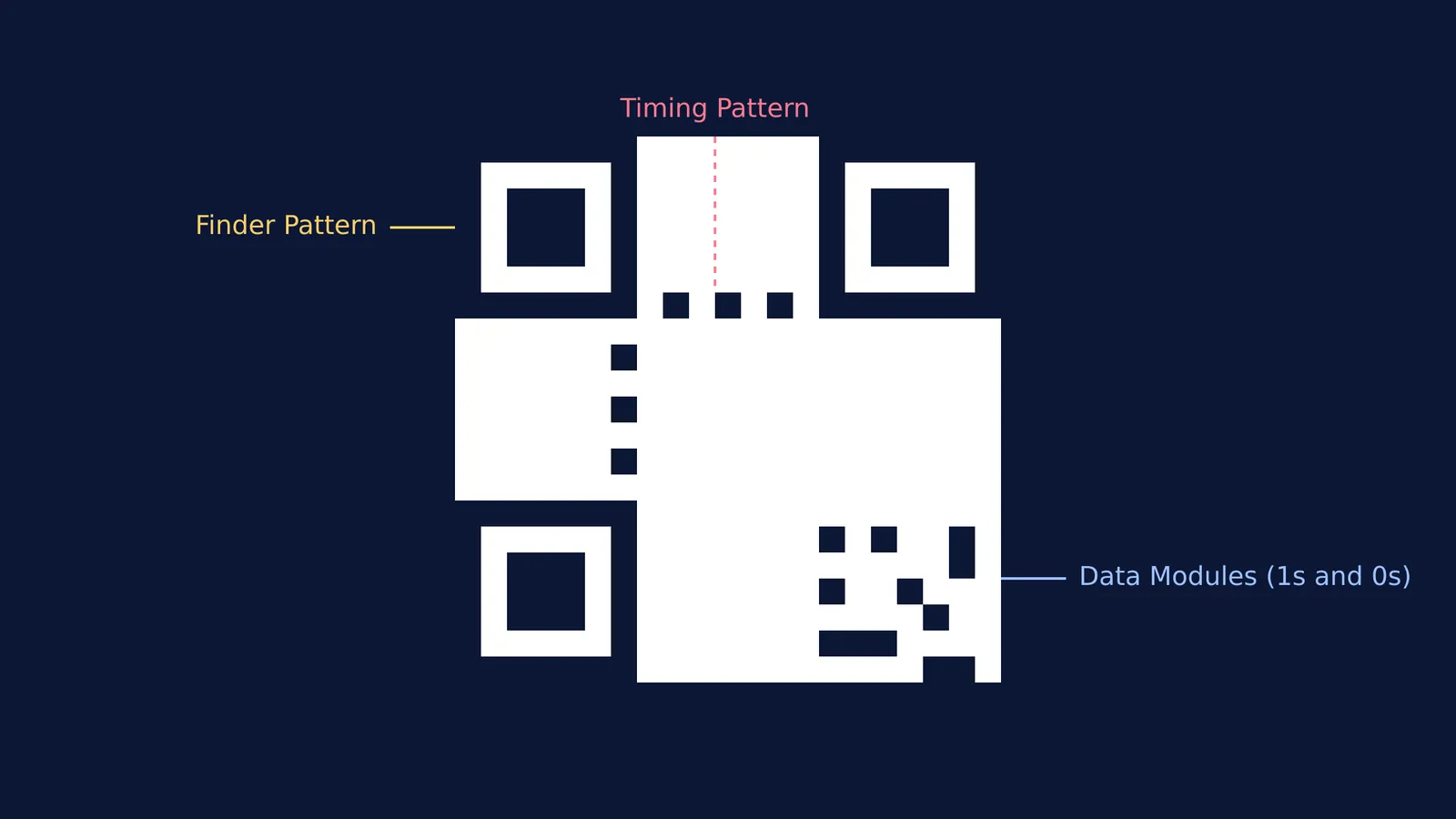
When you scan a QR code, your phone's camera is looking at a highly structured grid of black and white squares. To a computer, this grid is simply a stream of binary data. In the standard specification, a black square represents a binary 1, and a white square (or the background) represents a 0 (Wikipedia). Before becoming a visible grid of squares, your website URL, contact information or plain text is converted into these 1s and 0s using encoding rules similar to those used in binary, octal and hexadecimal number systems.
How is a web address turned into binary data?
Before the squares are drawn on the screen, the QR code generator software must translate your text or URL into a continuous binary sequence. It achieves this by selecting an encoding mode based on the type of characters you are using in your message. For instance, the numeric mode is the most space-efficient, used exclusively for strings of numbers. The alphanumeric mode handles capital letters, numbers, and a few basic symbols like spaces and dollar signs. For more complex inputs, such as lowercase letters or general computer data, the software uses the byte mode, which stores each character as an eight-bit block.
Once the generator converts your information into this long binary stream, it places the resulting modules in a zig-zag path across the grid. This path starts at the bottom-right corner and moves up and down in columns that are exactly two modules wide, carefully navigating around the finder patterns and other required structural elements of the code.
Why are there three large squares in the corners?
Every standard QR code features three prominent squares in its corners, which engineers call finder patterns. These specific patterns tell the scanner exactly where the code is located on the page and which way is up. Because there is intentionally no corresponding square in the bottom-right corner, the camera can instantly determine the code's orientation. This geometric design means you can scan a QR code upside down or completely sideways without any issues.
Between these three finder patterns run the timing patterns—dotted lines consisting of alternating black and white squares. These timing lines act as a visual ruler to help the scanner map the grid's coordinates and measure the exact size of the data modules, even if the code is printed on a curved surface like a coffee mug or a bottle.
How does error correction fix a damaged QR code?
You have likely scanned a QR code that was severely scratched, dirty, or had a large corporate logo stamped right in the middle of it. This still works perfectly because QR codes use the Reed-Solomon error correction algorithm. This mathematical algorithm treats the binary data as a complex polynomial over a Galois Field and adds redundant backup data directly to the grid.
There are four distinct levels of error correction built into the standard. Level L allows the recovery of about 7% of the data, while Level H can recover up to 30% of missing or damaged squares (qrcode.com). This high error correction capability is what allows companies to place a custom logo in the centre of their code; the scanner simply relies on the mathematical safety net to solve the equations and fill in the blanks created by the logo.
How does the scanner avoid reading large blank spaces?
If a web address contains a long string of zeroes, the resulting QR code might feature a large, completely white area. This could confuse the scanner, making it lose its place in the grid. To prevent this, the generator applies a mathematical mask to the data before printing. This mask flips specific bits (changing 0s to 1s and vice versa) according to a predefined pattern, ensuring the final image looks like static noise with a balanced mix of dark and light squares. The scanner reads the mask reference number from the code and automatically reverses the process to reveal the true data.
If you are studying the mathematics behind encoding and find concepts like polynomials or binary logic hard to picture, the Fermi Simulation Lab offers interactive simulations for the ideas that are easier to see than to read. You can explore how changing a single binary bit alters an entire system. Furthermore, you can review the underlying logic in the Fermi Concept Library, which maps every concept in physics, chemistry, biology, mathematics and computing, each with its own lesson and its place in the map. If you want to explore the history of the mathematical logic that makes all modern computing possible, you can read about George Boole and the Laws of Thought of 1854.
A checklist for printing reliable QR codes
If you are generating and printing a QR code for a school project, presentation or public event, follow these guidelines to ensure it always scans instantly:
Choose the right error correction: Use Level M (15% recovery) for standard printing, and Level H (30% recovery) if you plan to embed a logo or icon in the code (qrcode.com).
Ensure high contrast: Always keep the data modules significantly darker than the background. A white background with black squares is the easiest for optical sensors to read.
Maintain the quiet zone: Never let text or borders overlap the white space immediately surrounding the code.
Test at scale: Print a test copy and try scanning it from the expected distance. A code that is too dense will blur into a grey smudge from far away.


