

On this page
When you point your phone at a scene, the lens focuses light onto a tiny chip called an image sensor. This chip is a grid of microscopic light-sensitive squares called pixels.
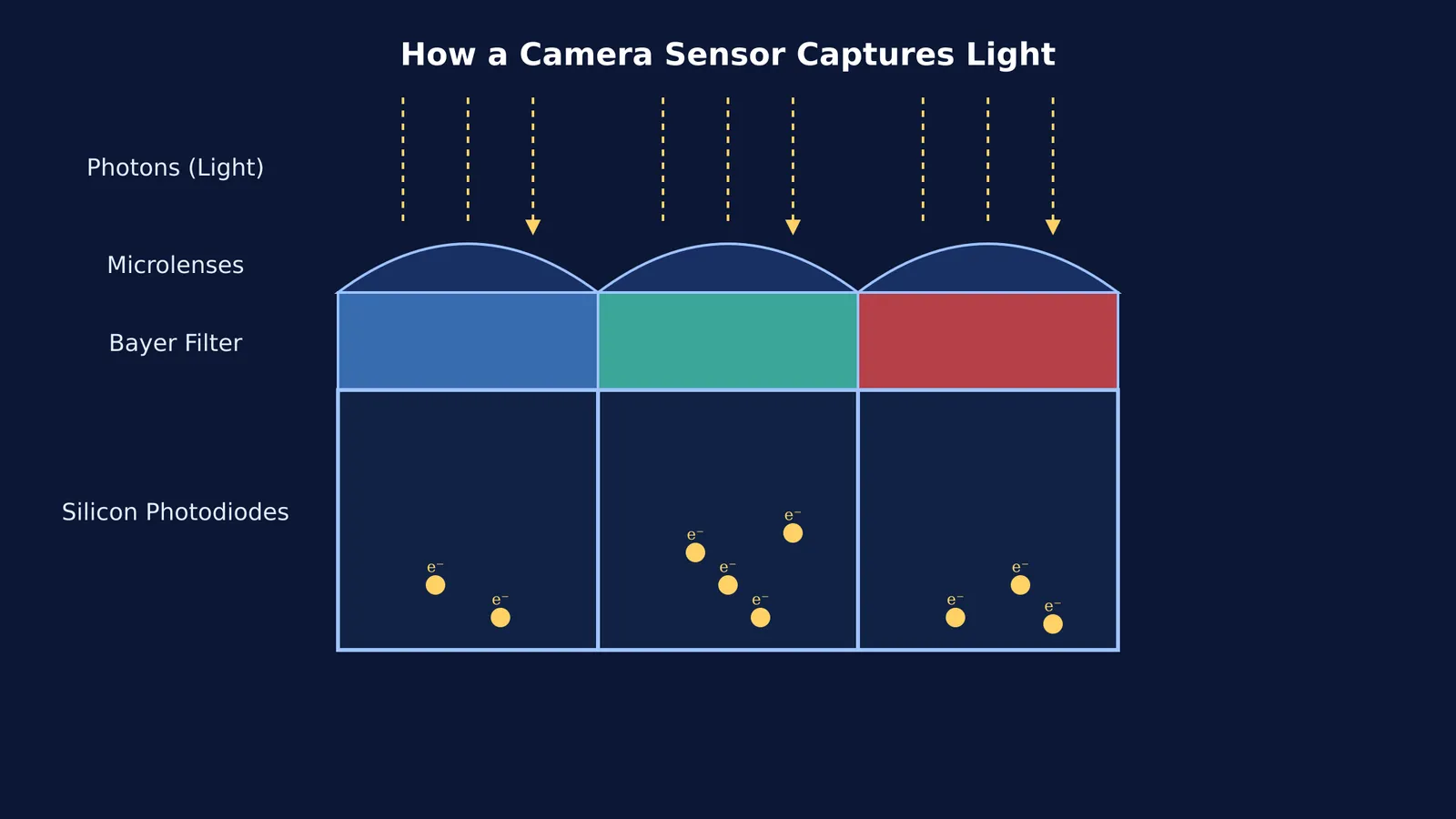
Each pixel works like a bucket catching rain. Instead of water, it catches particles of light called photons. When a photon hits the silicon inside the pixel, it knocks an electron loose. The pixel collects these freed electrons in a tiny well. When the exposure ends, the camera counts the electrons in each well to determine how bright that exact spot should be.
What is the photoelectric effect in a camera?
This process of using light to free electrons is called the photoelectric effect. Albert Einstein won the 1921 Nobel Prize in Physics for his discovery of the law of the photoelectric effect (Nobel Prize). He explained that light travels in discrete packets, and if a photon has enough energy, it can eject an electron from a material.
In your phone camera, the material is a carefully engineered silicon semiconductor. The photons enter the silicon and create electron-hole pairs, which are then separated by an electric field. If you are solving n-type and p-type semiconductors: carrier concentration problems, this is the exact technology at work. The more intense the light—that is, the greater the number of photons emitted per second—the more charge builds up in the pixel.
How does a camera see colour?
Silicon photodiodes only measure the amount of light; they cannot tell what colour the light is. If a camera only had a bare silicon sensor, every photo would be in black and white.
To capture colour, manufacturers place a microscopic mosaic of coloured glass over the pixels. Bryce Bayer of Eastman Kodak patented this specific colour filter array in 1976, and it is now known as the Bayer filter (US Patent 3971065).
A Bayer filter assigns a single colour to each pixel in a repeating 2×2 grid: one red, one blue and two green. The green gets double the space because the human eye is most sensitive to green light in daylight.
Because each pixel only records one colour, the camera must guess the other two by looking at its neighbours. This process, called demosaicing, uses maths to blend the signals together and produce the final, full-colour image you see on your screen.
Why do larger pixels capture better photos?
The physical size of the sensor and its individual pixels plays a massive role in image quality. If you compare a modern smartphone sensor to an older model, the overall megapixel count might be similar, but the physical size of the sensor is often larger.
Larger pixels have a greater surface area, which means their "bucket" is wider and can catch more photons during the same exposure time. This is particularly crucial in low-light situations. When a pixel collects more photons, the signal-to-noise ratio improves. The true electrical signal from the incoming light overpowers the random background noise, resulting in a cleaner and sharper image.
Conversely, cramming too many microscopic pixels onto a tiny sensor can degrade low-light performance. Because each pixel is smaller, it collects fewer photons. To compensate, the camera software must boost the weak electrical signal, which simultaneously amplifies the noise. This is why high-end professional cameras use sensors that are significantly larger than smartphone sensors, allowing them to capture stunning images even in near darkness.
Seeing the physics with Fermi
It is one thing to read about photons and electric fields, but picturing them is much harder. In the Fermi Simulation Lab, you can interact with simulations for the ideas that are easier to see than to read. You can shine light on a virtual metal plate and watch the electrons jump out as you change the wavelength. If you are struggling to connect the maths of the photoelectric effect to real-world devices, Fermi's AI tutor will work out what you already know and build a plan for the session.
A practical experiment: finding your camera's limits
You can see your sensor's charge-gathering at work by testing it in low light.
Find a dark room with only a faint light source, like a distant streetlamp.
Take a photo using your phone's default mode (without night mode or flash).
Look closely at the dark areas of the image.
You will likely see noise, which looks like a grainy, colourful speckling. This happens because the pixels did not receive enough photons. The camera amplifier had to boost the tiny electrical signal, amplifying random electrical fluctuations along with it.


